
One UI
Samsung releases first official One UI 9-based update for Galaxy Z Fold 8 phones


Samsung just released the first software update based on the official One UI 9 version. The company’s newest foldables are benefiting from this rollout; however, it’s coming a week before the public release of the devices.
First update for Galaxy Z Fold 8 phones
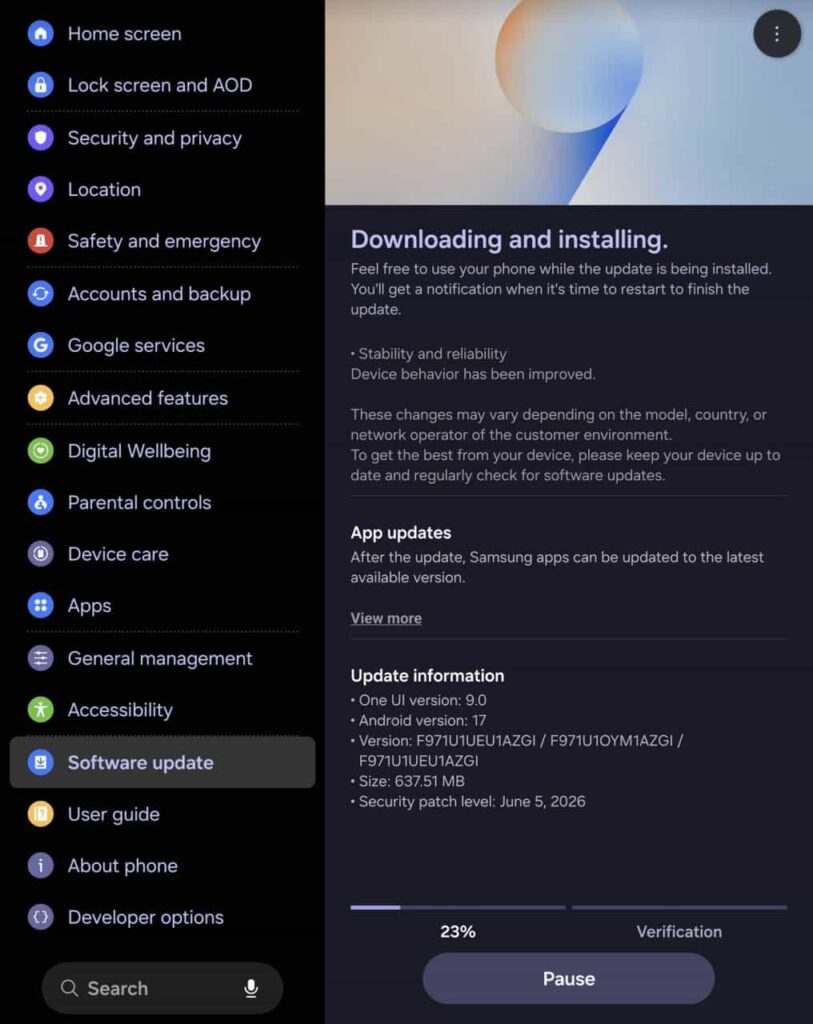
Galaxy Z Fold 8 and Z Fold 8 Ultra (probably the Z Flip 8 too) are receiving their first software update, which is based on official One UI 9.
Even though it landed on the verge of August, security patches date back to June 2026. The firmware size is over 600 megabytes, and the changelog content doesn’t specify the target changes beyond stability improvements.
That said, this update is aimed at early units of the devices. GregglesTV confirmed the rollout for Galaxy Z Fold 8, while tipster Kailash spotted the update for the Ultra version as well, making the Flip 8 also a beneficiary.
- Galaxy Z Fold 8 – F971NKSU1AZGI / F971USQU1AZGI
- Z Fold 8 Ultra – F976NKSU1AZGI / F976USQU1AZGI
Samsung is shipping its new Galaxy devices with Seamless Updates support. It significantly reduces the downtime while installing a firmware update, as most of the process completes without powering off the device.
Source – Greggles TV
One UI 9 Update Rollout
Samsung may keep the Stable One UI 9 update restricted to its new foldable phones for a specific period, which could be anything between weeks and months.
The public rollout begins on August 7, the date when the Z8 series goes on sale. Meanwhile, the Galaxy S26 series is gearing up to receive the fifth Beta firmware update in August.
Samsung also plans to expand the Beta Program in August 2026. Galaxy S25 series is ready to make the jump, while the Z Flip 7 and Z Fold 7 may also be preparing for their turn.


SammyFans Poll: Samsung’s One UI 9 software chapter has officially begun, but is it generating the usual excitement, or has update fatigue quietly set in among the fanbase?
One UI 9, built on top of Android 17, went official on July 22, 2026, arriving alongside the new Galaxy Z Fold 8 and Z Flip 8 lineup. That launch was really just the opening move, as the real test starts now, as Samsung shifts from “new phones get it first” mode into the much bigger job of pushing the update out to the rest of its device lineup.
The Galaxy Z Fold 8 series will see the full experience build land around August 7, and if past patterns hold, that will set the tone for how aggressively Samsung tackles the rest of the schedule.
Beta testing widens the net
Not everyone wants to wait for a new foldable to try new software, and Samsung knows that. The One UI 9 beta program is already active for the Galaxy S26 series in select markets, giving current flagship owners early access.
Galaxy S25 users should not feel left out for long either, with Beta access on the way soon. Once that happens, last year’s flagship buyers get their own hands on the latest software advancements and newly added AI features.
Even owners of the Galaxy S24 and S23 series aren’t being ignored. Internal testing is said to be progressing well behind the scenes, and a stable release for those devices could realistically show up as early as September.

One UI 9 brings refinement, not reinvention
What stands out about One UI 9 so far isn’t a dramatic redesign. It leans more toward Android 17 optimizations, smoother performance, and small but meaningful UI adjustments rather than anything that reshapes how the interface looks and feels.
So, where do you stand?
Are you genuinely looking forward to One UI 9, or has the excitement worn thin after years of iterative updates? Are you refreshing the Beta news daily, content to wait for the stable release, or simply happy running what you already have?
Vote in the poll below and let us know your thoughts in the X post’s comments!
#Poll: One UI updates used to feel huge. Now it's mostly subtle AI tweaks and minor UI changes.
How are you feeling about One UI 9 on your Galaxy?
— Sammy Fans – We ♥ Samsung! (@thesammyfans) July 31, 2026

Samsung launched One UI 9 Beta, but reserved its wearable iteration. Galaxy Unpacked is officially set for July 22, and the Android 17-based One UI 9 and Wear OS 7-based One UI 9 Watch will go official with new foldable phones and smartwatches.
One UI 9 Watch is set to deliver intelligent capabilities. The next-gen smartwatches are tailored for offering more personalized and adaptive experiences. Samsung will also share these new advancements with existing models.
One UI 9 Watch enters testing for existing smartwatches
Samsung’s Galaxy Watch 9 and Watch Ultra 2 will ship with One UI 9 Watch. Meanwhile, the Galaxy Watch 8, Watch 8 Classic, and Watch Ultra are the primary contenders for the One UI 9 Watch software update.
On July 8, Samsung started internal One UI 9 Watch testing for the Galaxy Watch 8 series. This info is derived from an early firmware discovery for the standard model, carrying build version L320XXU2BZG2.
The lineup includes a Classic variant as well, which should soon enter the streak. Samsung would take a couple of weeks for internal testing, and then a Beta Program will be opened for general users to help shape the firmware.
As of July 31, 2026, these Galaxy Watches are testing One UI 9 Watch:
Which Galaxy Watch models are eligible?
- Galaxy Watch 8 (40mm, 44mm, and 46mm)
- Galaxy Watch Ultra
- Galaxy Watch 7 (40mm and 44mm)
- Galaxy Watch FE
- Galaxy Watch 6 (40mm and 44mm)
- Galaxy Watch 6 Classic (43mm and 47mm)
- Galaxy Watch 5 (40mm and 44mm)
- Galaxy Watch 5 Pro
Galaxy Watch 4 also runs Wear OS, but the lineup is unlikely to receive one more major upgrade. The firmware support is already on the verge of ending, and if you are still on the Watch 4, it’s time to consider upgrading to a newer model.

Samsung’s next One UI 9 Beta for Galaxy S26 series could benefit the Galaxy S25 series. The company is internally testing fresh Beta builds for the two flagship lineups, and the release window may share the same date.
On July 22, Samsung announced its new foldable phones, wearable devices, and software advancements. The July 22 Unpacked event had a dedicated showcase for One UI 9 improvements and new features.
Samsung testing One UI 9 Beta for Galaxy S25
One UI 9 Beta is being tested internally for the Galaxy S25 series. It started only after the launch of the official One UI 9 version. The company plans to expand the Beta Program to even more users over the next couple of weeks.
Galaxy S25 users are set to benefit hugely with the One UI 9 upgrade. The next software is expected to add plenty of new features from the Galaxy S26 series, including Now Nudge, Horizon Lock camera, and My FanCam.
Galaxy S25’s Beta is linked to Galaxy S26
Samsung will first push Galaxy S26 Beta 5 in August 2026. This release will likely follow the Beta Program’s launch for the Galaxy S25 series. That’s how the software rollout of two different product lineups is linked to each other.
On July 14, Samsung started rolling out the One UI 9 Beta 4 update to the Galaxy S26 series. The update included important improvements to various system functions.
The gap between the release of Beta 1 and Beta 2 and between Beta 2 and Beta 3 was nearly two weeks, which stretched to around four weeks between Beta 3 and Beta 4. That said, the next Beta is expected to be available in early to mid-August.
Related article:
Samsung launched the full One UI 9 experience last week, which introduces 4 new AI features specifically for Netflix users.
The two companies have been partnering since the year 2019. Netflix is one of the most used entertainment platforms around the world. Netflix has deep links with Samsung; it is even available for download on Galaxy Store.
Samsung and Netflix are teaming up once again. To celebrate the new foldables, Samsung is offering five free themes and wallpapers inspired by The East Palace, along with matching icons.

The real highlight, though, is how deeply Netflix is now woven into One UI 9’s AI tools. Here’s what’s new:
There are 4 distinct Netflix-related AI enhancements:
- Netflix recommendations appear in Now Brief.
- Users can resume shows where they left off directly from Now Brief.
- Recommendations become context-aware (such as Travel Ready suggestions before a trip).
- Samsung Finder can search Netflix titles without opening the app.
Netflix in Now Brief:
Samsung’s AI assistant now surfaces Netflix recommendations as part of its daily suggestion cards, based on your schedule and how you use your device.
Resume from Now Brief:
When a show pops up in Now Brief, you can jump straight back to where you left off without opening the Netflix app first.
Context-aware suggestions:
Now Brief adapts recommendations to your situation. Heading out for a weekend trip, for instance, might trigger “Travel Ready” content picks suited for offline viewing.
Samsung Finder search:
You can now search for Netflix titles directly through Samsung Finder and land on related content instantly, skipping the need to launch the app manually.


Edge Panel is a signature feature of Samsung One UI, but a Good Lock module badly hurt its functionality. Samsung, meanwhile, found the root cause, which is linked to One Hand Operation +, and a fix is on its way.
Samsung users complained that the Edge Panel isn’t triggering with a swipe. The problem was widespread, but targeted specifically the users who have been using the Good Lock’s One Hand Operation + plugin.
Edge Panel comes preinstalled, while Good Lock has to be downloaded manually from Galaxy Store. Good Lock is a launcher, and modules are the ones that unlock various new features and customization tools for the users.
Therefore, users didn’t simply find that the problem with Edge Panel is tied to a buggy One Hand Operation + module. Meanwhile, a Samsung moderator confirmed that the problem will be addressed with a future/next update.
The mod also shared a workaround if you can’t disable the Good Lock module. You need to launch an app that supports landscape mode and rotate the screen, then rotate the screen back horizontally to make Edge Panel functional again.
If you use Edge Panel more than the One Hand Operation +, I recommend that you simply disable the module for a while. Samsung is working on a fix, which could take a few days to arrive on Galaxy devices.
Until then, give the module a break so Edge Panel offer optimal user experience.
-

 One UI20 hours ago
Samsung One UI 9 Watch internally testing on Galaxy Watch 8, 7, 6, and 5 series
-
One UI3 days ago
One UI 9 is coming, but when will your Samsung phone actually update?
-
One UI3 days ago
Stable One UI 9.0 adds four useful features Samsung didn’t announce
-
Apps2 days ago
Samsung One UI 9 brings 4 new AI features for Netflix users