
One UI
Samsung One UI 9 Watch internally testing on Galaxy Watch 8, 7, 6, and 5 series

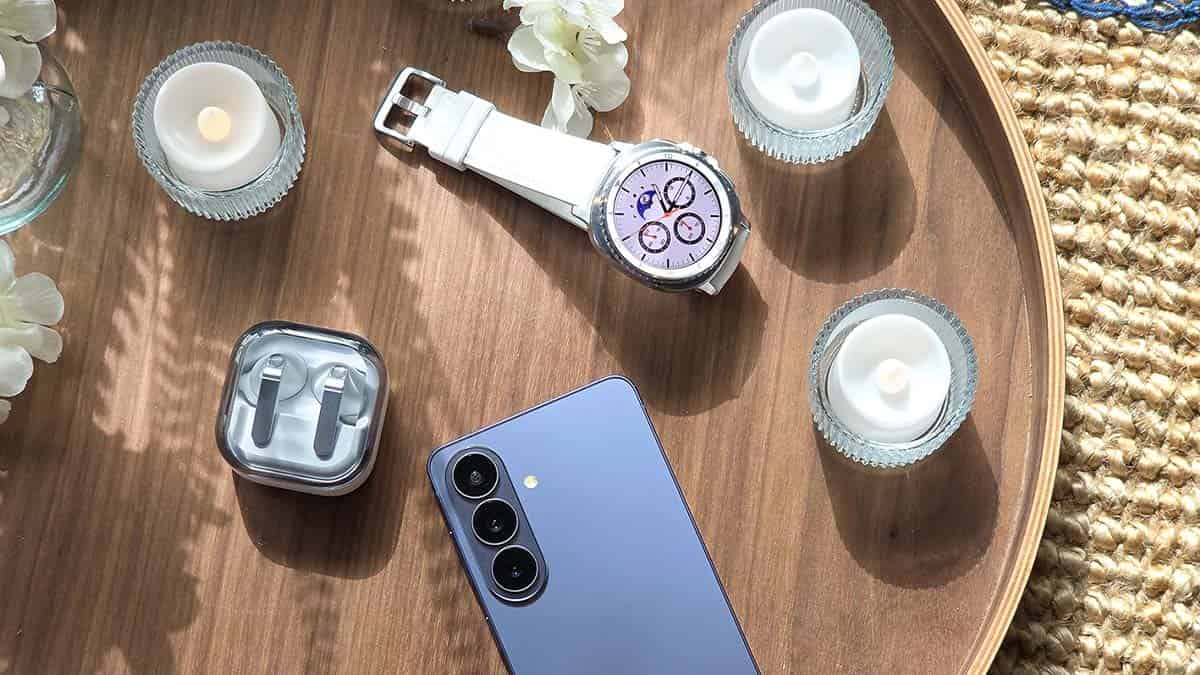
Samsung launched One UI 9 Beta, but reserved its wearable iteration. Galaxy Unpacked is officially set for July 22, and the Android 17-based One UI 9 and Wear OS 7-based One UI 9 Watch will go official with new foldable phones and smartwatches.
One UI 9 Watch is set to deliver intelligent capabilities. The next-gen smartwatches are tailored for offering more personalized and adaptive experiences. Samsung will also share these new advancements with existing models.
One UI 9 Watch enters testing for existing smartwatches
Samsung’s Galaxy Watch 9 and Watch Ultra 2 will ship with One UI 9 Watch. Meanwhile, the Galaxy Watch 8, Watch 8 Classic, and Watch Ultra are the primary contenders for the One UI 9 Watch software update.
On July 8, Samsung started internal One UI 9 Watch testing for the Galaxy Watch 8 series. This info is derived from an early firmware discovery for the standard model, carrying build version L320XXU2BZG2.
The lineup includes a Classic variant as well, which should soon enter the streak. Samsung would take a couple of weeks for internal testing, and then a Beta Program will be opened for general users to help shape the firmware.
As of July 31, 2026, these Galaxy Watches are testing One UI 9 Watch:
Which Galaxy Watch models are eligible?
- Galaxy Watch 8 (40mm, 44mm, and 46mm)
- Galaxy Watch Ultra
- Galaxy Watch 7 (40mm and 44mm)
- Galaxy Watch FE
- Galaxy Watch 6 (40mm and 44mm)
- Galaxy Watch 6 Classic (43mm and 47mm)
- Galaxy Watch 5 (40mm and 44mm)
- Galaxy Watch 5 Pro
Galaxy Watch 4 also runs Wear OS, but the lineup is unlikely to receive one more major upgrade. The firmware support is already on the verge of ending, and if you are still on the Watch 4, it’s time to consider upgrading to a newer model.


Samsung’s next One UI 9 Beta for Galaxy S26 series could benefit the Galaxy S25 series. The company is internally testing fresh Beta builds for the two flagship lineups, and the release window may share the same date.
On July 22, Samsung announced its new foldable phones, wearable devices, and software advancements. The July 22 Unpacked event had a dedicated showcase for One UI 9 improvements and new features.
Samsung testing One UI 9 Beta for Galaxy S25
One UI 9 Beta is being tested internally for the Galaxy S25 series. It started only after the launch of the official One UI 9 version. The company plans to expand the Beta Program to even more users over the next couple of weeks.
Galaxy S25 users are set to benefit hugely with the One UI 9 upgrade. The next software is expected to add plenty of new features from the Galaxy S26 series, including Now Nudge, Horizon Lock camera, and My FanCam.
Galaxy S25’s Beta is linked to Galaxy S26
Samsung will first push Galaxy S26 Beta 5 in August 2026. This release will likely follow the Beta Program’s launch for the Galaxy S25 series. That’s how the software rollout of two different product lineups is linked to each other.
On July 14, Samsung started rolling out the One UI 9 Beta 4 update to the Galaxy S26 series. The update included important improvements to various system functions.
The gap between the release of Beta 1 and Beta 2 and between Beta 2 and Beta 3 was nearly two weeks, which stretched to around four weeks between Beta 3 and Beta 4. That said, the next Beta is expected to be available in early to mid-August.
Related article:

Samsung launched the full One UI 9 experience last week, which introduces 4 new AI features specifically for Netflix users.
The two companies have been partnering since the year 2019. Netflix is one of the most used entertainment platforms around the world. Netflix has deep links with Samsung; it is even available for download on Galaxy Store.
Samsung and Netflix are teaming up once again. To celebrate the new foldables, Samsung is offering five free themes and wallpapers inspired by The East Palace, along with matching icons.

The real highlight, though, is how deeply Netflix is now woven into One UI 9’s AI tools. Here’s what’s new:
There are 4 distinct Netflix-related AI enhancements:
- Netflix recommendations appear in Now Brief.
- Users can resume shows where they left off directly from Now Brief.
- Recommendations become context-aware (such as Travel Ready suggestions before a trip).
- Samsung Finder can search Netflix titles without opening the app.
Netflix in Now Brief:
Samsung’s AI assistant now surfaces Netflix recommendations as part of its daily suggestion cards, based on your schedule and how you use your device.
Resume from Now Brief:
When a show pops up in Now Brief, you can jump straight back to where you left off without opening the Netflix app first.
Context-aware suggestions:
Now Brief adapts recommendations to your situation. Heading out for a weekend trip, for instance, might trigger “Travel Ready” content picks suited for offline viewing.
Samsung Finder search:
You can now search for Netflix titles directly through Samsung Finder and land on related content instantly, skipping the need to launch the app manually.


Edge Panel is a signature feature of Samsung One UI, but a Good Lock module badly hurt its functionality. Samsung, meanwhile, found the root cause, which is linked to One Hand Operation +, and a fix is on its way.
Samsung users complained that the Edge Panel isn’t triggering with a swipe. The problem was widespread, but targeted specifically the users who have been using the Good Lock’s One Hand Operation + plugin.
Edge Panel comes preinstalled, while Good Lock has to be downloaded manually from Galaxy Store. Good Lock is a launcher, and modules are the ones that unlock various new features and customization tools for the users.
Therefore, users didn’t simply find that the problem with Edge Panel is tied to a buggy One Hand Operation + module. Meanwhile, a Samsung moderator confirmed that the problem will be addressed with a future/next update.
The mod also shared a workaround if you can’t disable the Good Lock module. You need to launch an app that supports landscape mode and rotate the screen, then rotate the screen back horizontally to make Edge Panel functional again.
If you use Edge Panel more than the One Hand Operation +, I recommend that you simply disable the module for a while. Samsung is working on a fix, which could take a few days to arrive on Galaxy devices.
Until then, give the module a break so Edge Panel offer optimal user experience.

Samsung officially introduced One UI 9 full experience on July 22 and the rollout is set to begin on August 7, but what about users of older Galaxy devices?
At Unpacked, Samsung didn’t talk about the One UI 9 rollout to existing users. We had high hopes from the press release, which, disappointingly, had nothing. Samsung mentioned something in footnotes, but that too lacked a timeline or window.
One UI 9 official launch and release
Samsung says One UI 9 official rollout begins on August 7. The newest foldable phones, Z Flip 8, Z Fold 8, and Z Fold 8 Ultra, will ship with the latest software.
Meanwhile, users rocking older Samsung flagship and mid-range phones have to wait. The company is unlikely to begin expansion of the software perks immediately after the foldables go on sale.
A look at One UI 7, One UI 8 and One UI 9 rollouts
Samsung’s Android 15-based One UI 7 was introduced in January 2025. The Galaxy S25 series flagships were shipped with the Stable version, but expansion to older devices started in April 2025.
Android 16-based One UI 8 was launched in July 2025. Galaxy Z Flip 7 and Z Fold 7 were the first to launch with the new software. However, Samsung kept the update restricted to the foldables until late September 2025.
One UI 8.5 also had a Beta Program, which was one of the longest-running Beta Programs. Beta launched in December 2025, the official debut happened in February 2026, but rollout to older devices commenced in May 2026.
The latest One UI 9, based on Android 17, landed in the Beta Program in May 2026. Since then, the company has been testing the software on the Galaxy S26 series, and there’s no solid information on expansion to older models.
When will your Samsung phone get One UI 9 update
For One UI 7 (Android 15) and One UI 8.5 (Android 16), the gap between official debut and stable rollout was about 75 days. Samsung took a similar duration of about 60 to 70 days to kickoff Stable One UI 8 rollout.
In the past three major rollouts, the company took more than two months. If Samsung maintains a familiar strategy, the One UI 9 update rollout may begin in mid to late September.
Galaxy S26 series, as anticipated, will be the first to receive the official update. At the same time, Samsung will run Beta testing activity on a wide range of devices before the stable rollout.
Disclaimer: Samsung has not shared the One UI 9 rollout timeline or roadmap. We expect the update to be available in September, but it is not certain. Update rollout depends on various aspects, including testing and verification.
Stable One UI 9.0 update comes with four hidden features that Samsung left for users to discover themselves. The official rollout will start next week, with older Galaxy devices reportedly scheduled for early to mid-September.
Samsung’s Stable One UI 9.0 has four hidden features, which aren’t live yet on the Beta channel. Galaxy S26 users have access to the latest Android 17 software, but the features would become functional in the official version.
- App-level network restrictions get more granular
- Background Audio Hardening gets custom levels
- Bixby can now wake up with a gesture
- Use the device as a PC webcam
Among them, the new Bixby gesture came to light before the Unpacked event. However, the latest foldables shipping with the official software introduce the full experience, as covered by our folks at Android Authority.
App-level network restrictions get more granular
Inside Network restrictions, under the Advanced settings page, you’ll now find two dedicated toggles: Restrict browsers and Restrict games.
This gives users finer control over which categories of apps can reach the internet, which is a handy addition for anyone managing data usage, screen time, or just wanting to lock down distractions during work hours.
Background Audio Hardening gets custom levels
Android 17 introduced Background Audio Hardening as a security measure, and earlier builds of One UI 9 only offered a basic on/off switch for it, but the stable version changes that.
Head to Settings, then Developer options, then More settings, and you’ll now see three distinct levels to choose from:
- High (hardens all apps)
- Mid (the default setting)
- Low (skips hardening entirely)
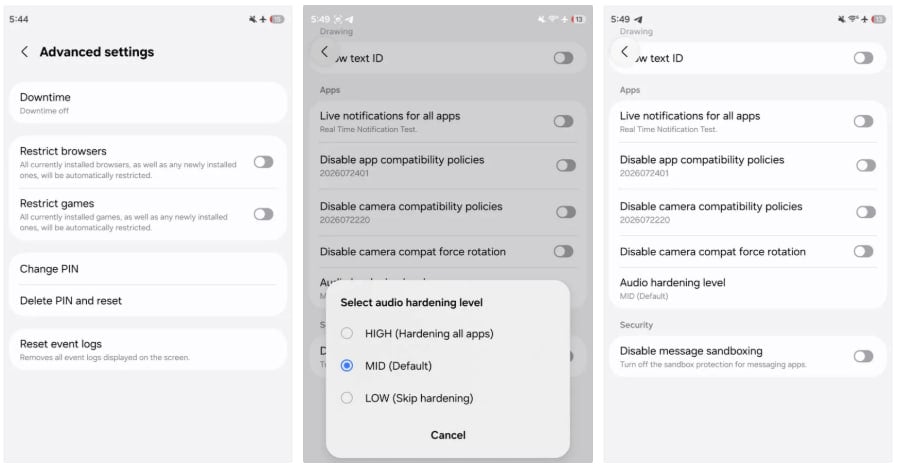
Image – Audio Hardening Settings | Source – Android Authority
Bixby can now wake up with a gesture
Gesture wake-up lets you summon Bixby without saying “Hi Bixby” or tapping a shortcut. Instead, you simply bring the phone close to your mouth, within about two inches, according to Samsung, and the assistant activates on its own.
The two-inch requirement should help avoid accidental triggers.
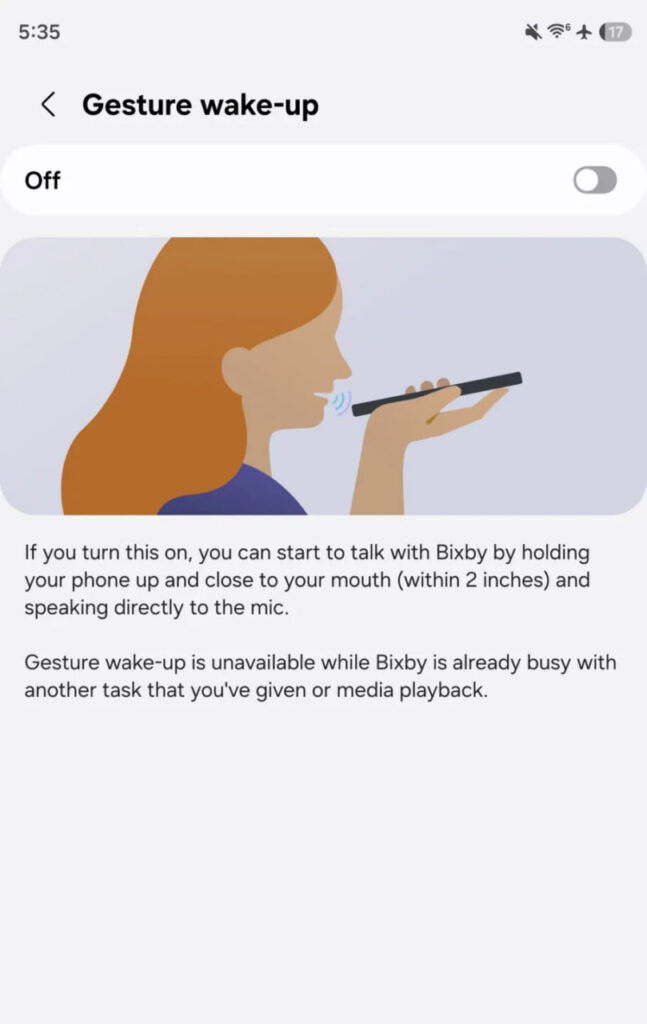
Image – Samsung Bixby Gesture Wake-Up | Source – Android Authority
Use the device as a PC webcam
The latest foldables also carry the feature that lets them work as a PC webcam. Laptop and PC cameras often lag in terms of quality and clarity. Using your phone’s camera as your webcam significantly improves the user experience.
For now, the Z Fold 8, Z Fold 8 Ultra, and Z Flip 8 are the only devices running Stable One UI 9. Owners of the Galaxy S26 lineup and last year’s foldables shouldn’t have to wait too long for the same treatment.
You may like:
-
 One UI3 days ago
How to install One UI 9 Watch Faces on your Samsung smartwatch
-
One UI2 days ago
One UI 9 is coming, but when will your Samsung phone actually update?
-
 Issues2 days ago
Galaxy S24 and S25 battery drain reports now come with overheating complaints
-
One UI2 days ago
Stable One UI 9.0 adds four useful features Samsung didn’t announce