
One UI
Samsung blends Google Search and Finder beautifully in One UI 9.0


Samsung introduced a new Google Search bar on One UI 9.0 homescreen. The upgrade landed as part of the official One UI 9 software, which debuted with the three new Galaxy foldable phones: the Z Fold 8, Z Flip 8, and Z Fold 8 Ultra.
One UI 9 blends Google Search and Finder beautifully
No one expected Google Search bar and Samsung Finder to be this beautiful side by side on your Galaxy phone’s homescreen. The placement is inspired by Pixel Launcher even without dropping the native Finder function.
One UI 9 Beta is also available on the Galaxy S26 series, but Google Search isn’t accessible for now. Samsung might bring this feature in the next Beta updates or keep it reserved for the public rollout of the full experience.
In the Beta Program, Samsung is playing with the Finder icon’s design. The company initially retained it from One UI 8.5. As the Beta evolved, the icon became better, but reverted to its previous look with the recent Beta.
Well, the official One UI 9.0 introduces a beautifully crafted Google Search and Finder experience for the homescreen. The pictures shared by X user @mnh_18 give us a closer look at their design, placement, and aesthetics.
Samsung lets you personalize the search function on the homescreen. You can have Google Search or Samsung Finder alone, or both together. There’s a simple toggle function that lets you enable and disable their homescreen presence.
To access this menu, tap and hold on the homescreen and enter the “Show search on Home screen” section. The page is full of rich visuals with clean buttons, allowing you to effortlessly tailor your home screen search experience.


Ahead of the official rollout, One UI 9 Watch faces have been extracted straight from system firmware and successfully sideloaded onto older Samsung Galaxy smartwatch models, with no root access required.
On July 22, Samsung unveiled the Galaxy Watch 9 and Watch Ultra 2. The new smartwatches are set to ship with One UI 9 Watch OS, starting on August 7. Meanwhile, their brand-new watch faces are already up for grabs.
Credit goes to @GalaxyTechie on X for pulling these unmodified APKs directly from official builds. Testing confirms compatibility across a wide range of devices, including the Galaxy Watch 4, 5, 6, 7, 8, and FE series.
The pack includes six distinct styles:
- Ultra Performance (made for the Watch Ultra 2)
- Analog Balance (crafted for the Watch 9)
- Portrait
- Radial Dashboard
- Dual Digit
- Dual Clock Info Board
On a Galaxy Watch 8, all six faces ran without issue, as per AndroidHeadlines. One early tester did flag a minor hiccup; the wrist-raise-to-wake gesture occasionally fails to activate the display when one of these ported faces is active.
How to install One UI 9 Watch faces on your Watch
What you’ll need before starting:
- A compatible Galaxy Watch running Wear OS
- An Android phone connected to the same Wi-Fi network as the watch
- The Bugjaeger Mobile ADB app from the Google Play Store
- One UI 9 watch face APK files
Step-by-step installation:
- Enable Developer Options:
- On the watch, head to Settings > About watch > Software info, then tap Software version repeatedly until developer mode unlocks.
- Turn on Wireless Debugging
- Inside Developer options, enable Wireless debugging and make sure the watch stays connected to Wi-Fi.
- Pair your devices
- Tap Pair new device on the watch to reveal an IP address, port number, and pairing code. Enter these into Bugjaeger on your phone to link the two.
- Sideload the APKs
- With the connection active in Bugjaeger, tap the install icon and select the watch face APK files to install them onto your smartwatch.


Samsung One UI 9.0 official rollout isn’t starting anytime soon for older Galaxy devices. New inputs suggest that the company will continue its Beta Program. Galaxy S26 users should be ready for the Beta 5 update, rather than the Stable build.
On July 22, Samsung officially unveiled One UI 9.0 full experience. It is based on Android 17, which brings various upgrades. Galaxy AI and personalization aspects are also getting improved for an enhanced user experience.
After the official reveal, the official rollout is set to start on August 7. Samsung confirmed the three new foldable phones will ship with the new firmware. It led fans to anticipate an imminent expansion to older Galaxy models.
One UI 9.0 Beta Program isn’t ending anytime soon
Firmware detective FahadAliJaved discovered a new internal Beta, ZZGA, for the Galaxy S26 series. It replaces Beta 4’s ZZG4 with ZZGA, confirming the entry of a new build on the server.
ZZGA is a newer build, but it might not arrive as Beta 5. Instead, Samsung may ship ZZG8 to Galaxy S26 series users as the fifth Beta update, as per Fahad.
Samsung has a history of reserving software advancements for newer hardware. We may not see the Korean tech giant kicking Stable rollout of One UI 9 for older devices until the new foldable phones hit their internally determined lifespan.
It could be anything between two weeks and two months.
Back in May 2026, Samsung launched the One UI 9 Beta Program. Galaxy S26 series users in six countries can have early access to the software. Meanwhile, Samsung is also gearing up to open the Beta Program for the Galaxy S25 series.


Samsung is internally testing Android 17-based One UI 9.0 software for various Galaxy devices. This activity is running in parallel to the Open Beta Program. The public beta update is exclusively available for the Galaxy S26 series.
One UI 9.0 update will bring Android 17 to Samsung devices. The official debut is set for late July, while the rollout will take a few more weeks to start. Samsung will first prioritize new devices rather than sharing software advancements.
Samsung picked mid-May as the timeline to announce and start the One UI 9 Beta Program. As of the third week of June, the company has already rolled out three Beta builds to Galaxy S26 users in six countries around the world.
Open Beta Program
- Galaxy S26
- Galaxy S26+
- Galaxy S26 Ultra
- Galaxy S25 – Coming soon
- Galaxy S25+
- Galaxy S25 Ultra
Samsung will keep the Beta Program limited to its latest flagship devices. Meanwhile, the internal testing has already started for plenty of models. It includes phones from the S series, foldables from the Z series, and tablets from the Tab series.
What’s more, some Galaxy A Series phones have also joined the party. The internal testing is expanding to unexpected models, including the budget ones. The pace is fast, and Samsung is gearing up for a faster rollout.
Internal Testing Stage
Galaxy S Series
- Galaxy S25
- Galaxy S25+
- Galaxy S25 Ultra
- Galaxy S25 FE
- Galaxy S24
- Galaxy S24+
- Galaxy S24 Ultra
- Galaxy S24 FE
- Galaxy S23
- Galaxy S23+
- Galaxy S23 Ultra
- Galaxy S23 FE
Galaxy Z Series
- Galaxy Z Fold 7
- Galaxy Z Flip 7
- Galaxy Z Fold 6
- Galaxy Z Flip 6
- Galaxy Z Fold 5
- Galaxy Z Flip 5
Galaxy A Series
- Galaxy A57
- Galaxy A37
- Galaxy A27
- Galaxy A17
- Galaxy A07
- Galaxy A56
- Galaxy A36
- Galaxy A26
- Galaxy A16
- Galaxy A55
- Galaxy A35
- Galaxy A25
- Galaxy A15 5G
- Galaxy A54
- Galaxy A34
- Galaxy A24
Galaxy M Series
- Galaxy M35
- Galaxy M56
- Galaxy M34
Galaxy Tab S Series
- Galaxy Tab S11
- Galaxy Tab S11 Ultra
- Galaxy Tab S10+
- Galaxy Tab S10 Ultra
- Galaxy Tab S10 FE
- Galaxy Tab S10 FE+
- Galaxy Tab S10 Lite
- Galaxy Tab S9
- Galaxy Tab S9+
- Galaxy Tab S9 Ultra
- Galaxy Tab A11
- Galaxy Tab S6 Lite
The list is broad enough yet incomplete. Samsung will add even more Galaxy models to its internal software testing streak. Beta Program may open for more users, but it would only happen after the Summer Galaxy Unpacked event.
Updated on July 28, 2026.

Samsung’s One UI 9.0 official version introduces a new Google Search bar for homescreen. The new search bar from Google joins Samsung’s Finder. Galaxy users now have two options to launch quick searches right from the homescreen.
Google Search on One UI 9.0 homescreen
One UI 9.0 brings the new Google Search bar to the homescreen on Samsung’s latest foldable phones. The option is expected to be expanded to existing devices, such as the Galaxy S26 series, with the Stable update rollout.
Pixel phones have had this feature for years through Pixel Launcher. Samsung adopting Pixel-inspired perks shows its deepening collaboration with Google. The homescreen itself is getting a Google-branded global Search bar.
Design-wise, the Search bar adopts a matching blur application. It looks like a system-level search widget added to your home screen. One UI 9.0 has accurately crafted the appearance so it doesn’t look just another search bar.
Finder allows you to search across your Galaxy device for what you need. Google Search goes a step ahead by connecting to the internet. As soon as you run a query, Google’s search engine will get triggered to respond to your query.
Well, it’s not permanent.
Samsung added enable and disable buttons for the Search and Finder. You can either have both on the homescreen or none of them. The choice is completely yours, and that’s what Samsung highlighted at the Unpacked event.

Image credit – @scousersvn
Samsung said the One UI 9.0 will begin rolling out with the new foldable phones. For existing devices, the company didn’t share a specific timeline.
You may like:
In particular, the Korean tech giant hasn’t revealed whether the new Search bar will be provided to older Galaxy devices with the One UI 9.0 update.
Based on previous rollout gaps, we expect the Beta Program to continue in August 2026. This would help Samsung further stabilize the firmware based on official One UI 9 and begin rollout by September.

Samsung One UI 9.0 introduces a major lockscreen change that makes every unlock attempt matter. The company today announced the new lock screen security policy, reducing the total number of allowed failed attempts.
On July 22, Samsung revealed its Android 17-based One UI 9.0 software. The new version comes with user interface tweaks and new features. Samsung also adopted Android 17’s security tweaks into the One UI 9.0 for Galaxy users.
One UI 9.0 lockscreen change comes from Android 17
Samsung announced that “the total allowed attempts before a lockdown are reduced” in One UI 9.0. That said, Galaxy phones will be even more secure against brute force attacks that could hand over your access if executed.
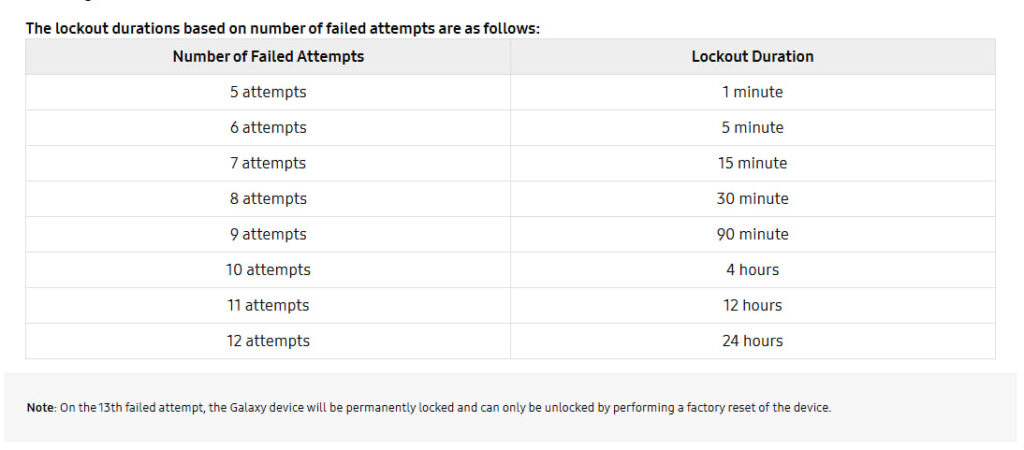
On July 25, Samsung published a dedicated webpage to announce the new policy. The company specifically highlighted “lockout duration” after a specific “number of failed attempts.”
At the same time, Samsung confirmed that there’s no return window after 12 consecutive failures. As soon as you surpass the limit, the 13th attempt will enforce a permanent lock, and there will be no other option but a factory reset.
Samsung has published the exact progression:
- 5 failures → 1 minute
- 6 failures → 5 minutes
- 7 failures → 15 minutes
- 8 failures → 30 minutes
- 9 failures → 90 minutes
- 10 failures → 4 hours
- 11 failures → 12 hours
- 12 failures → 24 hours
- 13 failures → Permanent lock
Earlier, Google reduced the allowed failed unlock attempts in Android 17. This move is aimed at securing devices from brute force attacks. Hackers try to gain access to your devices by endless PIN/Password checks on the lock screen.
Samsung has made the interface even more informative with the addition of a timer. Instead of leaving users guessing, One UI 9 displays the number of remaining attempts once a certain threshold is reached.
Genuine users are safeguarded by smarter implementation. One UI 9 won’t punish users for accidentally repeating the same wrong credential twice.
- Example:
- Wrong PIN: 1234
- Enter 1234 again immediately
- This counts as one failed attempt, not two.
Samsung specifically calls this out as a usability improvement to reduce accidental penalties.
One UI 9.0 will begin rolling out on August 7 with new foldable phones. The Beta Program is underway for Galaxy S26 series, with Samsung readying it for more devices. Existing devices will get Stable update by September 2026.
-
One UI1 day ago
One UI 9.0 (Android 17) testing on these 49 Samsung devices
-
 Updates2 days ago
Samsung’s July 2026 update rolling out to Galaxy A series phones
-
Wearables3 days ago
Samsung Galaxy Watch Ultra 2 has four impressive upgrades
-

 One UI2 days ago
One UI 9.0 brings new Google Search to Samsung homescreen