

WhatsApp will soon let users share Instagram-like self-destructing media

Just recently, WhatsApp started rolling out a new update through Google Play Store to the Android beta testers. This version comes with a new image animation in the header of the disappearing messages section that defines the sense of this feature.
Now, it looks like the company is rapidly working to implement more new features in the popular messaging app. According to the latest information, WhatsApp has recently seeded a new update via Google Play Beta Program with a version number: 2.21.9.3.
Currently, this update is reaching a limited number of Android beta testers as it’s a pre-release version and its changes are still under development. Talking about revisions, the latest WhatsApp beta update brings a new feature called Self-Destructing Media.
The Facebook-owned company explains that the Self-Destructing Media feature helps users sending images and videos more privately by allowing them to view the shared file only one time and gets removed from the chat automatically from the recipients.
On the other hand, users can still take a screenshot of the received image to save it in the phone’s storage while it arrived through self-destructing media function. However, this feature is under development but WABetaInfo brought us a preview image that is attached below.

STAY CONNECTED WITH US:
- Join SammyFans on Telegram
- Like SammyFans.com on Facebook
- Follow SammyFans on Twitter
- Get the latest insights through Google News
- Send us tips at – [email protected]
Also Check:
https://www.sammyfans.com/2021/04/20/download-latest-whatsapp-beta-and-stable-20/








WhatsApp is working on a new privacy feature that will give users more control over who can see their phone numbers when they use usernames. The feature is currently under development for Android and was spotted in WhatsApp beta version 2.26.45.1.
Recently, WhatsApp added a username field to the contact creation screen. This allows users to save someone’s username along with their name and phone number.
When a user sets up a username, people who do not have their phone number saved in their contacts cannot see it. This helps users connect with others without sharing their phone numbers. Now, WhatsApp is planning to add a new option to its privacy settings. This will allow users to choose who can see their phone numbers.
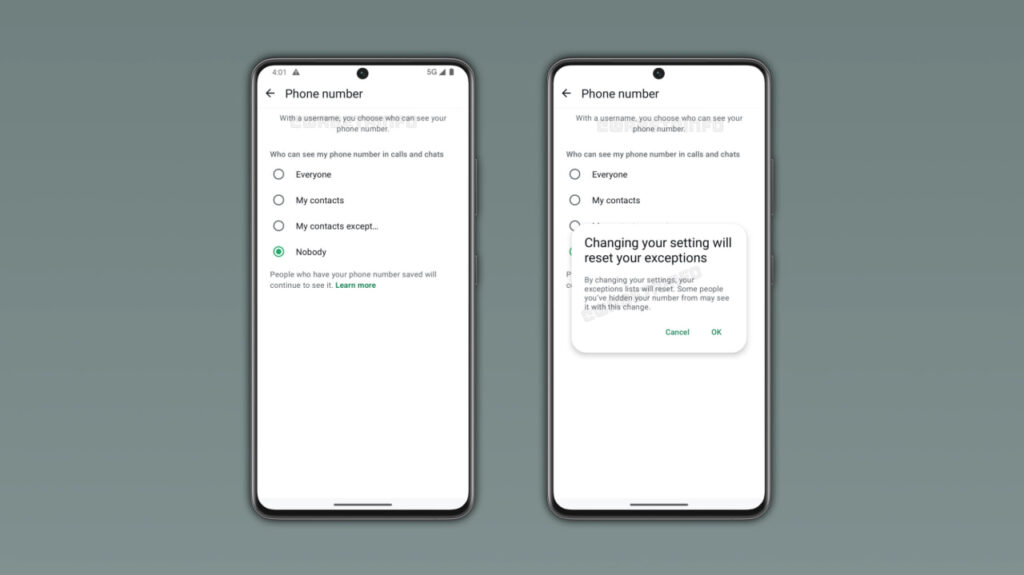
Image via WABetaInfo
According to the latest information, there will be four options: Everyone, My contacts, My contacts except, and Nobody. Users can choose to show their number to everyone, only their contacts, selected people, or hide it from people who do not already know it.
By default, WhatsApp will select the Nobody option for users who have a username. This means their phone numbers will remain hidden from new people who contact them through their usernames.
WhatsApp will also show a warning when users change this setting. The warning will explain that changing the option will reset their previous exceptions list. As a result, some people may be able to see their phone numbers after the change.
The new feature is still under development and is not available to users yet. WhatsApp has not announced when it will be released. It is expected to arrive in a future Android update.

WhatsApp is developing a native option to send media (photos and videos) in uncompressed, original quality, according to findings in the Android beta build 2.26.44.12. The feature expands beyond the existing Standard and HD presets, targeting power users who require pixel-perfect file delivery without resorting to workaround file-sharing methods.
Currently, WhatsApp’s standard tier compresses media heavily, while its HD toggle introduces lighter compression while retaining up to six times more data.
The upcoming “Original quality” mode bypasses compression algorithms entirely, as discovered by WABetaInfo. Meta plans to limit file size and resolution parameters only at extreme thresholds well beyond standard camera output.
The capability is slated as an exclusive perk for WhatsApp Plus. While standard users can currently send uncompressed files by routing media through the document picker, the native editor toggle streamlines high-fidelity transfers into the primary media flow.
The move reflects a broader monetization strategy across Meta’s messaging ecosystem, reserving workflow conveniences for paid subscribers while leaving core functionality accessible. By embedding full-resolution sharing into the standard camera and gallery pipeline, WhatsApp bridges a functional gap long exploited by platform competitors like Telegram.
The feature remains under active development and is expected to roll out to beta testers ahead of a wider public release in a future Android update.
WhatsApp is working on a new feature that will make it easier for users to manage their chats with Meta AI. The messaging app is introducing separate chats for Meta AI, allowing users to create different conversations and find them easily in their chat list.
With this feature, users can create separate chats with Meta AI for different topics. To create a new chat, users need to open their conversation with Meta AI and select the new chat option from the three-dot menu. They can then enter a name for the chat and choose a custom profile picture to identify it easily.
Once created, the new chat will automatically appear in the WhatsApp chat list, just like regular conversations. A small Meta AI logo on the profile picture will help users identify these AI chats.

Image via WABetaInfo
WhatsApp is also adding a new AI filter in the Chats tab. Users can tap this filter to see all their conversations with Meta AI in one place. They can also move the filter to a separate section if they do not want it in the main chat list. Users can delete these chats whenever they want.
Earlier, users had to open the main Meta AI conversation and find their saved threads through the menu. The new feature makes it easier to switch between different AI conversations.
The feature was spotted in the WhatsApp beta for Android 2.26.44.6 update, available on the Google Play Store. It is currently rolling out to some beta testers. There is no information about when it will be available to all users.
WhatsApp is introducing a new feature that will allow users to add cover photos to their personal profiles. Earlier, this feature was available only for WhatsApp Business accounts. Now, WhatsApp is bringing it to personal accounts as well.
With this feature, users can add a large landscape photo at the top of their profile. The cover photo will also appear in the app settings and on the chat info screen when someone opens a conversation. Users can keep their existing profile picture, as the new cover photo will not replace it.
To add a cover photo, users need to open their WhatsApp profile and tap the Edit button. They will get three options – take a new photo, select an image from their phone gallery, or create an image using Meta AI. WhatsApp will automatically adjust the selected image to fit the cover photo space.

Image via WABetaInfo
WhatsApp is also giving users control over who can see their cover photos. There will be four privacy options: Everyone, My Contacts, My Contacts Except, and Nobody. These options will help users decide who can view their cover photos. Users can also hide the photo from everyone without deleting it.
The feature has been spotted in the WhatsApp beta for Android 2.26.43.11 update, available on the Google Play Store. This means not all users will see it immediately. More users are expected to receive it in the coming weeks. WhatsApp has not yet announced when the feature will be available to everyone.

WhatsApp has introduced four new features to make group chats easier to use. These updates will help users find important messages, follow conversations, and share updates with group members. The new features are rolling out gradually for Android and iOS users.
Pin Messages Without a Time Limit
WhatsApp now allows users to pin important messages without a time limit. Earlier, users could pin messages for 24 hours, seven days, or 30 days.
With the new update, they can keep messages pinned for as long as they want. This will help group members find important information easily.
Share Message History With New Members
WhatsApp is making it easier to share recent messages with new group members. Users can share previous messages with someone who has just joined a group. This will help new members understand earlier conversations without asking others to explain everything. WhatsApp also protects these messages with end-to-end encryption.

Image via WhatsApp
Share Status Updates in Groups
Users can now share status updates directly with a specific group. This means they do not have to share every update with all their contacts.
Group members can view and react to these updates. They can also share their own statuses. Like regular WhatsApp statuses, group status updates disappear after 24 hours.
Find Mentions and Replies Easily
WhatsApp is adding a new filter to help users find unread group chats where someone has mentioned them or replied to their messages. It also shows messages where someone has mentioned everyone in a group. The filter works with community chats and can be removed if users do not need it.
WhatsApp is rolling out these four features gradually for Android and iOS users. Some users may have to wait a few weeks to receive them. Keeping the app updated can help users get the latest features when they become available.
-
 Updates2 days ago
Samsung Galaxy Watch 9 and Ultra 2 grab October 2026 update
-
 Updates3 days ago
Galaxy phones get new GPSU as Samsung confirms 200+ patches in November 2026 SMR
-
 Issues3 days ago
One UI 9 update triggers Wi-Fi and network drops, SIM card issues
-
 One UI3 days ago
10 changes/features needed in One UI 9.5 to fight Android 17 and iOS 27 in 2027