
Android
You can now Uninstall Google Play System Update on your Samsung phone


Google Play System updates are an important part of Android. They help your phone stay secure, fix bugs, and keep important features working well. But sometimes, an update can cause unexpected problems. In the past, if you wanted to undo one of these updates, the process was complicated and not very user-friendly.
Before, the only official way to roll back a Google Play System update was by using Google’s GPSUR tool. This required connecting your phone to a computer and using ADB (Android Debug Bridge), which many regular users don’t know how to use. Because of this, uninstalling a bad update was something most people avoided or didn’t know was even possible.
Now Google is rolling out a much easier option. A new entry called Mainline services is appearing (via Android Authority) inside Google Play Services on some devices.
This feature is still being rolled out, so it might not show up for everyone yet. But once it’s available, you’ll be able to uninstall Google Play System updates directly from your phone, so no computer is needed.
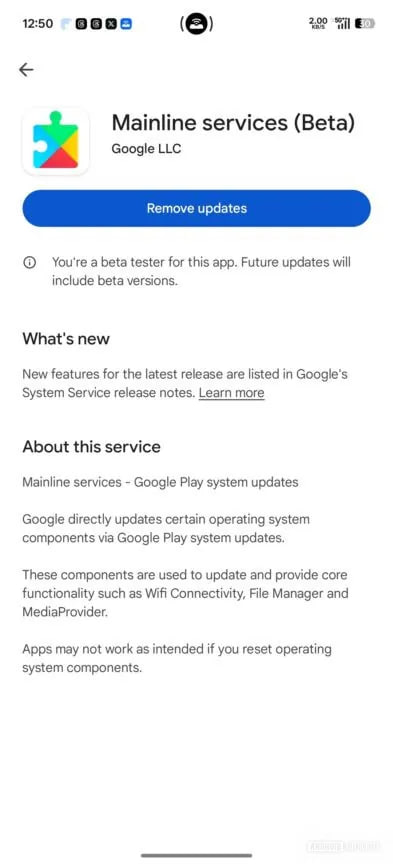
Image via Android Authority
When you tap on Mainline services, it takes you to a Play Store page. If an update is waiting to be installed, you’ll see a button to restart your phone. But after the update is installed, a new button appears, Remove updates.
Tapping it will show a warning message explaining that removing system updates might affect your phone’s features. If you choose to continue, the update is removed, and you can reinstall it later if you want.
This uninstall option is not meant for everyday use, and Google has kept it somewhat hidden. Still, it’s a helpful tool for those situations when an update causes issues.





Google Maps on Android Auto adopted a redesigned incident alert UI. It addresses a long-standing complaint about pop-ups that interrupt navigation directions. Meanwhile, a separate bug has surfaced that keeps Maps locked in day mode after dark.
The new alert clips onto the ETA bar at the bottom of the screen instead of swallowing your directions whole, via 9to5Google.
Turn instructions, road names, and distance countdowns stay exactly where they are. The Yes/No confirmation options appear within the small overlay, which fades away on its own after a few seconds if you do not interact with it.
The result varies slightly depending on the display in your vehicle. On taller screens, the improvement is noticeable but moderate. On shorter, wider displays, the new alert still avoids pushing critical navigation elements out of view.
Google hasn’t formally announced any of this, but the change appears to be server-side, rolling out gradually.

Over the past week, reports have been stacking up across Google’s support forums and Reddit from users whose Maps no longer switch to dark mode at night. The app just stays in its blinding day theme, headlights on or not.

Samsung phones, regardless of the One UI version, are receiving updated Android System Intelligence. Users can grab the latest version from the Google Play Store, available across various Galaxy device lineups.
Galaxy devices recently received their 7th Google Play system update in 2026. Samsung has widely expanded the One UI 8.5 update and is gearing up to kick off the June 2026 security patch’s rollout to compatible models.
Unlike security patches and system updates, the Android System Intelligence refines core OS features. It’s a built-in app that comes in a wide range of Android devices and provides proactive intelligence functions for various apps.
Google detailed in the May 2026 system update the changes of Android System Intelligence B.25 (2026-05-14). The release notes specifically mentioned bug fixes and maintenance changes for Android smartphones.
I’m seeing the latest version rolling out to devices running Android 16-based One UI 8 and One UI 8.5. It would have made its way to other OS versions as well, such as the Android 15-based One UI 7 and Android 17-based One UI 9 (Beta).
Android System Intelligence uses system permissions to provide smart predictions. For example, the app has permission to see your contacts so that it can show you suggestions to call a frequent contact.
As per Google’s support page, Android System Intelligence powers features such as Live Caption, Screen Attention, Smart Autorotate, Improved copy and paste, App predictions in the launcher, Notification management, Smart Text Selection across the system, Linkify text, Live Translate, App Search, Assistant Voice Typing, Now Playing, and Boarding pass with a screenshot.


Google is getting ready to release Android 17 soon, most likely before the end of June 2026. Samsung Galaxy phones that get the Android 17 update will also upgrade to the new One UI 9 software. Samsung has promised 4 to 7 years of major Android updates for many of its phones, so a lot of devices are eligible for this major software update.
Unlike Apple and Google, Samsung won’t send the update to everyone on the same day. Newer flagship phones and foldables will get this major update first. Then we have Mid-range and budget phones, these devices will come later, sometimes after a few months.
The real question is, who is getting this major Android 17 update?
Flagship Galaxy S Series Phones
- Galaxy S23 series: S23, S23+, S23 Ultra, S23 FE
- Galaxy S24 series: S24, S24+, S24 Ultra, S24 FE
- Galaxy S25 series: S25, S25+, S25 Ultra, S25 FE, S25 Edge
- Galaxy S26 series: S26, S26+, S26 Ultra
Foldable Phones (Z Series)
- Galaxy Z Fold 5, Z Flip 5
- Galaxy Z Fold 6, Z Flip 6 (and Special Edition)
- Galaxy Z Fold 7, Z Flip 7 (and FE models)
- Newer ones like Galaxy Z Fold 8, Z Flip 8, and Z TriFold
Mid-Range and Budget Phones
Samsung’s A, M, and F series have many models that qualify. Here are some important ones:
- A15, A16, A17, A24, A25, A26, A34, A35, A36, A37, A54, A55, A56, A57, and others like A06, A07.
- M15, M16, M17, M35, M36, M55, M56, and similar newer models.
- Many recent F models like F15, F16, F34, F35, F54, F55, etc.
Samsung made some important improvements with software updates. Even Galaxy phones from 2023 can still get the latest Android version. Upgrading to the latest official version means better security and new features. After upgrading to the latest version, you will notice smoother performance and fresh AI tools in One UI 9.
It is important to know that the exact timing depends on your region and carrier. Always keep your phone updated and back up your data before installing big updates.
Current Status of One UI 9
As of early June 2026, Samsung has already released the One UI 9 beta based on Android 17. The beta program started in mid-May for the Galaxy S26 series (S26, S26+, and S26 Ultra) in countries like the US, UK, Germany, South Korea, India, and Poland. The eligible Galaxy device owner can join the beta through the Samsung Members app to test new features like improved customization, better AI tools, and security updates.
The stable One UI 9 version is expected to launch in July 2026, most likely with the new Galaxy Z Fold 8 and Z Flip 8. After that, the stable version will roll out to other supported phones like the S25, S24, S23 series, and foldables, followed by mid-range models later in the year. It’s still early, so the full rollout will happen step by step.
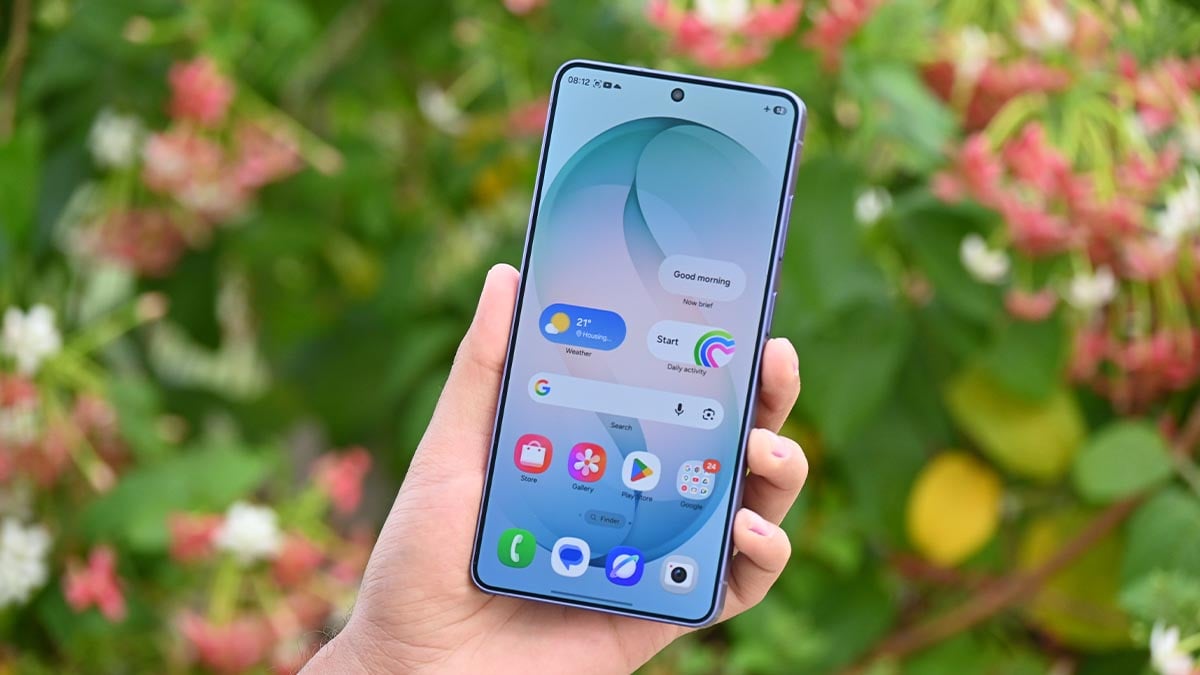
Your Samsung phone may soon become an ultimate creator tool, as Android Canary is showing signs of the upcoming feature to assist Screen Reaction videos.
Google’s Screen Reactions feature is yet to land on Pixel phones, but the Android Canary 2606 version has added the ability. The screen recording menu has added a switch to “Show selfie camera” when the recording is running.
Simply put, creating reaction videos is going to become a lot easier. Just record the screen through Android’s native screen recording tool and enable the selfie camera switch to include your reaction simultaneously.
The feature is smart enough as it automatically removes the background in real-time. The removal is accurate enough, matching third-party apps. However, you can also use a solid background from six different colors, AndroidAuthority reports.
Note that the selfie mode doesn’t work with partial screen sharing. It’s also unsupported for the selection of an app for screen recording. You need to record “Entire screen” to show yourself through the selfie camera.

Image credit – Android Authority
Meanwhile, more improvements and corrections are likely as Google tests the feature before broad rollout. You may find this feature boring, but it’s literally a big deal for the creator community, who is more active on social media.
Google hasn’t revealed when the feature will be publicly released. With Android Canary adding the Reactions feature recently, Pixel phones should soon be getting it in the near future. Samsung may bring it to Galaxy users through One UI 9.

Android’s AirDrop sharing compatibility expands to a Samsung Galaxy S phone and a foldable in its June 2026 expansion. Google has updated its Quick Share page and added the Galaxy S25 Edge and Galaxy Z Fold Special Edition phones.
Quick Share to AirDrop sharing first debuted on the Pixel 10 series. Google found a way to establish a connection between the two sharing tools. The feature lets users share files across devices without any additional app installation.
Galaxy S25 Edge and Galaxy Z Fold Special Edition have already received the One UI 8.5 update, which is necessary to support AirDrop sharing. Users have already gained access; Google’s page updation is more like a routine job.
Quick Share’s AirDrop support offers sharing between Android and Apple devices (with AirDrop). While no installation is necessary, users on both sides need to tweak a few settings inside the apps to establish the connection.
As of June 2026, these Samsung devices support AirDrop
- Galaxy S26, S26+, S26 Ultra
- Galaxy S25, S25+, S25 Ultra
- Galaxy S25 Edge – New
- Galaxy S24, S24+, S24 Ultra
- Galaxy Z Flip 7
- Galaxy Z Fold 7
- Galaxy Z Flip 6
- Galaxy Z Fold 6
- Galaxy Z Fold 6 (Special Edition) – New
- Galaxy Z TriFold
June 2026 expansion covers two Samsung phones along with a handful of Xiaomi, OnePlus, Oppo, Vivo, and Honor devices. Meanwhile, the AirDrop support is still away from popular phones like the Galaxy S23, Fold 5, and Flip 5.
Google is continuously expanding AirDrop compatibility. With Chinese phonemakers joining the party, a broad rollout to Galaxy devices seems on the verge.

-

 One UI2 days ago
These Samsung Galaxy devices received One UI 8.5 official update
-

 Updates3 days ago
Samsung Galaxy Watch 7 and 8 get new Wear OS update with security improvements
-

 Updates2 days ago
iOS 27 supports iPhones from 2019, Samsung’s 2022 flagship denied One UI 8.5
-
 Samsung3 days ago
7 Galaxy S26 Ultra features worth exploring, plus up to $720 off