
One UI
Samsung One UI 9 introduces new optional Secure Lock with Power button


Samsung One UI 9 Beta 4 introduces an optional “Secure lock with Power button” setting, allowing users to decide whether opening the power menu from Quick Settings should automatically activate Lockdown mode.
The company first integrated Lockdown mode into the power menu with One UI 9 Beta 2, making it much easier to instantly secure a device.
Once activated, the feature locks the phone and temporarily disables fingerprint and face authentication until the user unlocks it using their PIN, password, or pattern.
With One UI 9 Beta 4, Samsung has refined that behavior by introducing a new Secure lock with Power button toggle. Newly discovered strings confirm the feature is headed to the settings menu, giving users an option that wasn’t available before.
By default, tapping the power button shortcut in the Quick Settings panel no longer triggers Auto-Lockdown. Instead, users can access the power menu and dismiss it without the device locking, returning directly to the app.
Those who prefer the previous behavior can restore it by heading to Settings > Lock screen and AOD > Secure lock settings and enabling Secure lock with Power button.
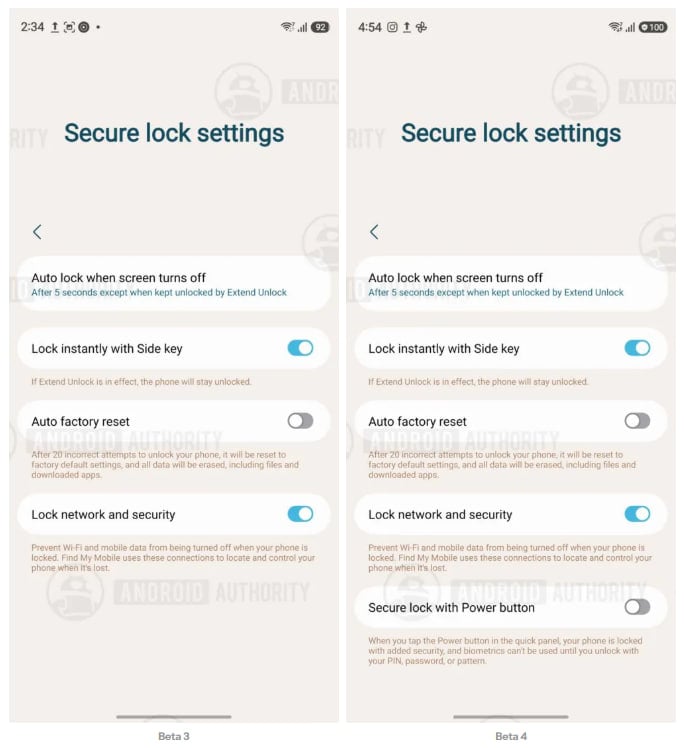
Image: One UI 9 Secure Lock Power Menu | Source: Android Authority
Once switched on, exiting the Quick Settings power menu immediately locks the phone and disables biometric authentication, just as it did in Beta 2 and Beta 3.
Meanwhile, the change affects only the Quick Settings power button, while the physical side button continues to trigger Lockdown by default.
The adjustment appears to be aimed at balancing convenience with security. Many users open the power menu simply to restart or power off their phone, and forcing Lockdown every time may have felt unnecessary.
If the feature remains unchanged, it should be a welcome quality-of-life improvement when One UI 9 reaches its Stable release.
Related article:


Samsung is internally testing Android 17-based One UI 9.0 software for various Galaxy devices. This activity is running in parallel to the Open Beta Program. The public beta update is exclusively available for the Galaxy S26 series.
One UI 9.0 update will bring Android 17 to Samsung devices. The official debut is set for late July, while the rollout will take a few more weeks to start. Samsung will first prioritize new devices rather than sharing software advancements.
Samsung picked mid-May as the timeline to announce and start the One UI 9 Beta Program. As of the third week of June, the company has already rolled out three Beta builds to Galaxy S26 users in six countries around the world.
Open Beta Program
- Galaxy S26
- Galaxy S26+
- Galaxy S26 Ultra
Samsung will keep the Beta Program limited to its latest flagship devices. Meanwhile, the internal testing has already started for plenty of models. It includes phones from the S series, foldables from the Z series, and tablets from the Tab series.
What’s more, some Galaxy A Series phones have also joined the party. The internal testing is expanding to unexpected models, including the budget ones. The pace is fast, and Samsung is gearing up for a faster rollout.
Internal Testing Stage
Galaxy S Series
- Galaxy S25
- Galaxy S25+
- Galaxy S25 Ultra
- Galaxy S25 FE
- Galaxy S24
- Galaxy S24+
- Galaxy S24 Ultra
- Galaxy S24 FE
- Galaxy S23
- Galaxy S23+
- Galaxy S23 Ultra
- Galaxy S23 FE
Galaxy Z Series
- Galaxy Z Fold 7
- Galaxy Z Flip 7
- Galaxy Z Fold 6
- Galaxy Z Flip 6
- Galaxy Z Fold 5
- Galaxy Z Flip 5
Galaxy A Series
- Galaxy A57
- Galaxy A37
- Galaxy A27
- Galaxy A17
- Galaxy A07
- Galaxy A56
- Galaxy A36
- Galaxy A26
- Galaxy A16
- Galaxy A55
- Galaxy A35
- Galaxy A25
- Galaxy A15 5G
- Galaxy A54
- Galaxy A34
- Galaxy A24
Galaxy M Series
- Galaxy M35
- Galaxy M56
Galaxy Tab S Series
- Galaxy Tab S11
- Galaxy Tab S11 Ultra
- Galaxy Tab S10+
- Galaxy Tab S10 Ultra
- Galaxy Tab S10 Lite
- Galaxy Tab A11
The list is broad enough yet incomplete. Samsung will add even more Galaxy models to its internal software testing streak. Beta Program may open for more users, but it would only happen after the Summer Galaxy Unpacked event.
Updated on July 3, 2026.

Samsung has brought your Galaxy’s Power Menu a Security Label with One UI 9.0 Beta 4. The update landed yesterday, weighing around 1.25 gigabytes. Release notes contained some crucial bug fixes, making the most anticipated update the most boring release.
Our team discovered a minor yet noticeable change in Beta 4. With the latest One UI 9.0 Beta, Samsung has added a Security Label to the Power Menu. For the first time, the menu now shows why your Galaxy device has been locked.
One UI 9.0 Power Manu adds Security Label
Samsung has made Lockdown mode the default in One UI 9. The power menu has deleted the lockdown mode button with the initial rollout. The revamped security system starts enforcing device lock as soon as you enter the power menu.
Simply put: entering power menu on your Galaxy device will result in a device lock. You can not revert to the home screen without unlocking your device. You can use the same credentials as the lock screen to unlock the power menu.
Previously, it was a blind application, leaving users to guess what happened suddenly. Adding a bit more clarity, the Korean tech giant has now slapped a dedicated information label.
The updated Power Menu page now displays “For your security, your phone is locked.” It doesn’t sound like a major development, but it’s practically a welcome addition.
-
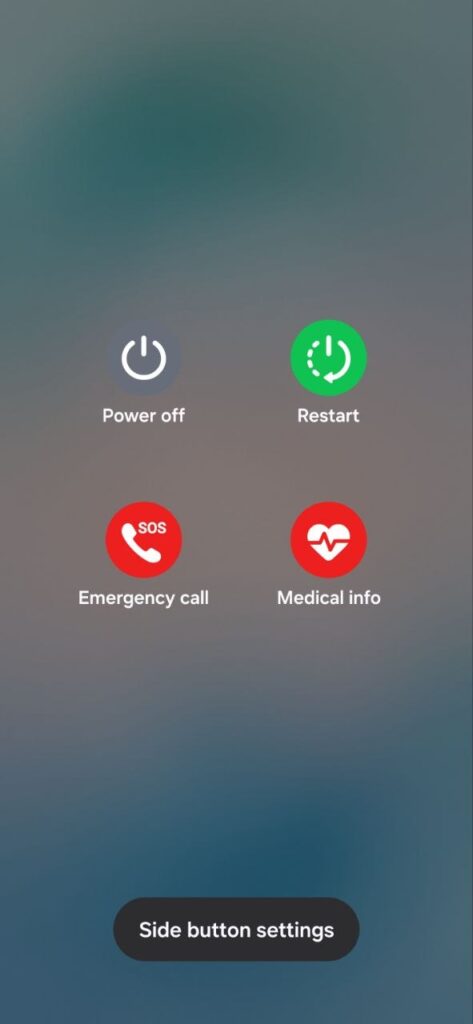
- One UI Power Menu [Before]
-
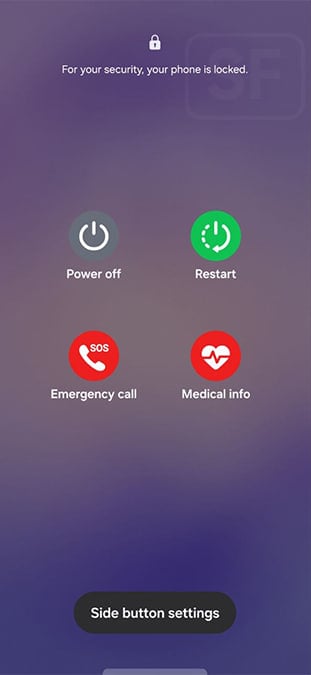
- One UI 9 Beta 4 Power Menu
If you are on One UI 9 Beta 4, you can check the message by entering the Power menu. Users running One UI 8.5 will get the complete deployment once the company begins the public rollout of the One UI 9.0 firmware update.
You may like:

Samsung has begun rolling out the One UI 9 Beta 4 update to the Galaxy S26 series. This is one of the company’s most awaited Beta updates this year. Engineers spent double the usual time to shape this update, which weighs no less than 1.25GB.
Starting in India, the One UI 9 Beta 4 update has expanded to European markets, including Germany, Poland, and the UK. Beta participants in South Korea have also started to receive the latest software update gradually.
Samsung recently started July patch’s rollout to Galaxy S26 series. That said, the fourth Beta also carries the latest security patches along. This will ensure the most optimal user experience along with the newest security patch.
One UI 9 Beta 4 rollout in the US?
If you are in the US, the Beta 4 update should already be there. It comes with a build version ending with ZZG4 for the S26, S26+, and S26 Ultra. Navigate to Settings > Software update > Download and install for a quick check.
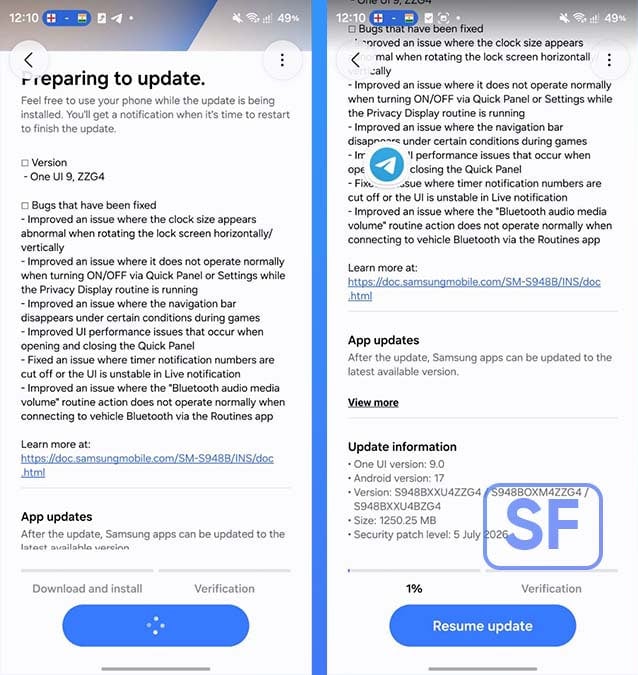
Samsung has fixed several usability issues in the latest update. The patch resolves an abnormal lock screen clock size when rotating the device, Privacy Display toggle conflicts, disappearing navigation bar during games, Quick Panel performance hiccups, timer notification UI glitches, and a Routines bug that prevented Bluetooth media volume actions from working properly with vehicle Bluetooth connections.
Samsung One UI 9.0 Beta 4 – Full Changelist
Samsung’s fourth One UI 9 Beta update (ZZG4) brings the following changes:
- Improved an issue where the clock size appears abnormal when rotating the lock screen horizontally/vertically
- Improved an issue where it does not operate normally when turning ON/OFF via Quick Panel or Settings while the Privacy Display routine is running
- Improved an issue where the navigation bar disappears under certain conditions during games
- Improved Ul performance issues that occur when opening and closing the Quick Panel
- Fixed an issue where timer notification numbers are cut off or the Ul is unstable in Live notification
- Improved an issue where the “Bluetooth audio media volume” routine action does not operate normally when connecting to vehicle Bluetooth via the Routines app

One UI 8.5 is set to lose its “latest” status later this month, as Samsung unveils the next major iteration, the Android 17-based One UI 9.0.
Samsung has scheduled its next Galaxy Unpacked event for July 22 in London. Fans around the world can join the official livestream from YouTube to watch the event live from their phone or bedroom TV setup.
Foldable phones, new smartwatches, and probably smart glasses will be unveiled. Additionally, Samsung will showcase its latest software advancements, including Android 17-based One UI 9 and Wear OS 7-based One UI 9 Watch.
Samsung One UI 8.5 will lose its latest status this month
One UI 8.5 holds the crown of the latest official version. It gained this status at launch with the Galaxy S26 series earlier this year. Now with Samsung gearing up for the One UI 9 reveal, the next version will take over the status as well.
One UI 9 introduces intelligent capabilities and adaptive user experiences. The software is already available in Beta Program for Galaxy S26 series; however, Samsung has kept the full experience reserved for the upcoming phones.
New foldables will ship with the Stable One UI 9.0 version, built on Android 17. It will have plenty of new software perks, upgraded AI tools, and enhanced multitasking. If you’re excited, reserve the next Galaxy for early access to the new OS.
Samsung is maintaining two One UI version strategy for Galaxy users. The Stable Android release follows a major bump from Samsung in the second half, while the first half of the succeeding year brings a mid-cycle iteration.
One UI 9 might not be a major upgrade itself, but One UI 9.5 would. The next mid-cycle version will be introduced with the Galaxy S27 series next year. Until then, the One UI 9.0 will enjoy the status of being the latest official software.
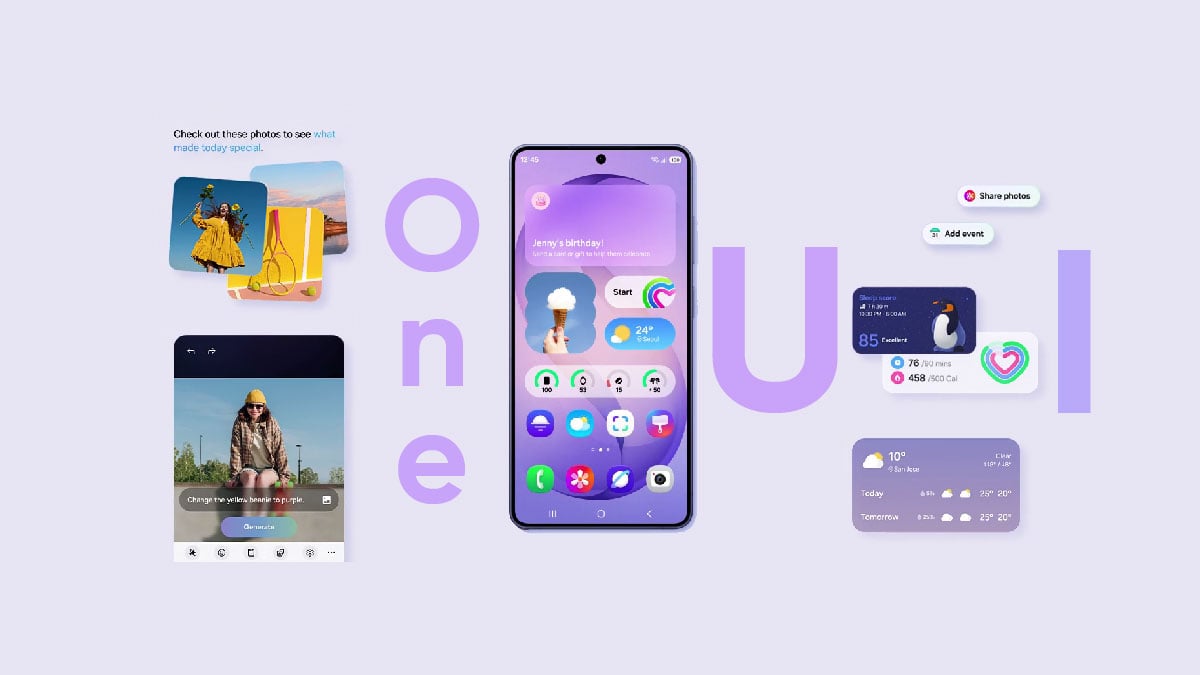


The One UI 9.0 beta 4 is set to rollout next week, and here’s everything you need to know about its release for the Galaxy S26 series.
So far, Samsung hasn’t shown any major additions in the One UI 9.0 software development pipeline. There are some UI exceptions and minor changes to the system apps.
This might be due to the Galaxy Z Fold 8 and Flip 8 launch this month. These will be the first to feature One UI 9.0 out of the box. Of course, Samsung may have some new features designed for the foldable user experience. However, the picture painted by the beta so far isn’t looking promising.
Another thing to know is that Samsung is fixing bugs with the new beta updates. The past three rollouts have mentioned several bugs that target stability and the user experience. Yet, the interactions felt quite similar to the beta 1.
The fourth beta may also go low in the charts, because Samsung may not want to take the spotlight away from the next-gen foldables. Simply put, the software must showcase first at the Unpacked. Then it will resume focus on the One UI 9.0 beta program with new beta releases.
It’s possible that Samsung could give users a glimpse of what’s coming with the update when it showcases at the Unpacked.
In the meantime, the Galaxy S26 series is receiving a One UI 8.5-based July 2026 security update. It’s also possible the One UI 9.0 beta program may add more devices, such as the Galaxy S25 series and others.
To conclude, the beta 4 is looking quite gloomy in terms of new feature rollout. We’ll keep you posted on the One UI 9.0 beta 4 rollout and share our insights on what’s new in this update next week.
-
One UI7 hours ago
One UI 9.0 (Android 17) testing on these 42 Samsung devices
-
 News1 day ago
Samsung Galaxy Z Fold 8 Ultra: Complete phone specifications
-

 Samsung1 day ago
Samsung Galaxy Z Fold 8 (Wide): Complete phone specifications
-
 Updates1 day ago
Samsung rolling out July 2026 update to Galaxy S24, S25, Edge, FE, Fold 7 and more phones