
Apps
Telegram officially launched for Wear OS smartwatches with 7 key features


Telegram for Wear OS is making its official debut for smartwatches. This announcement follows the recent launch of Telegram for Apple Watch. The company revealed 7 key features that the app is bringing to your wrist gadget.
If you own a Wear OS-based smartwatch, Telegram can now be accessed on it. The biggest beneficiaries are the owners of Samsung Galaxy and Google Pixel smartwatches.
When Telegram was available for Wear OS, Samsung was using its own Tizen OS in Galaxy watches. Google was not in the smartwatch segment, which actually made Telegram for Wear OS irrelevant from a usability perspective.
Telegram took almost five years to revive its Wear OS app, but the latest version is a pretty refined application. All the supported features are worth paying attention to, which complete the aesthetics of the standalone app.
Now you can browse chats and media, and read messages of any length without risking to drop your phone. Feel free to listen to voice messages and watch videos if there’s nobody in the next stall. You can also send text messages — or voice messages, if your hands are busy zipping up.
For some reason, our Android developer added muting and pinning chats, as well as deleting messages. Meanwhile, the iOS developer added viewing locations and sending stickers. Why?? We will never know. We’ve convinced them to steal these features from each other in the next update.

With the Telegram for Wear OS, you get features like sending text and voice messages as well as stickers, listening to voice messages, viewing media such as videos, location previews, and managing your chat effectively.
Here are the best Telegram Wear OS features
- Send text and voice messages
- Listen to voice messages
- View media and video messages
- Read long messages
- Preview locations
- Send stickers
- Manage your chats
To get Telegram on your Galaxy Watch, head toward the Play Store app, search “Telegram,” and start messaging today.








Samsung just released a One UI 9-compatible MultiStar module update, taking the supported Good Lock module numbers to 17. The new version is available on Galaxy Store with restricted support for the latest OS.
Last month, Samsung revealed Good Lock apps and plugins that work in One UI 9 software. The list comprised 16 apps/modules that work and 8 that don’t. MultiStar was one of those that weren’t functioning in One UI 9.
Enthusiast GalaxyTechie shared the latest MultiStar app update screenshot on X. The release notes confirm that the latest version works with One UI 9. This new release ramps the Good Lock compatibility list by one point.
MultiStar is a popular plugin among Galaxy users, specifically tablet and foldable owners. It extends Samsung’s multitasking feature capabilities. Galaxy S26 users will now be able to use the MultiStar on the One UI 9 Beta firmware.
If you are on One UI 8.5 or lower build, you have access to all Good Lock offerings. The compatibility issue is limited to Beta firmware. It’s a routine process as an OS upgrade requires deeper optimization across code.
These Good Lock apps/modules are supported in One UI 9:
- MultiStar
- One Hand Operation+
- Sound Assistant
- Keys Cafe
- Theme Park
- Wonderland
- Edge Lighting+
- Dropship
- Galaxy To Share
- Routines+
- Nice Catch
- Edge Touch
- Camera Assistant
- RegiStar
- Display Assistant
- Nice Shot
- Gallery Assistant
Apps/plugins that are under development are as follows:
Samsung has yet to fully support Good Lock modules with One UI 9. Useful apps such as QuickStar, LockStar, and Home Up are still unsupported. The development is underway and deployment likely around the July Unpacked event.
- QuickStar
- LockStar
- ClockFace
- NavStar
- NotiStar
- Home Up
- Game Booster+

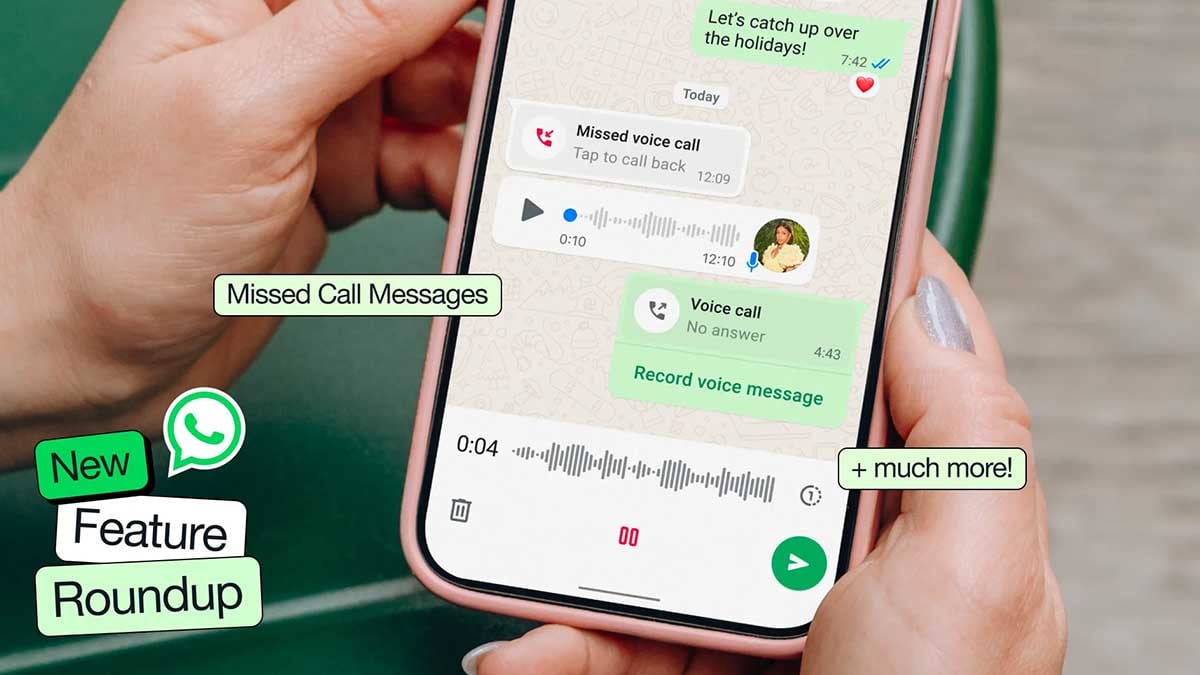
WhatsApp is finally bringing its chat message menu UI a seamless design it has been missing for years. The rollout has started for Android users in Beta, and the redesign looks incredibly good and offers a seamless experience.
WABetaInfo spotted the redesigned menu inside WhatsApp Beta for Android 2.26.23.8, now live on the Google Play Store. Three years, that’s how long Android users have waited for a WhatsApp seamless message menu.
The new interface surfaces in both individual chats and group conversations. Tap and hold any message, and the menu appears right there, anchored to the message itself.
Old vs New
The old setup scattered actions across two places: the overflow menu and the top app bar, which held shortcuts for forwarding and editing.
The redesign collapses everything into one contextual menu that floats near the selected message. Common actions sit front and center, while less-used options live one tap deeper under a dedicated “More” section.
iOS users have had something close to this for years.

Image source – WABetaInfo
Rollout is limited right now. Not every beta tester sees it yet, and there’s no confirmed timeline for a stable release.

Google has now dropped Gemini 3.5 Live Translate, and it’s the most ambitious thing the company has done with language since the original experiment launched.
It detects over 70 languages automatically, no manual configuration, no awkward menu-diving. Moreover, it preserves the speaker’s actual intonation, pacing, and pitch, not a robotic approximation.
Google Meet’s speech translation topped out at five languages and only worked between English and something else. Now it’s 70-plus languages and over 2,000 language combinations in a single meeting.
Our partners at Grab are testing the model to enable multilingual communication in near real-time between drivers and travelers at pickups. These users make over 10 million voice calls per month through Grab.
Developers can access 3.5 Live Translate right now through the Gemini Live API and Google AI Studio in public preview. Enterprise customers get a private preview in Google Meet starting this month, and regular users?
It’s rolling out globally on Google Translate for both Android and iOS.
The model is also rolling out on the Google Translate app globally, on both Android and iOS. When using the Live Translate feature, simply connect any pair of headphones to experience a more seamless translation that mirrors the speaker’s tone across 70+ languages.
Android users also get Listening mode, which lets you hold your phone to your ear and hear translations stream directly through the earpiece. No headphones needed, surprisingly useful in a noisy street interaction.
All generated audio gets watermarked through Google’s SynthID system, so AI-produced speech stays detectable.

Google Maps on Android Auto adopted a redesigned incident alert UI. It addresses a long-standing complaint about pop-ups that interrupt navigation directions. Meanwhile, a separate bug has surfaced that keeps Maps locked in day mode after dark.
The new alert clips onto the ETA bar at the bottom of the screen instead of swallowing your directions whole, via 9to5Google.
Turn instructions, road names, and distance countdowns stay exactly where they are. The Yes/No confirmation options appear within the small overlay, which fades away on its own after a few seconds if you do not interact with it.
The result varies slightly depending on the display in your vehicle. On taller screens, the improvement is noticeable but moderate. On shorter, wider displays, the new alert still avoids pushing critical navigation elements out of view.
Google hasn’t formally announced any of this, but the change appears to be server-side, rolling out gradually.

Over the past week, reports have been stacking up across Google’s support forums and Reddit from users whose Maps no longer switch to dark mode at night. The app just stays in its blinding day theme, headlights on or not.

Samsung is bringing new sports animations to Always On Display and Now Bar, and the rollout timeline aligns with FIFA World Cup 2026. The app is getting updated through Galaxy Store, and users are getting new visual tweaks.
Always On Display app’s 8.9.36.23 version is available on Galaxy Store, bringing new UI and animations for Google Sports. The newly added visuals will be displayed through Now Bar, not independently.
This time, Samsung has shared more information than it usually does. The update changelog (via Alfaturk) clearly states that the new version adds new UI and animations for Google Sports soccer goal celebrations and key moments on Now bar.
Google Sports offers live scores on the Samsung lock screen and Now bar. The pre-FIFA update further elevates the functionality and makes it more fun.
Now Bar will now display visuals to celebrate the winnings post-match. Additionally, the interactive pill will also be used as a dedicated estate on the screen to showcase key moments.
Google Sports in Now Bar
Google Sports is available as an opt-in service for Samsung’s Now Bar. You may need to manually enable it from the Settings window. A normal Google Sports setup is also required, which allows you to follow your favorite teams.
Once done, if teams from your following list go live on the match, the system triggers real-time notifications on the Now Bar. If AoD is enabled, the Now Bar will continue the showcase on the AoD screen at minimal battery consumption.
Starting in Android 16, Samsung’s Now Bar has been optimized for Google’s Live Updates. This internal collaboration ensures Galaxy’s lock screen will continue to deliver the most dynamic and engaging experience.

-

 One UI3 days ago
These Samsung Galaxy devices received One UI 8.5 official update
-

 Updates3 days ago
iOS 27 supports iPhones from 2019, Samsung’s 2022 flagship denied One UI 8.5
-
 Updates22 hours ago
Samsung releases June 2026 security enhancements for Galaxy S26, S25 (Edge/FE), Fold 7, Flip 7 and TriFold
-
 Issues3 days ago
Samsung One UI 8.5 had a 5-month Beta, but battery life seems a mess