

Samsung Gallery update brings Galaxy S21’s ‘Remaster picture’ feature [Video]

Samsung started rolling out a new Gallery app update, which includes an excellent tool called ‘Remaster picture’. This new tool comes with Samsung Gallery v12.1.06.x, and you can check to download it via Galaxy Store if it has arrived for your device.
This newly added ‘Remaster picture’ feature lets users refine any image from the stock Gallery app. However, it only allows you to increase or decrease its strength, but impressively brings sharpness to the blurry images.
At the same time, the new tool could also apply tinted overtones to the image with the help of artificial intelligence. However, if your Galaxy smartphone or tablet still eligible to get new Gallery updates, you will soon be getting it through the Galaxy Store.

It’s worth mentioning that Samsung has already introduced this feature alongside the Galaxy S21 series smartphones. Moreover, the company officials explained how the new Remaster picture feature works to enhance the quality of images with AI.
Aside from this, Samsung Gallery also includes a bunch of entertaining features in a hidden menu called Gallery Labs. While the company has not openly added these features in the Gallery app, it looks like the developers’ team is working on them.
STAY CONNECTED WITH US:
- Join SammyFans on Telegram
- Like SammyFans.com on Facebook
- Follow SammyFans on Twitter
- Get the latest insights through Google News
- Send us tips at – [email protected]





Samsung has a new version of Galaxy software in development, and it is getting plenty of new customization upgrades early. Samsung pushed One UI 9.5-based Home Up, which brings 6 big customization upgrades to Galaxy users.
Good Lock’s Home Up is a widely used plugin for experimental customization. You can tweak the gestures and app opening/closing animations. There are several other personalization tools that let you give One UI a personal touch.
Samsung has updated Good Lock’s Home Up in One UI 9.5 to version 18.5.00.30. As per Theordysm, the latest version introduces six major customization upgrades, including new features and functional enhancements.
New Icon, Page and Folder settings
Home Up now lets you adjust the app icon size as per your convenience. The plugin has replaced the legacy slider with fixed presets with a true slider.
Samsung has also redesigned the Page transition effect page. There’s a dedicated card, titled “Transition effect settings,” which features all the available transition effects for users, namely Focus, Swing, Layer, Stack, Paper, Cube, Cylinder, and Wave.
Like the Page transition effect, the new Home Up has also overhauled the “Folder icon setting” page. The preview layout offers 8 options, including Grid, Radial, Honeycomb, Heart, Arc, Diamond, Hero, and Stack.
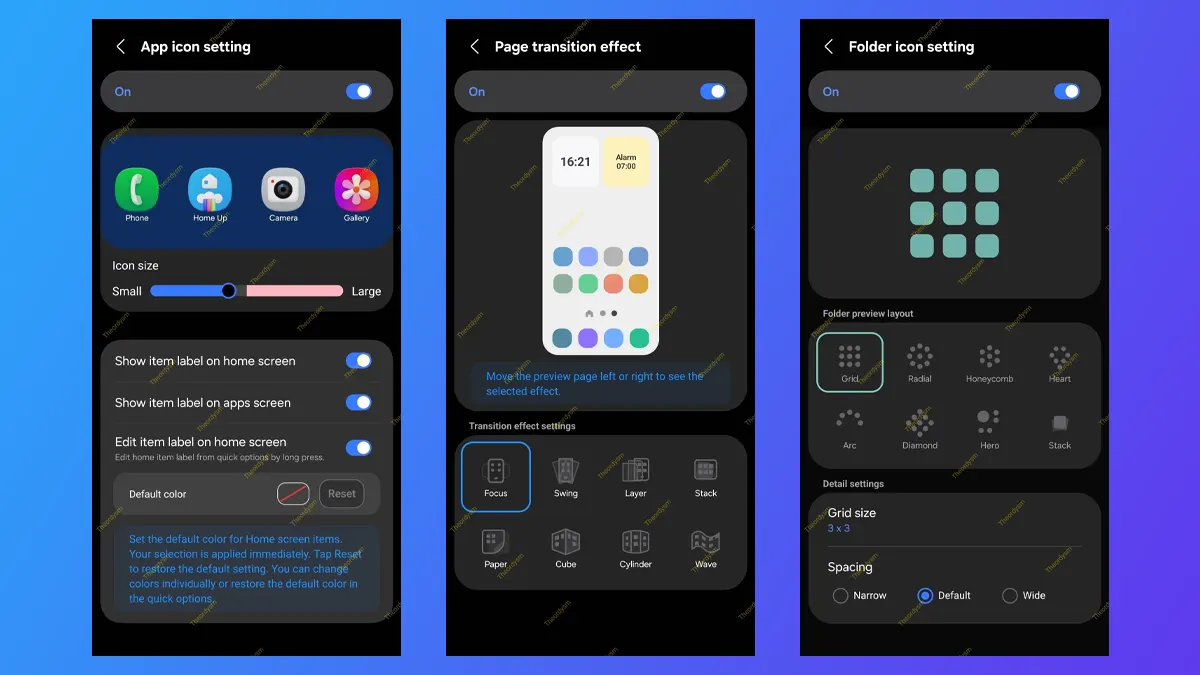
Image source: Theordysm/X
Galaxy’s Favorites background customization tool now offers additional Blur and Shadow settings. There’s a dedicated slider to adjust the blur, while the Shadow tab has three additional options, including Color, Range, and Opacity.
Samsung is finally ending one of the most long-standing complaints with the Apps screen grid. The screen grid now has up to 8×8 layout, making the Apps screen even more valuable with extended app display without needing a swipe.
The revamped Popup folder setting page offers various options, including size and type, with Detail settings card having additional toggles such as Grid size, Variable size, Position central fixation, Hide edit bar, Remove blur effect, and Apply folder background color.
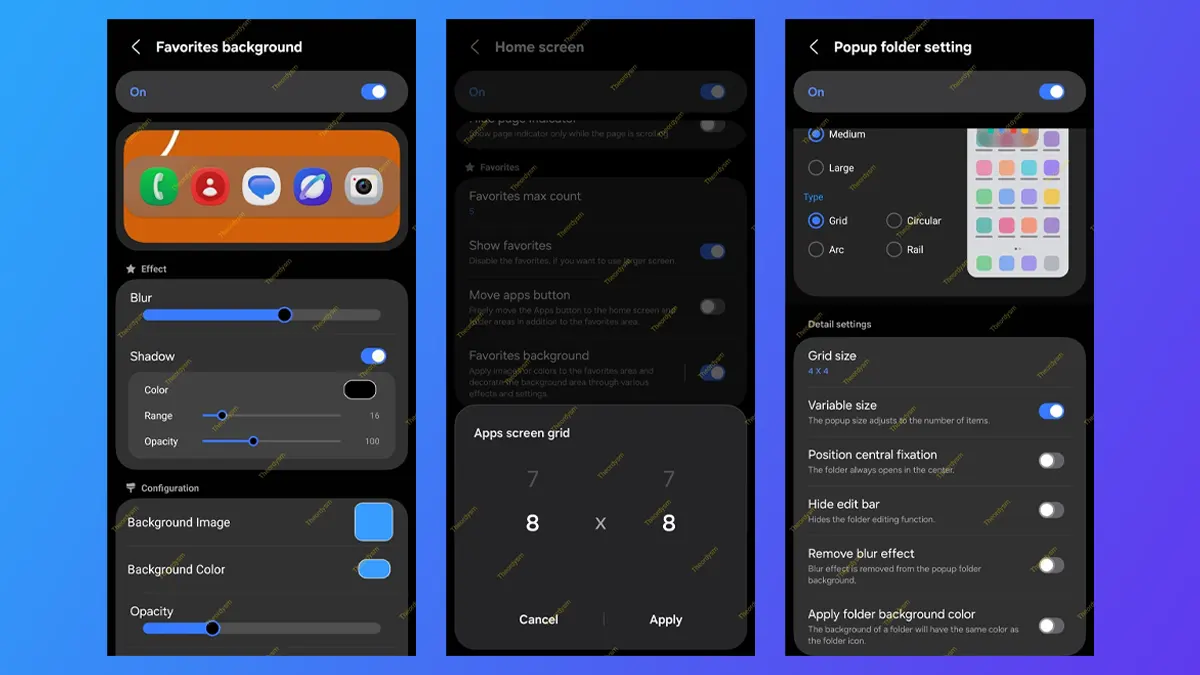
Image source: Theordysm/X
The upgraded interface is available on One UI 9.5 devices, such as the Galaxy S26, S26+, and S26 Ultra. The software is in the Beta Program, so unexpected bugs may appear, which may ruin your user experience.
You may be able to sideload the One UI 9.5-based Home Up on your existing Galaxy device to access the new options, but they might not work, even after appearing in settings. That said, backup your current Home Up data before doing a sideload.


Samsung is working on new features for its Messages app that could make texting easier with the help of AI. These features may allow users to find, send, reply to and forward messages simply by asking an AI assistant.
The latest Samsung Messages version 16.3.27.7 is rolling out to selected Galaxy smartphones in South Korea. According to the information, the update includes 10 new functions that AI assistants like Google Gemini could use to control the app.
With these features, users may not need to open the Messages app to find old conversations. For example, they could simply ask Gemini to find a discount code received last week. The AI assistant could also send messages, reply to texts, forward conversations and delete unwanted messages.
The update also suggests that Samsung is working on a smarter search feature. This could help users find messages by asking questions in simple words instead of searching for exact keywords.
Image – SammyFans
Another new feature may help users check whether a received photo has been edited or created using AI. This will work through Google’s Content Credentials technology.
Samsung’s upcoming Galaxy Claw AI experience could also use these features to complete tasks across different apps, including Messages. However, these features are not available yet. They have only been found in the app’s code, and Samsung has not announced an official launch date.
The update is currently reaching selected Galaxy phones running One UI 9.0 in South Korea, including Ultra models from the Galaxy S23 series. Similar features were also spotted in China in September.
Although Samsung stopped its Messages app in the US in July, the company continues to develop it for users in other markets.

Samsung Good Lock users are facing an issue with the widget background blur effect in Home Up. While the blur effect works properly on Favorites and Edge Panel backgrounds, it does not seem to work on widget backgrounds.
According to users, widget backgrounds originally had a blur effect without becoming transparent. However, after changing the ‘Remove Blur’ option in Home Up’s Widget Settings, the widget background became transparent, and the blur effect stopped working. Users are now looking for a way to bring back the original blur effect.
In response to this, Samsung’s Good Lock Support Team explained that the ‘Remove Blur’ option is designed to remove the blur effect from widget backgrounds. Samsung suggested that users first turn off this option and check whether the widget background looks normal again.
To do this, open the Good Lock app, go to Home Up, select Widget Settings, find the ‘Remove Blur’ option, and turn it off. After that, check the widget background on your home screen.
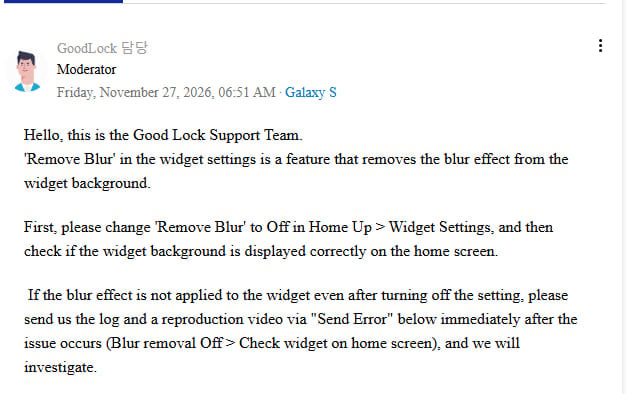
Samsung also asked users to send an error report if the blur effect does not return after turning off the option. Users should record a short video showing the issue and submit it along with the error log through the ‘Send Error’ option. Samsung recommends sending the report immediately after reproducing the issue by turning off Remove Blur and checking the home screen widget.
For now, Samsung recommends keeping the ‘Remove Blur’ option turned off. If the issue continues, users should share their logs and a reproduction video with Samsung so the team can investigate further.

Samsung is set to remove its “Private sharing” feature from Quick Share. The company has informed Galaxy users through a new update to the Quick Share app. The changelog specifically mentions the potential removal of the “Private sharing” feature.
A new Galaxy Store changelog for Quick Share version 13.9.10.5 includes an explicit “Advance notice of the upcoming discontinuation of the ‘Private sharing’ feature,” confirming earlier string discoveries.
The deprecation is already visible in Samsung’s active software pipeline. On Galaxy S26 Ultra hardware running One UI 9.5 Beta 1, which bumps the Quick Share client to version 13.9.50.30, the Private sharing toggle, underlying code, and localized strings have been scrubbed entirely, despite the omission of this change from the official beta release notes.
While Samsung has not finalized a public cutoff date, leaving a date placeholder inside the app’s backend code, pushing a warning to the stable Galaxy Store channel indicates the shutdown is imminent.
Originally built as a blockchain-encrypted transfer layer exclusively between Samsung’s Galaxy devices, Private sharing gave senders granular digital rights management over sensitive media and documents.
Users could enforce expiration timers, remotely revoke file permissions, and block recipients from saving, forwarding, or screenshotting shared items. Once Samsung flips the switch, both sending and receiving via this mode will cease, and recipients will immediately lose access to any historical files.

Samsung recently introduced AirDrop compatibility on the Galaxy S26 lineup alongside support for Android, Windows, and select iOS devices, while laying the groundwork for Tap to Share in One UI 9.5.
Maintaining a proprietary, cloud-reliant blockchain pipeline for a niche Galaxy-only feature likely created unnecessary engineering overhead as Samsung prioritizes universal, low-friction file sharing across competing ecosystems.
Users holding critical documents inside Private sharing sessions will need to back up or migrate those files through alternative encrypted channels before the server-side deprecation takes effect.
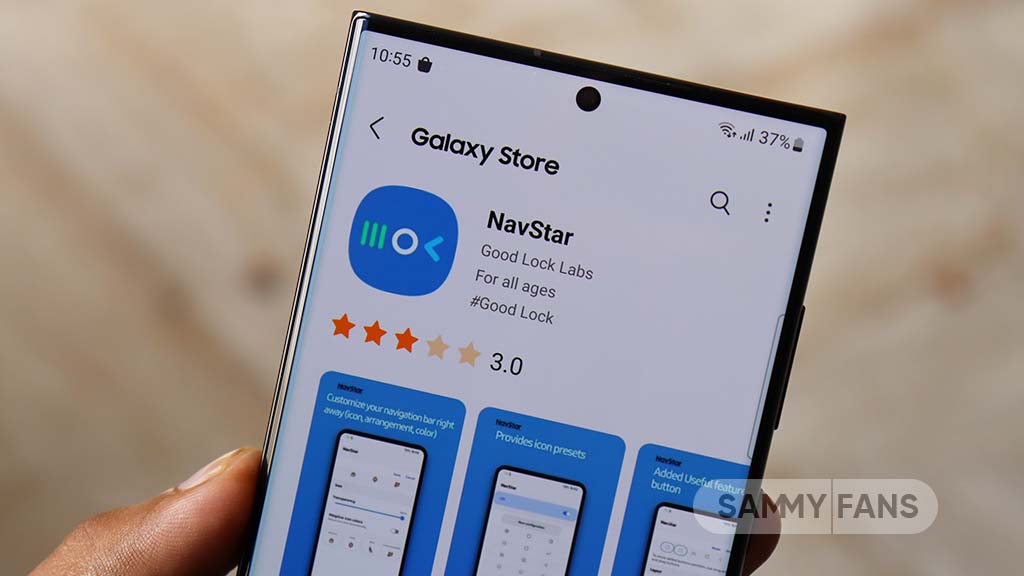
Samsung has officially released a new update for its Good Lock NavStar module, bringing support for One UI 9.5 along with some useful improvements for Galaxy users. The latest update comes with version number 9.5.01.2 and focuses on making navigation customization easier and more convenient.
With this update, Samsung has introduced a new floating tab layout on the NavStar main screen. This gives the app a fresh look and makes it easier for users to explore different settings and options. The company has also improved the custom button creation and editing screen. It makes it simpler to create new navigation buttons or edit existing ones.
The latest NavStar update now supports button alignment on the Galaxy Z Fold Cover Screen. This means users get more flexibility to adjust the position of navigation buttons according to their preferences.
However, Samsung has also announced an important change that users should know about. Starting with One UI 9.5, the Pin/Hide Button feature will no longer be available in NavStar. This means users upgrading to One UI 9.5 will lose access to this feature. However, those running One UI 9.0 or older versions can continue using it as before.
Galaxy users can check for the latest NavStar 9.5.01.2 update through the Samsung Good Lock app or Galaxy Store. This update brings a fresh design, better customization options, and improved support for Galaxy Z Fold users. While the removal of the Pin/Hide Button feature may disappoint some users, the other improvements make NavStar a better experience.
-
 One UI2 days ago
One UI 9.5 Eligible Devices: These Samsung devices could receive the next major update
-
 Wearables1 day ago
Samsung confirms Galaxy Watch 9 features for older models, including Watch 4!
-

 News2 days ago
Galaxy S25 could be banned in the US as Samsung loses camera patent case
-
 Deals3 days ago
Samsung Galaxy S26 Ultra is $350 off for Black Friday