
WhatsApp adding new Instagram Reels button for quick sharing


WhatsApp is making it easier to share Instagram Reels directly in chats with a dedicated button shortcut in the attachment menu.
The feature, spotted in WhatsApp Beta for Android version 2.26.42.9, gives users a more direct way to access Reels without navigating through the app’s existing media picker. The new button opens a dedicated interface with three tabs: Recents, Saved, and Liked.
As per WABetaInfo, these sections let users find recently watched Reels, bookmarked videos, and content they have liked on Instagram, respectively. Users can then select content to share in a WhatsApp conversation.
The change builds on WhatsApp’s existing integration with Instagram and Facebook media through Meta’s Accounts Center.
Meta introduced a way for users to access their linked social media content from WhatsApp’s media picker, including posts, stories, and Reels. Previously, users had to navigate the picker’s source list and select Instagram to find that content.

Source: WABetaInfo
The dedicated shortcut makes the existing functionality more visible and reduces the steps needed to share a Reel. However, it comes with a requirement: users must link their WhatsApp account through Accounts Center.
Those who prefer keeping their accounts separate can continue using WhatsApp without linking them, but they will not see the new button.
WhatsApp is rolling out the shortcut to select Android beta testers through the Google Play Store. Availability is gradual, so installing the latest beta does not guarantee immediate access. Meta has yet to announce a wider release date.






WhatsApp is once again tweaking how Android users navigate the app, this time focusing on navigation bar UI behavior rather than static visual tweaks.
In the latest Beta build (version 2.26.41.6), Meta’s messaging platform WhatsApp is testing a dynamic bottom navigation bar that dynamically resizes based on screen scrolling direction.
When you scroll down through your chat feed, the full-width navigation bar gradually shrinks into a compact floating pill, freeing up vertical screen space. Scrolling back up restores the bar to its default expanded layout, as per WABetaInfo.
While it might sound like a minor refinement, it addresses a genuine UX pain point: maximizing screen real estate when browsing through long conversation threads without forcing users to lose immediate access to tab shortcuts.

This dynamic response mirrors design choices Meta previously rolled out on Instagram, pointing toward a broader effort to unify interaction patterns across its application ecosystem.
Over the last few beta builds, WhatsApp has swapped text labels, experimented with floating rounded edges, and tested circular tab selectors.
This latest scrolling behavior reinforces that Meta isn’t finished refining the interface just yet, though there is no confirmed timeline for a stable public release.


WhatsApp is working on a new chat bar design for its Android app. The new design aims to make the chat screen look simple and modern. The company is testing two different designs before deciding which one will be available to users.
The main change is the position of the text box and send button. In the new design, the text box will appear at the top of the chat bar, above the emoji button. The send button will also become part of the chat bar instead of staying outside it.
WhatsApp is testing two layouts. In the first design, the emoji button will appear on the right side, while the attachment and camera buttons will be placed on the left, next to the send button. This design will look similar to the current layout but with a few changes.
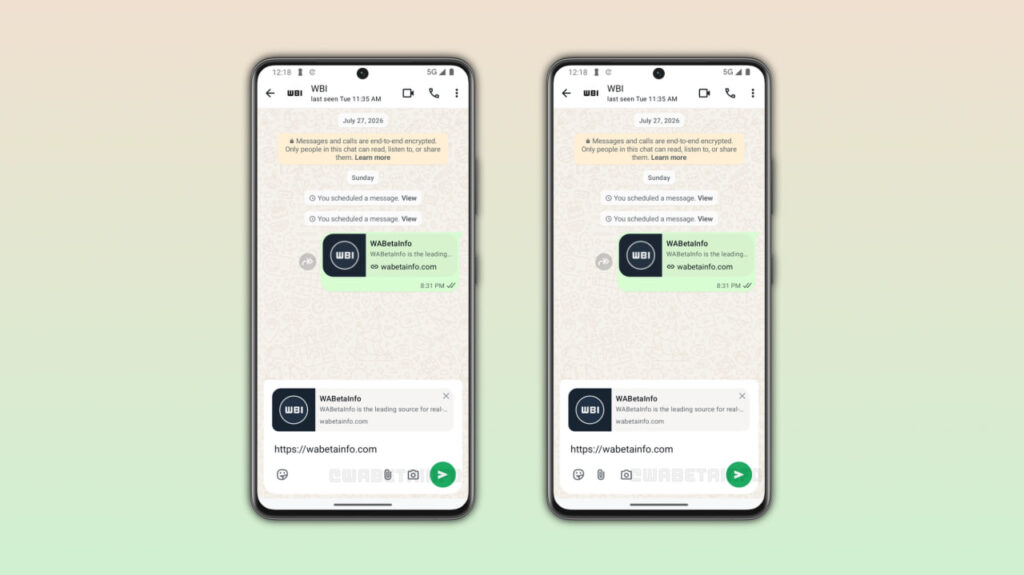
Image via WABetaInfo
In the second design, the emoji, attachment, and camera buttons will all appear on the left side. The send button will be placed alone on the right side, giving the chat bar a cleaner look.
Along with the chat bar, WhatsApp is also working on improving its bottom navigation bar. The company may replace the pill-shaped indicator that shows the selected tab with a circular one.
WhatsApp has not confirmed which chat bar design it will choose or when the new feature will be released. The company may make more changes before bringing it to Android users in a future update.
The new chat bar has been spotted in the WhatsApp beta for Android 2.26.41.11 update, available on the Google Play Store. However, the feature is still under development and is not yet available to beta testers.
WhatsApp is working on a new design for its bottom navigation bar on Android. The company is testing a change that will make the selected tab look different. Instead of the current pill-shaped indicator, WhatsApp plans to use a green circle to highlight the active tab.
Currently, WhatsApp uses a wide, rounded rectangle behind the icon of the selected tab. This shape helps users identify which section of the app they are using. In the new design, the rectangle will be replaced with a green circular indicator. This will give the selected tab a different and cleaner look.
The rest of the navigation bar will remain the same. It will have a floating design with rounded corners and icons without text labels. The new circular indicator also looks similar to the tab selection style used in WhatsApp for iOS.
The new design has been spotted in the WhatsApp beta for Android 2.26.41.7 update, available on the Google Play Store. However, the feature is still under development and is not available to all users.

Image via WABetaInfo
In earlier beta updates, the company introduced a floating navigation bar and later tested a version without text labels. Now, it is working on improving the look of the selected tab.
These changes show that WhatsApp is still testing the design before releasing it to users. The company may make more changes before the final version is ready.
WhatsApp has not announced when the new navigation bar will be released. The feature may become available to some users in a future update. Until then, Android users will have to wait for an official rollout.

WhatsApp has launched a new feature, Guest Calls. It allows people without a WhatsApp account to join voice and video calls using a link. Guests do not need to download the app or create an account. The feature is free and has no time limit.
To start a guest call, users need to open the Calls tab and tap the “+” icon to create a call link. They can share this link with friends, family members, or colleagues. Guests can open the link in their web browser, enter their name, and request to join the call.
The host must approve every guest before they can join. This helps prevent unknown people from entering a call without permission. The feature supports individual and group calls with up to 32 participants.

Image via WABetaInfo
Guests can use features such as screen sharing, emoji reactions, and raising their hands to speak. However, they cannot see other participants’ phone numbers, send messages, or invite other people to the call.
WhatsApp says guest calls support end-to-end encryption, which helps keep conversations private. The host can also remove a guest or end the call for everyone at any time.
The company is rolling out guest calls slowly to users with the latest version of WhatsApp. The feature may not be available to everyone yet. Users who cannot see the option will need to wait for it to arrive on their accounts in the coming weeks.
WhatsApp is finally fixing one of its most glaring feature gaps. After months of quiet development, WhatsApp is rolling out the ability for users to schedule messages through Android Beta version 2.26.40.7.
If you have ever relied on third-party workarounds or set calendar reminders just to send a late-night birthday wish without waking someone up, this update could make your life significantly easier, as discovered by WABetaInfo.
How message scheduling works and how to use it
Instead of tapping the send icon as you normally would after typing out a text or selecting a photo, holding down the send button triggers a new bottom sheet menu.
From there, you can pick a specific date and time for delivery.
WhatsApp allows you to queue up text messages, links, single photos, and individual videos anywhere between 10 minutes and two weeks in advance.
Crucially, delivery happens on WhatsApp’s servers, meaning your message fires off on schedule even if your phone happens to be powered off or completely disconnected from the network at that exact moment.
A dedicated section inside the chat info screen lets you review or delete pending items before they go out. Recipients will not see any tag indicating a message was scheduled, nor will they be notified if you decide to cancel one before delivery.
In group chats, messages are only delivered to members who were present at the moment of scheduling, avoiding awkward context issues if new members join later.
While the feature is currently limited to select beta users, a broader rollout across the stable channel should follow in the coming weeks.

-

 Updates2 days ago
October 2026 One UI 9 update arrives for Galaxy S24 Ultra
-
 Updates3 days ago
Got an Android update from January 2027? Samsung, Google hit by weird date-stamp glitch
-

 News2 days ago
Samsung One UI 9 reportedly increased battery drain on Galaxy S24 Ultra
-

 Deals3 days ago
Samsung Galaxy Z Fold 8 deal slashes price by $580