
Samsung
Samsung Galaxy Z Fold 8 (Wide): Complete phone specifications


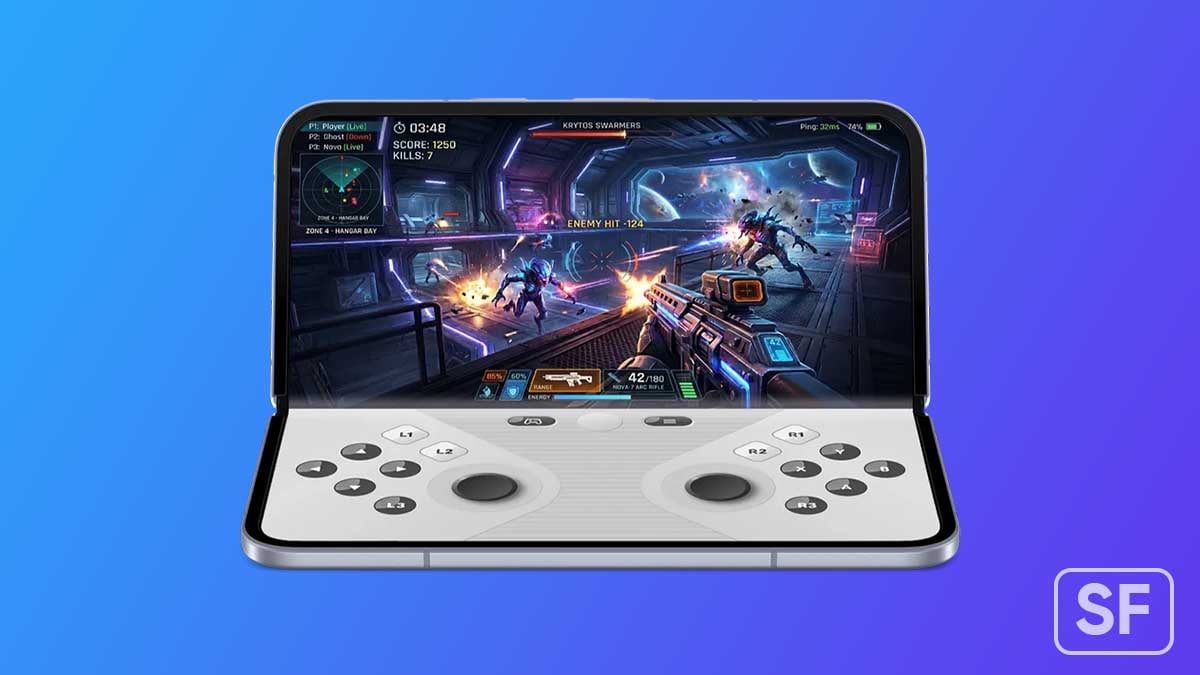
Samsung is expanding its foldable portfolio by adding a new model to the Galaxy Z Fold lineup. Samsung Galaxy Z Fold 8, featuring a wide-screen form factor, is coming this year, aimed to offer an incredible experience to users.
| Samsung Galaxy Z Fold 8 (Wide) – Rumored Specifications | |
| Processor | |
| CPU Speed | Snapdragon 8 Elite Gen 5 for Galaxy (all regions) |
| CPU Type | Octa-core (TSMC’s 3nm process) |
| Display | |
| Size (Main Display) | 7.6-inch (4:3 / 9:7 aspect ratio, landscape-first) |
| Resolution (Main Display) | TBC |
| Technology (Main Display) | Dynamic AMOLED 2X, HDR10+, up to 2,600 nits peak brightness |
| Colour Depth (Main Display) | 16M |
| Max Refresh Rate (Main Display) | 120 Hz |
| Panel Structure (Main Display) | UTG 3.0 (Ultra-Thin Glass) – significantly reduced crease visibility |
| Size (Cover Display) | 5.4-inch (16:10 aspect ratio) |
| Resolution (Sub Display) | TBC |
| Technology (Sub Display) | Dynamic AMOLED, up to 2,600 nits peak brightness |
| Colour Depth (Sub Display) | 16M |
| Max Refresh Rate (Sub Display) | 120 Hz |
| Camera | |
| Rear Camera – Resolution (Multiple) | 50 MP (wide) + 50 MP (ultrawide) |
| Rear Camera – F Number (Multiple) | TBC |
| Rear Camera – Auto Focus | Yes |
| Rear Camera – OIS | Yes |
| Rear Camera – Zoom | Digital Zoom only (no optical telephoto lens) |
| Rear Camera – AI Processing | Galaxy AI 3.0 – Enhanced Nightography, ProVisual Engine |
| Front Camera – Resolution | 10 MP |
| Front Camera – F Number | F2.2 |
| Front Camera – Auto Focus | No |
| Rear Camera – Flash | Yes |
| Video Recording Resolution | UHD 4K (3840 x 2160)@60fps |
| Slow Motion | 240fps @FHD, 120fps @FHD |
| Storage/Memory | |
| Memory (GB) | 12 / 16 |
| Storage (GB) | 256 / 512 |
| Available Storage (GB) | 223.8 (256GB variant, estimated) |
| Network/Bearer | |
| Number of SIM | Dual-SIM |
| SIM size | Nano-SIM (4FF), Embedded-SIM |
| SIM Slot Type | SIM 1 + eSIM / Dual eSIM |
| Infra | 2G GSM, 3G WCDMA, 4G LTE FDD, 4G LTE TDD, 5G Sub6 FDD, 5G Sub6 TDD |
| 2G GSM | GSM850, GSM900, DCS1800, PCS1900 |
| 3G UMTS | B1(2100), B2(1900), B4(AWS), B5(850), B8(900) |
| 4G FDD LTE | B1(2100), B2(1900), B3(1800), B4(AWS), B5(850), B7(2600), B8(900), B12(700), B13(700), B17(700), B18(800), B19(800), B20(800), B25(1900), B26(850), B28(700), B66(AWS-3) |
| 4G TDD LTE | B38(2600), B39(1900), B40(2300), B41(2500) |
| 5G* FDD Sub6 | N1(2100), N2(1900), N3(1800), N5(850), N7(2600), N8(900), N12(700), N20(800), N25(1900), N26(850), N28(700), N66(AWS-3), N71(600) |
| 5G* TDD Sub6 | N38(2600), N40(2300), N41(2500), N77(3700), N78(3500) |
| Connectivity | |
| USB Interface | USB Type-C |
| USB Version | USB 3.2 Gen 1 |
| Location Technology | GPS, Glonass, Beidou, Galileo, QZSS |
| Earjack | USB Type-C |
| MHL | No |
| Wi-Fi | 802.11a/b/g/n/ac/ax/be 2.4GHz+5GHz+6GHz, EHT320, MIMO, 4096-QAM |
| Wi-Fi Direct | Yes |
| Bluetooth Version | Bluetooth v6.0 |
| NFC | Yes |
| OS | |
| Android | Android 17, One UI 9 |
| General Information | |
| Form Factor | Fold (wide/landscape-first book-style) |
| Sensors | Accelerometer, Barometer, Fingerprint Sensor, Gyro Sensor, Geomagnetic Sensor, Hall Sensor, Light Sensor, Proximity Sensor |
| Physical specification | |
| Dimension (HxWxD, mm) | 161.4 x 123.9 x 4.9 mm |
| Dimension when folded (HxWxD, mm) | 123.9 x 82.2 x 9.8 mm |
| Weight (g) | ~201 |
| Frame Material | Armour Aluminium 2 |
| Inner Glass | UTG 3.0 (Ultra-Thin Glass) |
| Water Resistance | IPX8 |
| Hinge Rating | 500,000 folds |
| Battery | |
| Battery Capacity (mAh, Typical) | 4800 |
| Wired Charging | 45W |
| Wireless Charging | 25W Qi2-ready |
| Video Playback Time (Hours, Wireless) | Better than Fold 7 |
| Removable | No |
| Audio and Video | |
| Stereo Support | Yes |
| Video Playing Format | MP4, M4V, 3GP, 3G2, AVI, FLV, MKV, WEBM |
| Video Playing Resolution | UHD 8K (7680 x 4320)@60fps |
| Audio Playing Format | MP3, M4A, 3GA, AAC, OGG, OGA, WAV, AMR, AWB, FLAC, MID, MIDI, XMF, MXMF, IMY, RTTTL, RTX, OTA, DFF, DSF, APE |
| Services and Applications | |
| Gear Support | Galaxy Ring, Galaxy Buds Core, Galaxy Buds3 Pro, Galaxy Buds2 Pro, Galaxy Buds Pro, Galaxy Buds Live, Galaxy Buds+, Galaxy Buds3, Galaxy Buds2, Galaxy Buds, Galaxy Buds FE, Galaxy Fit3, Galaxy Fit2, Galaxy Fit e, Galaxy Fit, Galaxy Watch FE, Galaxy Watch Ultra 2, Galaxy Watch Ultra, Galaxy Watch9, Galaxy Watch8, Galaxy Watch7, Galaxy Watch6, Galaxy Watch5, Galaxy Watch4, Galaxy Watch3, Galaxy Watch, Galaxy Watch Active2, Galaxy Watch Active |
| Samsung DeX Support | Yes |
| Bluetooth Hearing Aid Support | Android Audio Streaming for Hearing Aid (ASHA) |
| SmartThings Support | Yes |
| Mobile TV | No |
| Software Support | |
| Security Update Period (Valid until) | July 2033 |



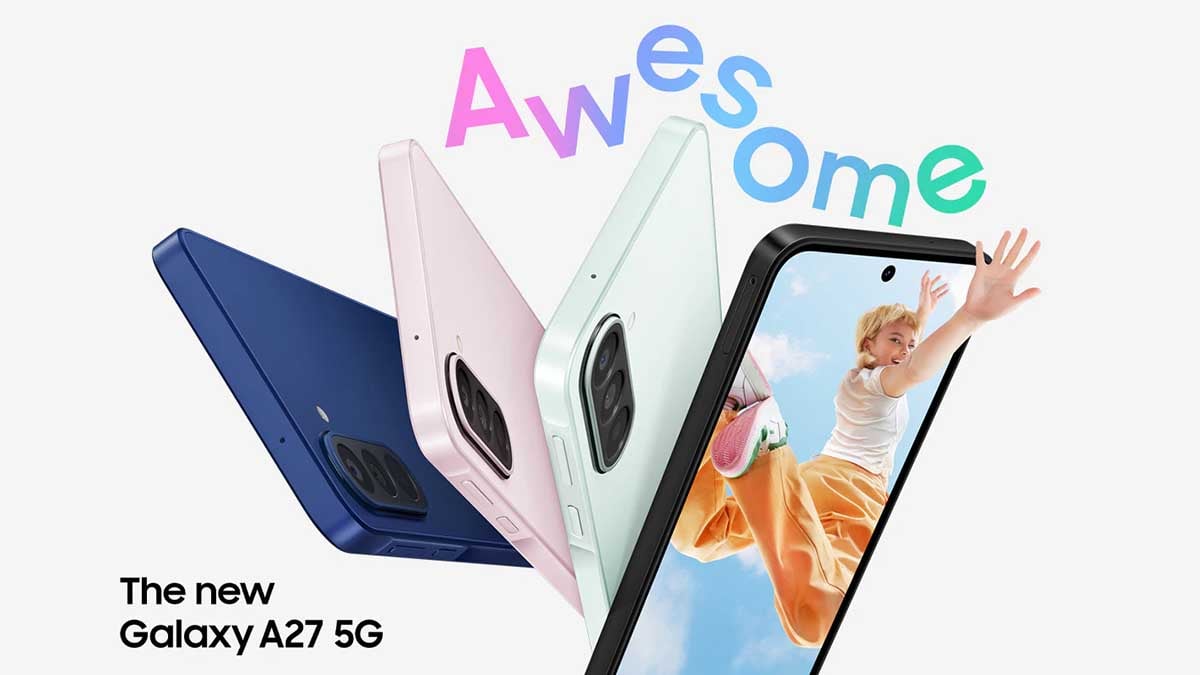
This June, Samsung once again expanded its affordable 5G smartphone lineup with the Galaxy A27 5G, bringing a One UI 8.5 preinstalled, refreshed design, and several meaningful upgrades over last year’s Galaxy A26 5G.
Samsung has replaced the Galaxy A26’s older U-shaped notch design with a modern punch-hole display on the Galaxy A27. This gives the phone a cleaner front look and makes it feel closer to the premium Galaxy lineup.
The Galaxy A27 5G comes with a 6.7-inch Super AMOLED display featuring FHD+ resolution and a 120Hz refresh rate. While the core display experience remains familiar, the new punch-hole design makes the device look more premium.
Samsung has equipped the Galaxy A27 5G with a Snapdragon 6 Gen 3 processor paired with 8GB RAM and 256GB storage. The phone also supports microSD expansion up to 2TB, giving buyers more flexibility for apps, photos, and videos.
Galaxy A27 brings five major upgrades over Galaxy A26
The punch-hole display, front camera OIS, DeX support and extended security updates make it a more refined upgrade over the Galaxy A26 for users looking for a budget-friendly phone.
1. Punch-hole display replaces the old notch
The Galaxy A27 moves to a punch-hole display, replacing the Galaxy A26’s U-shaped notch.
2. Improved camera setup
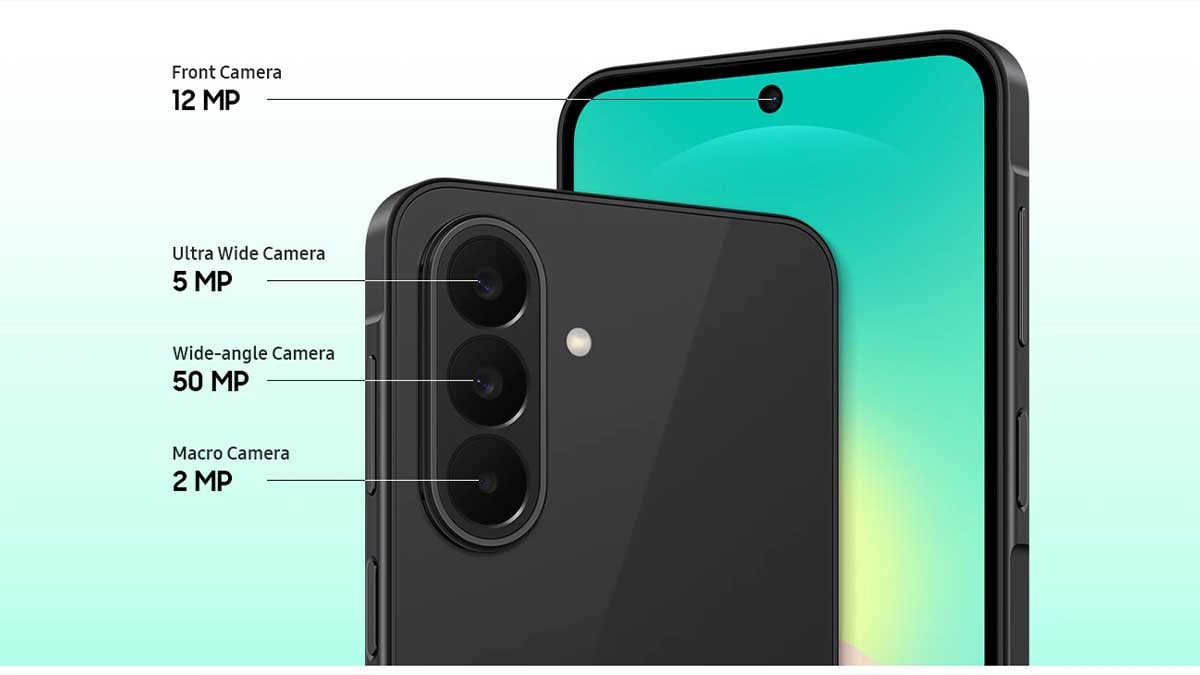
Compared to the Galaxy A26, the ultra-wide camera resolution drops from 8MP to 5MP, while the dedicated macro sensor has been replaced by a depth sensor.
3. Front camera gains Optical Image Stabilization
The Galaxy A27 features a 12MP front camera compared to the Galaxy A26’s 13MP selfie camera. While the resolution is slightly lower, Samsung has added OIS support.
4. Samsung DeX support arrives on the A-series
Samsung has added DeX support to the Galaxy A27, allowing users to access a more desktop-like experience with compatible displays and accessories.
5. Perplexity with Bixby
Samsung officially announced Galaxy A27 supports Perplexity with Bixby. This joins the existing support for Google’s Gemini AI assistant.
6. Longer software support
The Galaxy A27 comes with security updates promised until July 2032, extending its usable lifespan.
The Galaxy A27 5G is not a major hardware overhaul, but Samsung has focused on the areas buyers notice most: design, software longevity, and useful features.
Clear voice calls remain one of the biggest challenges for true wireless earbuds. The problem is simple: an earbud microphone sits much farther away from the user’s mouth than a smartphone microphone, creating a difficult engineering battle between human speech and surrounding noise. Samsung’s Galaxy Buds 4 Pro takes a different approach with AI and Sensor Fusion tech for clear calls.
Instead of relying on a single microphone system to fight noise, Samsung rebuilt the voice capture pipeline around Sensor Fusion technology, combining multiple hardware inputs with an AI-powered processing system designed specifically for a compact wearable form factor.
Galaxy Buds 4 Pro uses multiple sensors to rebuild your voice
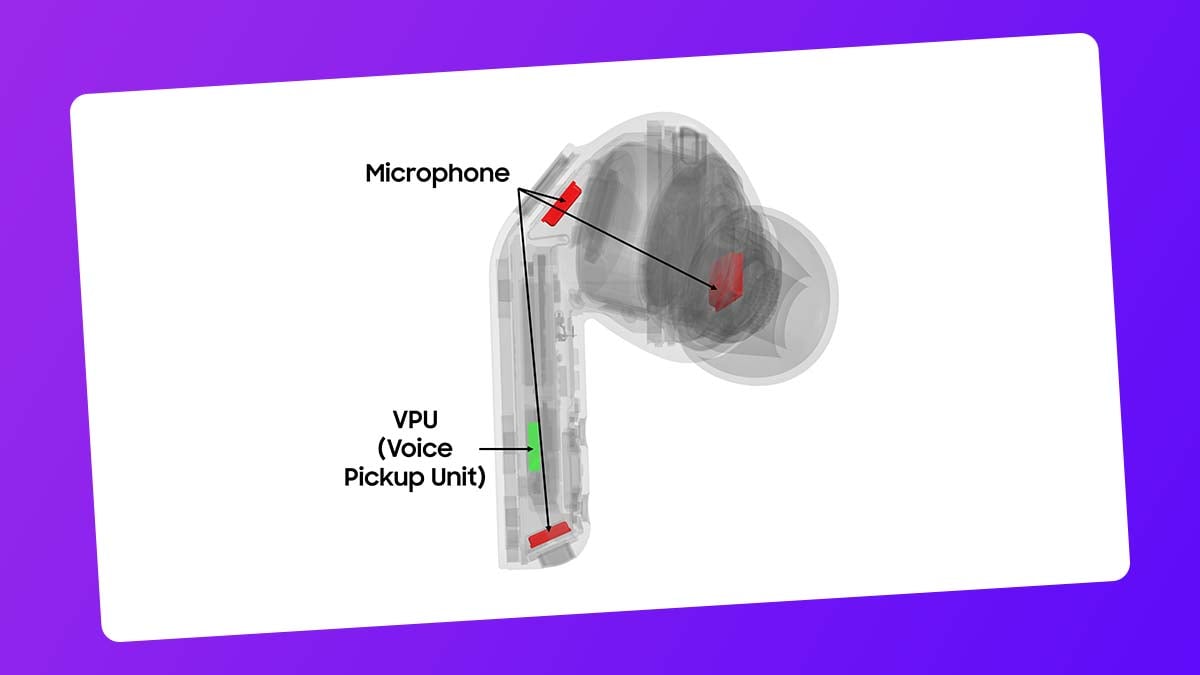
The foundation of Sensor Fusion is the combination of three microphones and a Bone Conduction-based Voice Pickup Unit (VPU). Two external mics capture the user’s voice from the surrounding environment, while the internal mic analyzes speech signals inside the ear.
The VPU adds another layer by detecting physical vibrations generated when a person speaks. This allows Galaxy Buds 4 Pro to understand voice characteristics beyond traditional audio capture, giving the system additional data to separate speech from unwanted background sounds.
This hardware synergy helps the earbuds reconstruct the user’s voice with greater accuracy, even in challenging conditions like crowded streets, busy cafes, or noisy transportation environments.
Samsung shrunk AI processing for a tiny earbud
Behind this capability is a Deep Neural Network (DNN), an AI model designed to identify and separate human speech from environmental noise. The challenge was bringing this level of computation into a device small enough to fit inside an earbud.
Samsung optimized the entire AI architecture for on-device processing, reducing the required computational workload to around 10% of the original demand. The model size was also reduced to roughly 30 percent.
Protecting voice detail
Galaxy Buds 4 Pro’s upgraded algorithm analyzes past, current, and predicted sound data to adapt instantly. Samsung says the system captures 16 times more vocal detail compared with previous generations.
Normal movements can create small gaps that allow external noise to enter. By comparing signals from internal and external microphones, Galaxy Buds 4 Pro detects these “fit leakages” and adjusts audio processing in real time.
Galaxy Buds4 Pro’s Sensor Fusion system shows how Samsung is addressing the core limitation of wireless earbuds, using smarter hardware coordination and optimized AI processing rather than simply adding more microphones.

Phone makers are pretty much attracted to Samsung’s Privacy Display tech used in the Galaxy S26 Ultra. They intend to source the technology from Samsung Display, but the company isn’t rushing to expand the FMP panels.
Privacy Display is not just another software trick or a cheap privacy filter slapped onto the screen. It is built into the hardware itself, giving users a way to block unwanted side glances without changing the phone’s design.
Samsung doesn’t want Privacy Display rivals anytime soon
The idea has caught the attention of the wider industry. Smartphone, tablet, and laptop makers are already looking at Samsung Display’s privacy panel. Yet Samsung is not moving quickly to supply this technology to rivals.
The company appears ready to take its time, with rivals not expected to receive these panels until around late 2028. That delay suggests Samsung sees the first generation as a foundation rather than a finished product.
Samsung’s Privacy Display works at a hardware level, narrowing viewing angles so people beside you cannot easily see what is on the screen. Samsung also added two privacy intensity modes and a notification-only option, making it more flexible.
A built-in privacy layer could be useful for business users, commuters, travelers, and anyone handling personal info in crowded places. Rivals are circling because this solves a real problem without forcing users to install bulky accessories.
Meanwhile, turning privacy protection up to its highest level affects the premium display experience. Color accuracy takes a hit, brightness drops, and sharpness is reduced, which is a real letdown in the first-generation.
Waiting until 2028 could mean getting access to a more polished second-generation panel with fewer compromises. Privacy is valuable, but customers buying high-end devices still expect the best possible screen quality.


Samsung just launched the UFS 5.0 storage solution, which is expected to debut with the Galaxy S27 smartphones next year. The new memory chip offers several upgrades over the UFS 4.1, potentially elevating the S27 experience.
Galaxy S26 Ultra features a UFS 4.1 solution, which is mighty enough. Next year’s flagships would go even further with UFS 5.0 memory paired with LPDDR6 DRAM. On-device AI will land on a whole new level, thanks to these core upgrades.
5 ways UFS 5.0 could improve the Galaxy S27 experience
UFS 5.0 unlocks several key improvements, including faster data speeds, improved efficiency, and a smaller design. With read speeds of up to 10.8GB/s and write speeds reaching 9.5GB/s, it delivers over twice the performance of UFS 4.1.
The new memory standard also reduces power consumption by more than 40%, helping devices manage workloads more efficiently. Its compact 7.5mm x 13mm x 0.9mm package allows more design flexibility.
Additionally, support for capacities up to 1TB makes it suitable for future smartphones, wearables, and other connected devices. Other options could include 256GB and 512GB, paired with next-gen DRAM semiconductor.
Samsung is placing a lot of emphasis on Agentic AI on Galaxy flagships. Galaxy S26 series marked the start, and the Agentic AI would expand further next year. That said, the UFS upgrade in the Galaxy S27 series will improve that aspect.
Software optimization is another way to improve the experience. Samsung’s One UI 9.5 optimization with Galaxy S27’s LPDDR6 and UFS 5.0 hardware would bring practical enhancements to the UX.
Samsung hasn’t officially confirmed UFS 5.0 for the Galaxy S27 series. However, the timeline of mass production aligns with the next-gen flagships. 2027 would witness the official debut of new premium phones with modern hardware.

Samsung’s One UI 9.0 Beta is already running on the Galaxy S26, and most of the coverage has gone to the creative tools and accessibility changes. The security upgrades have been quieter, but they’re worth understanding.
New security features of One UI 9 are inspired by Android 17. Google has long been focused on security and privacy aspects, and version 17 is no exception. One UI 9 has three big improvements for security.
One UI 9.0 on Galaxy S26 enhances security
Android 17’s contacts picker limits what data apps can see in the first place. Auto Blocker’s high-risk detection stops dangerous apps from running even after they’ve landed on the device.
The Security Report gives you visibility over what’s been blocked. Maximum Restrictions closes the physical attack surface for users who need that level of control.
Proactive high-risk app detection
Previous versions of Auto Blocker were largely preventive; they stopped you from installing apps from unauthorized sources. In One UI 9, the Auto Blocker can detect a high-risk app that’s already on your device and stop it from running.
When something trips the detection, you get a warning, the app is blocked from executing or installing further components, and the system recommends deletion.
A companion feature called Manage Unknown Apps handles the discovery side of this. It gathers every app installed from outside the Play Store or Galaxy Store into one place.

Auto Blocker’s new Security Report
Auto Blocker has been part of One UI since version 6, but it’s always worked silently. However, Samsung’s new One UI 9 changes that with a Security Report section inside Auto Blocker.
It logs every time the system blocks an app from an unknown source. The last seven days show up as a list; switch to the Month tab, and you get a graph. It’s a small UX addition, but it makes the feature visible in a way it never has been before.
Full USB connection blocking
Auto Blocker’s Maximum Restrictions mode is the strictest setting. In One UI 8.5, that mode blocked USB commands but left the physical connection open. In One UI 9, Maximum Restrictions cuts off the USB connection entirely.
This prevents unexpected attacks where a compromised public charging port attempts to push data or software to your phone, and physical data-extraction attempts that work at the hardware level rather than through software.
Well, it’s an opt-in mode, not a default.
-
 Updates2 days ago
Samsung June 2026 security enhancements now available on Galaxy S23, S24, S25, S26 and foldables
-
 One UI3 days ago
Samsung is testing One UI 9.0 (Android 17) for these 22 Galaxy devices
-
 Phones2 days ago
Samsung Galaxy Z Fold 8 release date allegedly revealed; Flip 8 to get Snapdragon chip in the US
-
Samsung1 day ago
Samsung Galaxy A27 has DeX, Perplexity, and 5 big features