
Samsung
Samsung Galaxy Z Flip 8: Complete phone specifications


Samsung will launch its next clamshell-style foldable phone, the Galaxy Z Flip 8, at its Summer Unpacked next month. Leaks and rumors suggest the device would bring modest upgrades over the Galaxy Z Flip 7, and could be the last Flip phone from Samsung.
| Samsung Galaxy Z Flip 8 – Rumored Specifications | |
| Processor | |
| CPU Speed | Exynos 2600 (Europe/Korea) / Snapdragon 8 Elite Gen 5 for Galaxy (other regions) |
| CPU Type | Deca-Core (Samsung’s 2nm node) / Octa-core (TSMC’s 3nm process) |
| Display | |
| Size (Main Display) | 6.9-inch |
| Resolution (Main Display) | 2520 x 1080 (FHD+) |
| Technology (Main Display) | Dynamic AMOLED 2X, HDR10+, up to 2,600 nits peak brightness |
| Colour Depth (Main Display) | 16M |
| Max Refresh Rate (Main Display) | 120 Hz |
| Panel Structure (Main Display) | UTG 3.0 (Ultra-Thin Glass) – reduced crease visibility |
| Size (Cover Display) | 4.1-inch FlexWindow |
| Resolution (Sub Display) | 1048 x 948 |
| Technology (Sub Display) | Dynamic AMOLED, up to 2,600 nits peak brightness |
| Colour Depth (Sub Display) | 16M |
| Max Refresh Rate (Sub Display) | 120 Hz |
| Camera | |
| Rear Camera – Resolution (Multiple) | 50 MP + 12 MP |
| Rear Camera – F Number (Multiple) | F1.8, F2.2 |
| Rear Camera – Auto Focus | Yes |
| Rear Camera – OIS | Yes |
| Rear Camera – Zoom | Optical quality Zoom 2x (Enabled by Adaptive Pixel sensor), Digital Zoom up to 10x |
| Rear Camera – AI Processing | Galaxy AI 3.0 – Enhanced Nightography, ProVisual Engine |
| Front Camera – Resolution | 10.0 MP |
| Front Camera – F Number | F2.2 |
| Front Camera – Auto Focus | No |
| Rear Camera – Flash | Yes |
| Video Recording Resolution | UHD 4K (3840 x 2160)@60fps |
| Slow Motion | 240fps @FHD, 120fps @FHD |
| Storage/Memory | |
| Memory (GB) | 12 |
| Storage (GB) | 256 / 512 |
| Available Storage (GB) | 223.8 (256GB variant) |
| Network/Bearer | |
| Number of SIM | Dual-SIM |
| SIM size | Nano-SIM (4FF), Embedded-SIM |
| SIM Slot Type | SIM 1 + eSIM / Dual eSIM |
| Infra | 2G GSM, 3G WCDMA, 4G LTE FDD, 4G LTE TDD, 5G Sub6 FDD, 5G Sub6 TDD |
| 2G GSM | GSM850, GSM900, DCS1800, PCS1900 |
| 3G UMTS | B1(2100), B2(1900), B4(AWS), B5(850), B8(900) |
| 4G FDD LTE | B1(2100), B2(1900), B3(1800), B4(AWS), B5(850), B7(2600), B8(900), B12(700), B13(700), B17(700), B18(800), B19(800), B20(800), B25(1900), B26(850), B28(700), B66(AWS-3) |
| 4G TDD LTE | B38(2600), B39(1900), B40(2300), B41(2500) |
| 5G* FDD Sub6 | N1(2100), N2(1900), N3(1800), N5(850), N7(2600), N8(900), N12(700), N20(800), N25(1900), N26(850), N28(700), N66(AWS-3), N71(600) |
| 5G* TDD Sub6 | N38(2600), N40(2300), N41(2500), N77(3700), N78(3500) |
| Connectivity | |
| USB Interface | USB Type-C |
| USB Version | USB 3.2 Gen 1 |
| Location Technology | GPS, Glonass, Beidou, Galileo, QZSS |
| Earjack | USB Type-C |
| MHL | No |
| Wi-Fi | 802.11a/b/g/n/ac/ax/be 2.4GHz+5GHz+6GHz, EHT320, MIMO, 4096-QAM |
| Wi-Fi Direct | Yes |
| Bluetooth Version | Bluetooth v6.0 |
| NFC | Yes |
| OS | |
| Android | Android 16, One UI 8 |
| General Information | |
| Form Factor | Flip |
| Sensors | Accelerometer, Barometer, Fingerprint Sensor, Gyro Sensor, Geomagnetic Sensor, Hall Sensor, Light Sensor, Proximity Sensor |
| Physical specification | |
| Dimension (HxWxD, mm) | 166.8 x 75.4 x 6.6 mm |
| Dimension when folded (HxWxD, mm) | ~85.4 x 75.4 x 13.2 mm |
| Weight (g) | ~180 |
| Frame Material | Armour Aluminium 2 |
| Inner Glass | UTG 3.0 (Ultra-Thin Glass) |
| Water Resistance | IPX8 |
| Hinge Rating | 500,000 folds |
| Battery | |
| Battery Capacity (mAh, Typical) | 4300 |
| Wired Charging | 25W |
| Wireless Charging | 15W Qi2-ready |
| Video Playback Time (Hours, Wireless) | Better than Flip 7 |
| Removable | No |
| Audio and Video | |
| Stereo Support | Yes |
| Video Playing Format | MP4, M4V, 3GP, 3G2, AVI, FLV, MKV, WEBM |
| Video Playing Resolution | UHD 8K (7680 x 4320)@60fps |
| Audio Playing Format | MP3, M4A, 3GA, AAC, OGG, OGA, WAV, AMR, AWB, FLAC, MID, MIDI, XMF, MXMF, IMY, RTTTL, RTX, OTA, DFF, DSF, APE |
| Services and Applications | |
| Gear Support | Galaxy Ring, Galaxy Buds Core, Galaxy Buds3 Pro, Galaxy Buds2 Pro, Galaxy Buds Pro, Galaxy Buds Live, Galaxy Buds+, Galaxy Buds3, Galaxy Buds2, Galaxy Buds, Galaxy Buds FE, Galaxy Fit3, Galaxy Fit2, Galaxy Fit e, Galaxy Fit, Galaxy Watch FE, Galaxy Watch Ultra 2, Galaxy Watch Ultra, Galaxy Watch9, Galaxy Watch8, Galaxy Watch7, Galaxy Watch6, Galaxy Watch5, Galaxy Watch4, Galaxy Watch3, Galaxy Watch, Galaxy Watch Active2, Galaxy Watch Active |
| Samsung DeX Support | Yes |
| Bluetooth Hearing Aid Support | Android Audio Streaming for Hearing Aid (ASHA) |
| SmartThings Support | Yes |
| Mobile TV | No |
| Software Support | |
| Security Update Period (Valid until) | July 2033 |


Your Samsung phone gets new One UI updates, Play system updates, and app updates. After installing the latest versions of the three, you might think everything is up to date. You might be wrong, as Google has three new updates for every Samsung phone that elevate the user experience behind the scenes.
Google is rolling out three updates, Android System SafetyCore, Android System WebView, and Google Play Services, to every Samsung phone. The availability of these updates may vary by region or carrier, but their arrival is certain.
System SafetyCore, System WebView, and Play Services are getting updated. You need to install them manually as they could stay outdated until your Samsung Galaxy smartphone receives a new One UI update.
Here are the latest versions:
- Android System SafetyCore (version 1.0.925574157)
- Android System WebView (version 149.0.7827.91)
- Google Play Services (version 26.22.33)
Patch/release notes are not available for these apps for now. Google may specify changes in a different way or medium, but the rollout is underway. You should install the latest versions to ensure the optimal state on your device.
Avoiding crucial updates may end up risking your phone with vulnerabilities, bugs, performance issues, and security problems. That said, ensuring their timely update should be your routine task after every One UI release.
Google’s System SafetyCore and WebView functions back various functionalities on Android. Certain features rely on these core apps, which you may think never existed, given their indirect backing rather than visibility.
How to update
The method to update these apps is something different and tricky. To do so, open your phone’s Settings, then Apps, and search for the apps by their names.
The searched app will be listed there, and you need to expand the page. Now, tap “App details in store” to get redirected to their listing page on Google Play Store, where you need to tap Update key.

Samsung phased out the Galaxy S22 series (and some others) from a major software update rollout, and we hope the Galaxy S23 series won’t meet the same fate in 2027.
Galaxy S22, S22+, and S22 Ultra aren’t getting the One UI 8.5 update, and they will spend their remaining life on One UI 8.0. Both versions are based on Android 16, but the difference in QPR versions is the primary culprit.
Well, Samsung has provided One UI 8.5 to a $200 smartphone as well, so it doesn’t mean that one is better than the Galaxy S22 flagships in 2026.
Samsung Galaxy S23 shouldn’t be the next S22 in 2027
Samsung has already disappointed millions of users of the Galaxy S22 series. One UI 8.5 upgrade is bigger than the One UI 8.0, which would have elevated the user experience in multiple ways, not limited to the user interface.
The Galaxy S23 series is eligible for the Android 17-based One UI 9.0 upgrade. The Beta Program of this software is already live in 6 countries. Design-wise, the software has no major upgrades as the focus is on overall refinements.
The company is reportedly testing One UI 9 for Galaxy S23 series internally. A previous leak suggested that the Galaxy S27 series will launch with One UI 9.5. That said, the next x.5 software is slated for launch in 2027 as well.
Samsung may continue its strategy of basing One UI on Android QPR versions. If the 2026 method is retained in 2027, the One UI 9.0 will ship with Android 17 QPR1 atop, while One UI 9.5 could be based on the QPR2 version.
Like the S22 series become ineligible for the last One UI upgrade, Samsung shouldn’t do it for the S23 series in 2027. The 2023 flagships have an even larger consumer base than the 2022 models, and it will also be extremely upsetting.
Your Samsung phone has two great features to safeguard your data and privacy under the Theft Protection section. This intelligent feature kit provides a necessary shield to your Galaxy phone in case it gets stolen while you use it.
Think you are roaming outside and using your phone for surfing or attending an important phone call. You suddenly come to know that someone snatched your device from your hands, leaving you shocked at the moment.
Smartphones are no longer just communication devices. They have become a crucial part of our lives as they store credentials, digital keys, banking apps, and digital identity. Losing the phone means you are losing almost everything you digitized.
Samsung phones have a Theft Detection feature, but it must be enabled manually. When enabled, it ensures your phone locks itself if a possible theft is detected. It has been designed brilliantly and works the way it should.
Smartphone theft can happen unexpectedly, but taking a few minutes to enable Theft Protection can help safeguard your data and privacy.
The suite of these intelligent security tools can automatically lock your Samsung smartphone when theft is detected, lock a phone when it goes offline for an extended period, and even allow users to remotely lock their device.
Technically, Theft Detection Lock can identify motion patterns commonly associated with theft, such as a device being suddenly snatched away from a user. If suspicious activity is detected, the smartphone screen automatically locks.
Here’s a step-by-step guide to enable the Theft Detection feature:
Step 1: Open Settings and tap Security and privacy
Step 2: Tap Lost device protection
Step 3: Select Theft protection
Step 4: Tap Theft Detection Lock
Step 5: Tap Turn on
Step 6: Tap Offline Device Lock
Step 7: Tap Turn on
Step 8: Tap Remote Lock and select Use Remote Lock to enable the feature


Samsung’s System LSI division just delivered its best-ever first-quarter revenue. Sounds like great news, right? But there’s a catch – the company still expects to end the full year with losses in this part of its chip business.
President Park Yong-in recently talked about the challenges. He said Samsung needs bigger structural changes because demand is soft in several key areas. Even with strong memory (HBM) chip sales, thanks to AI demand, the non-memory side (foundry and System LSI) continues to struggle.
“We achieved the highest level of sales in the first quarter of this year” Park said at the briefing. Park said, “The System-on-Chip (SoC) business is difficult to convert into a surplus in the short term, but we will strive to improve the business body and improve profitability.” “We will create an environment where structural problems can be solved by management and members can focus on technology.”
The one chance? Development of the next flagship Exynos 2700 processor is moving along steadily. Samsung is expected to use it in the next Galaxy S-series phones.
Samsung is clearly treating its foundry business (making chips for other companies) and System LSI (mobile processors and more) as key parts for the entire company.
What’s the real issue? The mobile SoC market is super competitive, and AI demand has not helped every segment the same way. While memory chips are printing money, fixing the logic and foundry side will take serious time and effort.
For long-term success, Samsung is trying to balance its memory and non-memory chip businesses. Investors are watching closely to see if these changes start delivering real results soon.
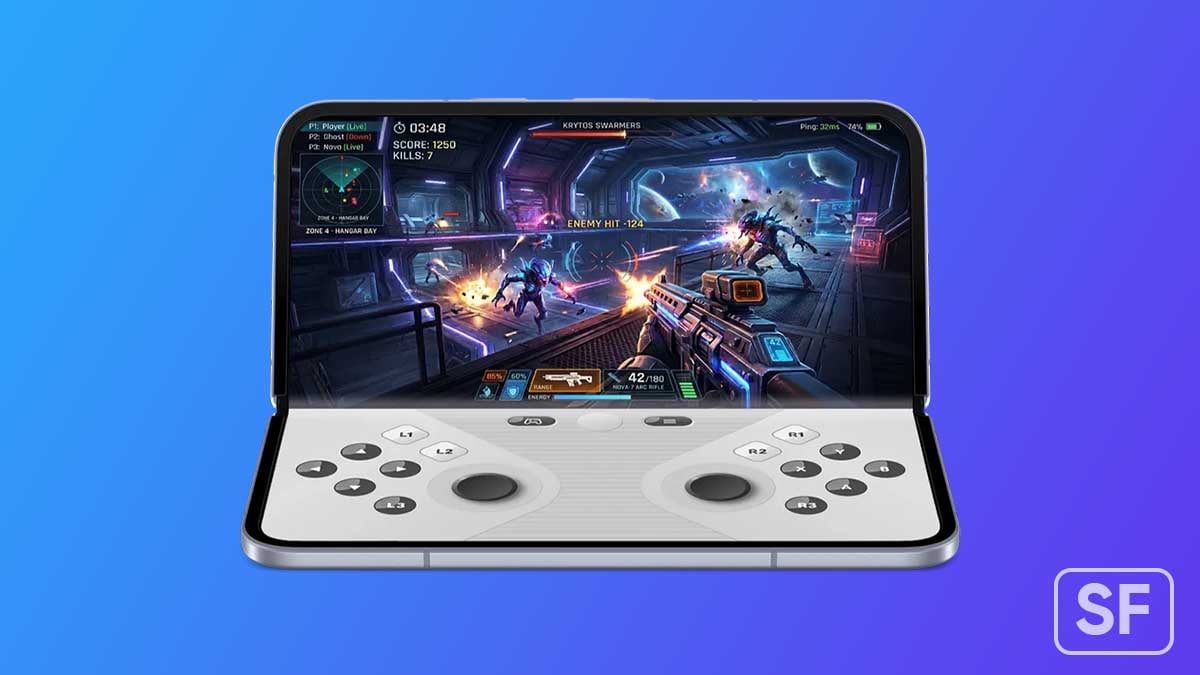
Samsung’s Galaxy Z Fold 8 is still weeks away from its official unveiling, but the Android 17 release handed us a feature demo. The new OS went live on Pixel devices yesterday, and a significant chunk of what it does is built specifically for foldables.
Since the Galaxy Z Flip 8, Galaxy Z Fold 8, and Galaxy Z Fold 8 Ultra launch with One UI 9 on top of Android 17, what you’re seeing on Pixel right now is a preview of what’s landing on Samsung’s most premium device next month.
Foldable Gaming Mode
Google built a dedicated gaming mode into Android 17 for foldables. It splits the inner display 50/50 game on the top half, with virtual gamepad controls on the bottom.
The gaming mode isn’t fully live yet, even on Pixel. Google confirmed it’s arriving via OTA in the coming months. Given the Fold 8 launches in late July, Samsung has time to ship One UI 9 with this already in place. Timing works in their favour.
Multitasking bubbles
The biggest new thing in Android 17 is Bubbles, a system-wide floating window mode. Long-press any app icon, and it opens as a resizable overlay on top of whatever you’re already doing.
Google says it’s useful for keeping maps, notes, or a sports score up while you work in another app. Combined with the inner display real estate on the Fold 8, Bubbles turns the phone into something that starts closing the gap with a desktop setup.
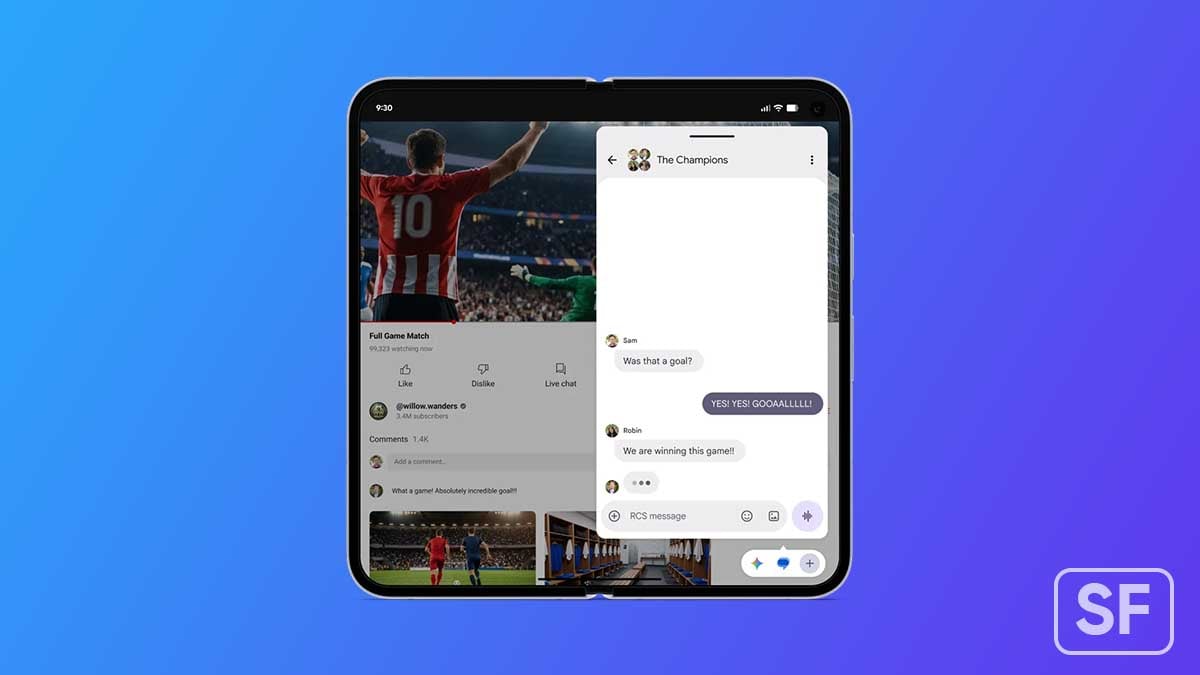
The Galaxy Z Fold 8 is widely expected on July 22 at Unpacked in London, shipping out of the box with One UI 9 on Android 17. Samsung has confirmed that the stable One UI 9 release on new foldables will include advanced AI features.
Hardware upgrades on the Fold 8 are substantial: a 200MP main sensor, 5,000mAh battery, 45W charging, and Snapdragon 8 Elite Gen 5. The software story is just as important this cycle, and Android 17 makes a real case for it.
Everything Google showed off on Pixel yesterday is what Samsung could be selling next month.
-
 One UI2 days ago
Samsung is testing One UI 9.0 (Android 17) for these 21 Galaxy devices
-
 Updates2 days ago
Samsung phones get 27 improvements with June 2026 Google Play system update
-
Samsung2 days ago
3 Google updates quietly improving every Samsung phone
-
One UI2 days ago
Samsung Galaxy S23 shouldn’t be the next Galaxy S22 in 2027