
Android
Official Android 17 is here: 7 new features coming to your phone


Google officially released the Android 17 update with 7 notable features. Compatible Pixel phones are starting to receive updates on June 16, 2026. Android vendors, including Samsung, will distribute the update to eligible devices throughout the year.
It’s a broad drop covering multitasking, gaming, security, and a handful of small quality-of-life fixes that add up fast.
Android 17 introduces 7 new features
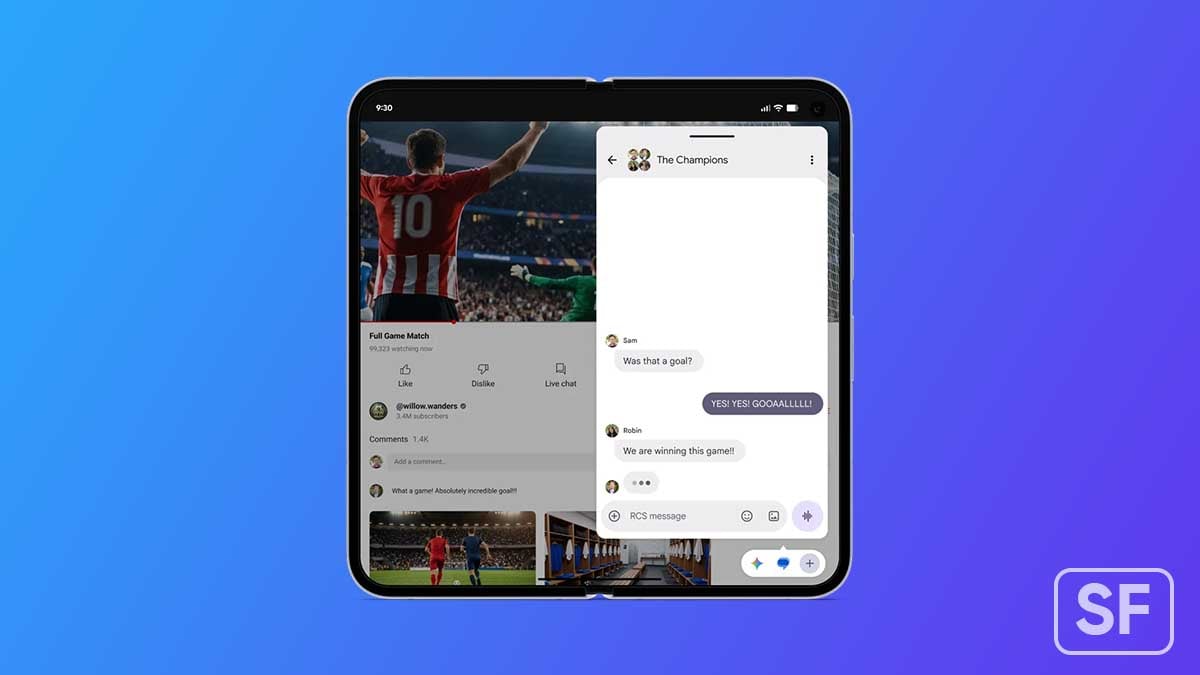
Bubbles for better multitasking
Turn apps into floating windows, with improved support for large-screen devices and a dedicated bubble bar.
Screen Reactions for easier sharing
Record your screen and selfie camera together, allowing reactions and commentary without switching apps.

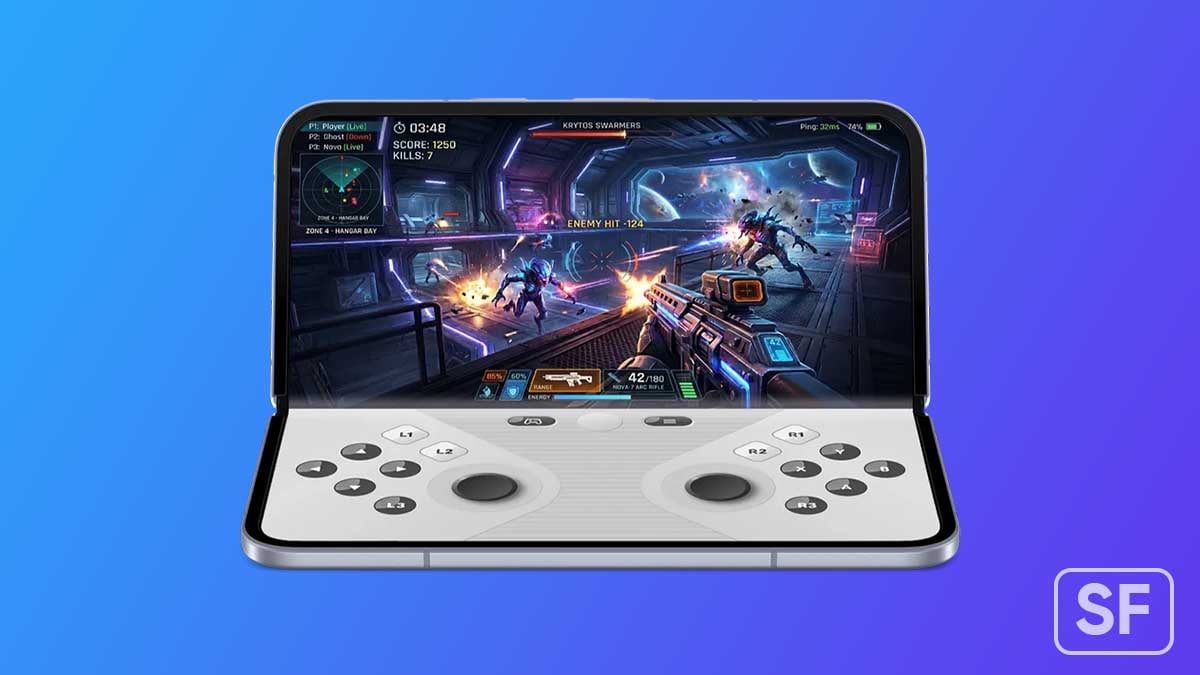
Foldable gaming mode
Optimizes foldable phones with a 50/50 layout, placing the game view on top and controls below.
Improved gaming performance
Reduces frame drops and stutters through better memory cleanup during high-end gaming.
More advanced privacy and security controls
Includes temporary precise location access, selective contact sharing, and stronger app protections.
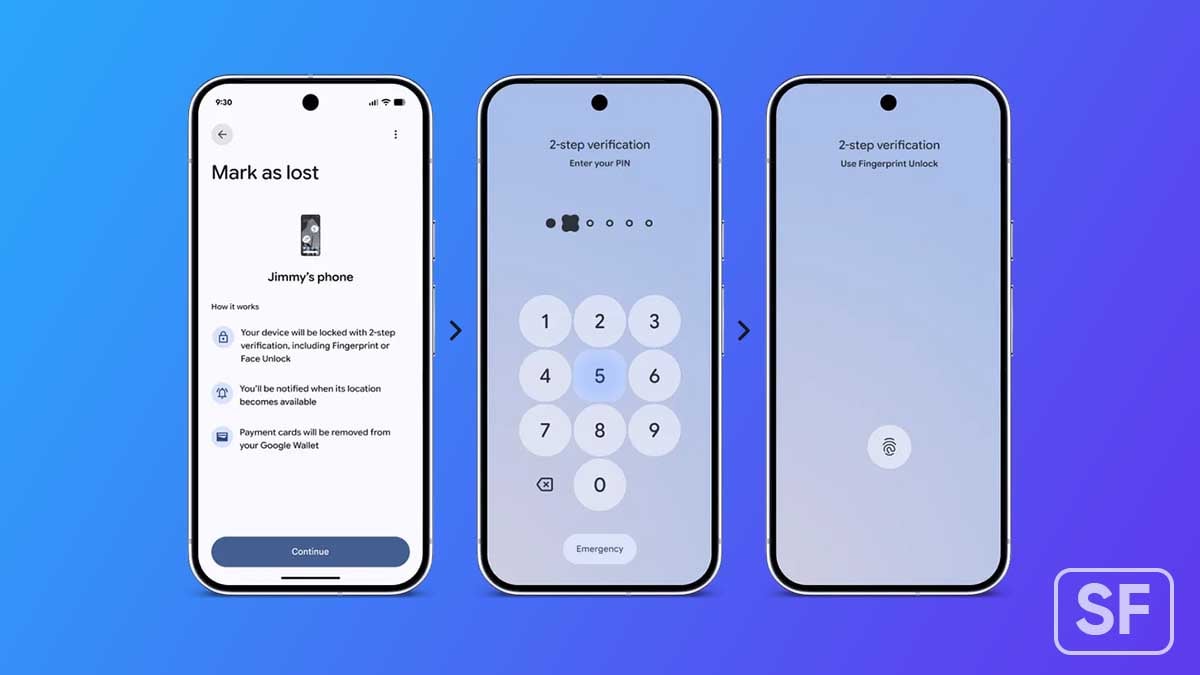
Enhanced Find Hub protection
The improved “Mark as lost” feature lets users lock missing devices with biometrics, adding protection even if someone knows the passcode.
Smarter system performance improvements
Adds app memory limits to prevent excessive RAM usage and improve overall performance and battery efficiency.
Apart from this, Google is also hiding app names on your home screen if you want a cleaner look, expanding Parental Controls to all Android devices, and adding a dedicated volume slider for your assistant.
App memory limits are baked in under the hood to keep RAM usage from spiraling and dragging down battery life. That said, Android 17 is a mature update from a platform that’s earned confidence in these areas.
Samsung’s Android 17 update
Samsung is already running the One UI 9 Beta Program, based on Android 17. The official version is slated for a July 2026 release with the foldable phones. The company would take some time to begin rolling out the update to older phones.


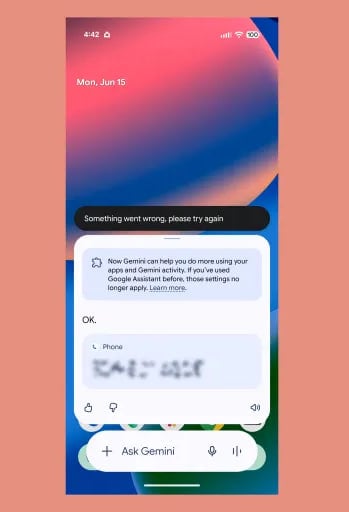
A bug surfacing across Android phones and Android Auto users this week is blocking Gemini from placing phone calls through voice commands. It’s not isolated to one device or one situation; users are hitting a dead wall almost everywhere.
Multiple Reddit threads confirmed (via 9to5Google) that Gemini fails to dial out when prompted. The error message reads: “Something went wrong. Please try again.”
Meanwhile, it’s not just an Android Auto problem; the same failure is hitting Android phones directly, which means something deeper in Gemini or the Google app is broken.
What’s causing it is probably a bad Gemini or Google app update. The workaround: switching back to Google Assistant appears to stop the bleeding for now.
There’s also a separate weirdness worth flagging. Android Auto has been flashing the old Assistant icon even when Gemini is actually running the response.
For now, frustrated users are saying that Google replaced Assistant with Gemini and somehow made it harder to make a phone call. Even though it’s triggered by the app itself, the user experience is getting ruined, and the aim is at Google.

Google Maps on Android Auto adopted a redesigned incident alert UI. It addresses a long-standing complaint about pop-ups that interrupt navigation directions. Meanwhile, a separate bug has surfaced that keeps Maps locked in day mode after dark.
The new alert clips onto the ETA bar at the bottom of the screen instead of swallowing your directions whole, via 9to5Google.
Turn instructions, road names, and distance countdowns stay exactly where they are. The Yes/No confirmation options appear within the small overlay, which fades away on its own after a few seconds if you do not interact with it.
The result varies slightly depending on the display in your vehicle. On taller screens, the improvement is noticeable but moderate. On shorter, wider displays, the new alert still avoids pushing critical navigation elements out of view.
Google hasn’t formally announced any of this, but the change appears to be server-side, rolling out gradually.

Over the past week, reports have been stacking up across Google’s support forums and Reddit from users whose Maps no longer switch to dark mode at night. The app just stays in its blinding day theme, headlights on or not.
Samsung phones, regardless of the One UI version, are receiving updated Android System Intelligence. Users can grab the latest version from the Google Play Store, available across various Galaxy device lineups.
Galaxy devices recently received their 7th Google Play system update in 2026. Samsung has widely expanded the One UI 8.5 update and is gearing up to kick off the June 2026 security patch’s rollout to compatible models.
Unlike security patches and system updates, the Android System Intelligence refines core OS features. It’s a built-in app that comes in a wide range of Android devices and provides proactive intelligence functions for various apps.
Google detailed in the May 2026 system update the changes of Android System Intelligence B.25 (2026-05-14). The release notes specifically mentioned bug fixes and maintenance changes for Android smartphones.
I’m seeing the latest version rolling out to devices running Android 16-based One UI 8 and One UI 8.5. It would have made its way to other OS versions as well, such as the Android 15-based One UI 7 and Android 17-based One UI 9 (Beta).
Android System Intelligence uses system permissions to provide smart predictions. For example, the app has permission to see your contacts so that it can show you suggestions to call a frequent contact.
As per Google’s support page, Android System Intelligence powers features such as Live Caption, Screen Attention, Smart Autorotate, Improved copy and paste, App predictions in the launcher, Notification management, Smart Text Selection across the system, Linkify text, Live Translate, App Search, Assistant Voice Typing, Now Playing, and Boarding pass with a screenshot.


Google is getting ready to release Android 17 soon, most likely before the end of June 2026. Samsung Galaxy phones that get the Android 17 update will also upgrade to the new One UI 9 software. Samsung has promised 4 to 7 years of major Android updates for many of its phones, so a lot of devices are eligible for this major software update.
Unlike Apple and Google, Samsung won’t send the update to everyone on the same day. Newer flagship phones and foldables will get this major update first. Then we have Mid-range and budget phones, these devices will come later, sometimes after a few months.
The real question is, who is getting this major Android 17 update?
Flagship Galaxy S Series Phones
- Galaxy S23 series: S23, S23+, S23 Ultra, S23 FE
- Galaxy S24 series: S24, S24+, S24 Ultra, S24 FE
- Galaxy S25 series: S25, S25+, S25 Ultra, S25 FE, S25 Edge
- Galaxy S26 series: S26, S26+, S26 Ultra
Foldable Phones (Z Series)
- Galaxy Z Fold 5, Z Flip 5
- Galaxy Z Fold 6, Z Flip 6 (and Special Edition)
- Galaxy Z Fold 7, Z Flip 7 (and FE models)
- Newer ones like Galaxy Z Fold 8, Z Flip 8, and Z TriFold
Mid-Range and Budget Phones
Samsung’s A, M, and F series have many models that qualify. Here are some important ones:
- A15, A16, A17, A24, A25, A26, A34, A35, A36, A37, A54, A55, A56, A57, and others like A06, A07.
- M15, M16, M17, M35, M36, M55, M56, and similar newer models.
- Many recent F models like F15, F16, F34, F35, F54, F55, etc.
Samsung made some important improvements with software updates. Even Galaxy phones from 2023 can still get the latest Android version. Upgrading to the latest official version means better security and new features. After upgrading to the latest version, you will notice smoother performance and fresh AI tools in One UI 9.
It is important to know that the exact timing depends on your region and carrier. Always keep your phone updated and back up your data before installing big updates.
Current Status of One UI 9
As of early June 2026, Samsung has already released the One UI 9 beta based on Android 17. The beta program started in mid-May for the Galaxy S26 series (S26, S26+, and S26 Ultra) in countries like the US, UK, Germany, South Korea, India, and Poland. The eligible Galaxy device owner can join the beta through the Samsung Members app to test new features like improved customization, better AI tools, and security updates.
The stable One UI 9 version is expected to launch in July 2026, most likely with the new Galaxy Z Fold 8 and Z Flip 8. After that, the stable version will roll out to other supported phones like the S25, S24, S23 series, and foldables, followed by mid-range models later in the year. It’s still early, so the full rollout will happen step by step.
Your Samsung phone may soon become an ultimate creator tool, as Android Canary is showing signs of the upcoming feature to assist Screen Reaction videos.
Google’s Screen Reactions feature is yet to land on Pixel phones, but the Android Canary 2606 version has added the ability. The screen recording menu has added a switch to “Show selfie camera” when the recording is running.
Simply put, creating reaction videos is going to become a lot easier. Just record the screen through Android’s native screen recording tool and enable the selfie camera switch to include your reaction simultaneously.
The feature is smart enough as it automatically removes the background in real-time. The removal is accurate enough, matching third-party apps. However, you can also use a solid background from six different colors, AndroidAuthority reports.
Note that the selfie mode doesn’t work with partial screen sharing. It’s also unsupported for the selection of an app for screen recording. You need to record “Entire screen” to show yourself through the selfie camera.

Image credit – Android Authority
Meanwhile, more improvements and corrections are likely as Google tests the feature before broad rollout. You may find this feature boring, but it’s literally a big deal for the creator community, who is more active on social media.
Google hasn’t revealed when the feature will be publicly released. With Android Canary adding the Reactions feature recently, Pixel phones should soon be getting it in the near future. Samsung may bring it to Galaxy users through One UI 9.
-

 Updates15 hours ago
11 Samsung Galaxy Watch models getting new Wear OS update with security improvements
-
 Updates2 days ago
Samsung releases June 2026 security enhancements for more Galaxy S26, S25 (Edge/FE), Fold 7, Flip 7 and TriFold
-
 Phones18 hours ago
Samsung Galaxy Z Flip 8, Fold 8 and Fold 8 Ultra clearing hurdles before launch
-
 Wearables18 hours ago
Samsung’s Watch 9 Classic missing in Watch 9 and Ultra 2 certification