
Issues
Samsung Galaxy users are struggling to connect Android Auto after One UI 9

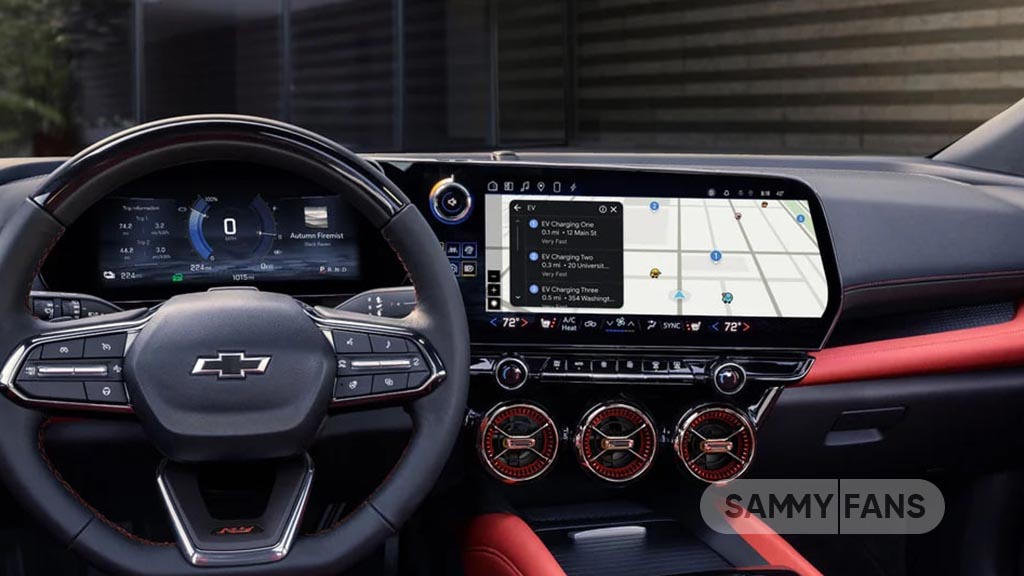
Some Samsung Galaxy users who recently updated their phones to One UI 9 are reporting an unexpected problem with Android Auto. The feature, which allows users to access apps, navigation, and other phone functions through their car’s display, is reportedly failing to work properly on some devices.
Notably, Android Auto was working fine for some users before the software update, which makes the situation frustrating. Now, several Galaxy owners say their phones either fail to connect to their cars or disconnect without warning.
The issue has been discussed on Reddit and Samsung’s Community forum. Users have also tried different ways to restore the connection, but the results have not been encouraging.
A Galaxy S26 owner tried clearing app data, pairing the phone again and using a wired connection. Unfortunately, none of these attempts worked.
Another user noticed a possible link with the latest software. Samsung phones running One UI 8.5 reportedly connected to Android Auto without any trouble. However, the problem appeared on a Galaxy S24 Ultra after it received the One UI 9 update.
Google is now aware of at least some of these reports. The company confirmed to a Galaxy A55 user that the complaint had been shared with its Android Auto team for further review.
Still, there is no confirmed solution or explanation for the connectivity problems. It is also unknown whether Samsung’s latest software update is directly responsible. Until Google or Samsung provides an official update, affected users will have to wait for a proper fix.







Samsung Galaxy Watch Ultra 2 users are facing a problem with VO2 Max readings during track running. The watch is not showing this data after track running sessions, even when users complete their workouts properly. Samsung has confirmed the issue and is working on a fix.
The problem was reported by a user on the Samsung Community forum. The Samsung Health app says the user did not run for at least 10 minutes at a speed of 4 km/h or faster with a good GPS signal. However, the user’s workout records show that these conditions were met. The user also confirmed that the GPS signal was stable.
The issue does not seem to affect outdoor running. The Galaxy Watch Ultra 2 can still calculate VO2 Max correctly during outdoor running sessions. VO2 Max estimates how much oxygen the body can use during exercise. It helps users understand their fitness levels and track their progress.

Image via Samsung community
A Samsung Community moderator has confirmed that the company’s developers are aware of the problem. Samsung plans to fix it through a future software update. However, the company has not announced when the update will arrive.
Until then, affected users may need to wait for the fix. Meanwhile, outdoor running appears to remain a working option for getting VO2 Max readings on the Galaxy Watch Ultra 2.

The rise of Quick Share might push Samsung to abandon the Dropship app. The company launched this nifty app in 2022, which offered the ease of sharing files across operating systems, including Android to iOS. Meanwhile, the Dropship app is facing an error with its sharing functionality, and Samsung has started preparing a fix.
Samsung Dropship can no longer share files across Android and iOS versions due to an error. The company has acknowledged the bug and stated “it’s working on a fix,” which could be provided to users in November 2026.
Over the past weeks, several reports emerged, claiming the Dropship is displaying an error every time when sharing files. The flood of complaints in Members community has forced Samsung to go quick with reinstating the app.
One affected user (via AndroidAuthority) claims that sending photo files is failing on six out of seven iPhones. The user reportedly receives a message that says, “The coordinates you entered are incorrect, or the item has expired.”
Samsung’s Good Lock moderator surfaced with a response, revealing that the team is aware of the bug as well as confirming that a fix is in the works and it will be part of a future update; however, an exact date was not shared.

Samsung Dropship
Samsung Dropship lets Galaxy users send up to 5GB worth of files per day to other devices, including iPhones. It was released as a Korea-exclusive app through Good Lock, but Samsung hasn’t banned its functionality when sideloaded.
Users can download the app’s APK and install it on their Galaxy device. Note that it only works if your Galaxy phone supports the Good Lock suite.
The sharing error seems temporary, probably caused by the major OS switch. The new Android 17 upgrade may have left some codes unable to work seamlessly with Good Lock’s Dropship plugin.
You may like:

Some Samsung Galaxy Watch users have reported red marks, skin irritation, and blisters on their wrists after wearing their watches overnight. These reports have raised concerns about possible overheating during sleep.
Users have shared their experiences on Reddit, Facebook, and Samsung’s official forums. One Galaxy Watch 5 Pro user reportedly went to bed with a fully charged watch but woke up to find the battery dead and a red mark on the wrist. Similar complaints have come from Galaxy Watch 7, Watch 8, and Watch Ultra users.
The exact cause of these marks is still unknown. Wearing a watch too tightly, sweat, and dirt trapped under the device can cause skin irritation. However, reports of blisters have raised concerns about possible burns caused by heat.

Image via Reddit
A possible reason could be a software problem that keeps the watch running continuously, causing the battery to drain quickly and the device to become hot. However, no specific hardware defect or software issue has been confirmed as the cause.
Samsung has not confirmed a manufacturing defect linked to these reports. The company generally advises users to keep their watches clean and avoid wearing them too tightly.
Users should remove their watches immediately if they become unusually hot or cause pain. If blisters or burns appear, they should consult a doctor and contact Samsung support for help. Although these reports do not prove a widespread safety problem, users should take unusual heat and skin injuries seriously.

Samsung Galaxy S26 Ultra users are facing a keyboard color issue after updating to One UI 9.0. The issue has been reported by a user who customized their keyboard using Samsung’s Good Lock Keys Cafe app.
According to the user, the custom keyboard was disabled after the update. After applying it again, they noticed that some clipboard items were difficult to see. The pinned icon, delete icon, and the word “Clipboard” appeared unclear.
The user thought the problem might be related to the keyboard brightness or theme settings. To check this, they switched to the default keyboard theme available in Keys Cafe. However, the same issue continued. They then asked whether the problem was caused by the software update or incorrect settings.
In response, a Samsung community moderator suggested creating a new keyboard theme. The moderator explained that some theme elements may work differently depending on the One UI version.
Users can try opening the Keyboard Customization menu in Keys Cafe, tapping the ‘+’ button, and creating and applying a new theme. They can then check whether the clipboard icons and text are clearly visible.
If the problem continues, Samsung recommends sending an error report through the Send Error option immediately after the issue occurs. Users should also include system logs and a video showing the problem.
Samsung has not confirmed whether this is a One UI 9.0 bug or a theme compatibility issue. Further internal investigation may be needed to identify the exact cause. Stay tuned for more information.

Some Galaxy S26 Ultra units are suddenly freezing on the setup screen due to a One UI 9.0 bug. This is no longer an assumption, but Samsung officially acknowledged the problem and shared a workaround for affected users.
One UI 9.0 took months to go stable, but the Galaxy S26 Ultra freezing issue shows Samsung couldn’t convince its loyal fanbase when it comes to updates.
A Korean Galaxy S26 Ultra user reported the problem on the Samsung Members community, attaching screenshots of the setup screen. The interface lets the user navigate, but the finish window is broken at the last step.
You can try fixing the freezing bug
Samsung’s initial setup screen is broken on some Galaxy S26 Ultra units. The page can be bypassed by switching to Wi-Fi network from mobile network.
Another guidance provided by the Samsung moderator advises affected users to log in to Samsung Account through the official Samsung Account login website.

The freezing issue seems to be linked to Samsung Account on specific network carriers. The bug is apparently limited to South Korea, as we don’t see widespread outrage after installing the latest October 2026 security update.
The bug emerges on the setup screen, which might be on a broad range of devices. Since not every user resets their phone after a major upgrade, it has yet to be detected by consumers.
However, Samsung has acknowledged the freezing issue, and it will be addressed with the next OTA. So make sure you don’t reset your device just yet until the problem is resolved completely and confirmed by Samsung itself.
November patch is expected to arrive in the first or second week. Details may be revealed in the first week itself; however, the rollout may take some time to start. December could mark the beginning of the One UI 9.5 Beta Program.
-

 Deals3 days ago
Samsung unveils Black Friday 2026 deals in the UK on phones, foldables, wearables and more
-
 Updates3 days ago
Entire Galaxy S26 family getting surprise update in the US
-

 AI2 days ago
Samsung One UI 9.5 to introduce new Agentic AI features
-

 One UI3 days ago
Samsung tablet owners vent over slow One UI 9.0 rollout