
One UI
Samsung removes manual toggle for Lockdown Mode in One UI 9


Samsung is changing how Lockdown mode works in its new One UI 9. The company is making it easier to use and stronger in terms of security by removing its toggle.
In One UI 8.5, Lockdown mode was a separate option in the power menu. Users had to long-press the power button, open the power menu, and then tap Lockdown mode.
When it was turned on, the phone would lock fully. It would also turn off fingerprint and face unlock, hide lock screen notifications, and disable Smart Lock. To unlock the phone again, users needed a PIN or password. The same PIN was also needed to turn off or restart the phone.
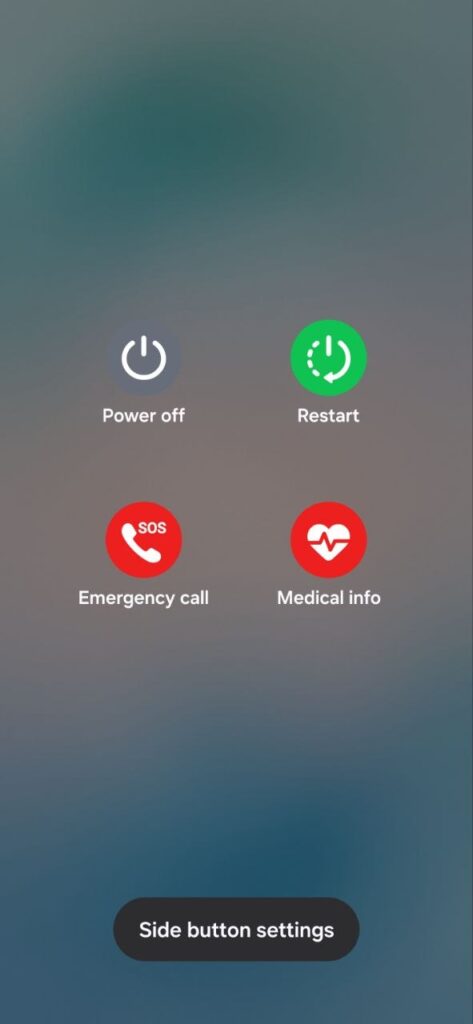
Now, in One UI 9 beta, Samsung has removed this manual Lockdown mode button. There is no longer a separate option to tap. Instead, Lockdown mode is now part of the power menu itself.
One UI
When users open the power menu in One UI 9, the phone automatically goes into a locked state. This means biometric unlock, like fingerprint and face recognition, stops working right away. The phone can only be unlocked using a PIN or password.
The big changes are in what happens after closing the power menu. Earlier, users would return to the app they were using. Now, the phone goes straight to the lock screen instead. This adds more protection and reduces the chances of unwanted access.
Even restarting or switching off the phone now needs a PIN or password. This stops anyone from forcing the phone to power down or restart without permission. With One UI 9, Samsung is making Lockdown mode simple but powerful.
Currently, the One UI 9 Beta Program is live for the Galaxy S26 series. Users of this series of devices can check out this new change.


Samsung has completed the One UI 8.5 rollout without publicly revealing an update schedule. Meanwhile, the Android 17-based One UI 9.0 update may not miss a release date chart, but it’s less likely to be confirmed at Unpacked event.
One UI 9 Beta Program has been running since the start of May 2026. Users of the Galaxy S26 series have early access to the software in six countries. A broader Beta Program is unavailable, which is pretty disappointing for users.
One UI 9.0 release date schedule unlikely at Unpacked
Well, Samsung is set to unveil One UI 9.0 at the Unpacked event. The software will have a dedicated showcase running on the latest foldable phones. It will be a full reveal, showcasing what Samsung kept away from Beta participants.
Galaxy Z Fold 8, Flip 8, and Fold 8 Ultra will start shipping in the first week of August 2026. It will mark the stable release for users worldwide. Meanwhile, existing phones, foldables, and tablets will have to wait a bit longer.
Every year, we expect Samsung to announce a software rollout plan at the Unpacked event. However, the company doesn’t proceed with that approach.
That said, Samsung is unlikely to reveal One UI 9.0 release date chart for users having older Galaxy devices at the July 22 Unpacked event. Users will have to wait till the Beta testing concludes, and then a roadmap will arrive.
When to expect One UI 9.0 rollout?
Stable One UI 9.0 will begin rolling out in early August, starting with the new foldable phones. You can get the software immediately after its release by purchasing one of the three new foldable smartphones.
Galaxy S26 series will be the first to receive the Stable update. Older models, such as the S25 and S24 series, as well as the Z Fold7 and Z Flip7, may first be invited to a Beta testing program before moving to the Stable build.
That said, Galaxy S26 series could get the official update by the end of August or the beginning of September.


Samsung is testing One UI 9.0 for the Galaxy S26 series, but a recent leak gave us a glimpse of the feature set for old Galaxy devices, including one that caught my eye for obvious reasons.
Despite keeping the public beta campaign limited to the S26 models, Samsung is internally testing firmware for existing smartphones such as the Galaxy S25 series and more.
This has allowed firmware enthusiasts to crack down on its new capabilities, such as the new horizontal lock for the camera. This feature made its debut with the Galaxy S26 series and may enter the Galaxy S25 lineup. New agentic AI and other functions will also come to older Galaxy devices, but the extent of model support is unknown.
Among these is the new home screen finder, which is also the first to come with the Galaxy S26 through One UI 8.5.
Basically, it lets you enter the global search with a simple tap. You can perform similar tasks through the app drawer, but that requires you to swipe at least two times on the screen. This option is off by default, and users need to enter the home screen settings to enable it.
Finder allows you to search apps, suggested content, app options, web search, and hidden apps. It employs NPU to compound the search results. So, flagship phones are the ones to get it.
What interests me the most is that Samsung had enough time to bundle Finder with One UI 8.5 for the S25 series. However, that didn’t happen, and now, it could happen with One UI 9.0. Does this require a platform upgrade to trigger a search? Absolutely not.
The Finder may finally land on the Galaxy S25 series and other devices with One UI 9.0, but a rollout date remains unknown.
This past week, Samsung released One UI 9.0 beta 4 for the Galaxy S26 series, but it didn’t bring new features. Samsung started testing the software in May this year, and the program is yet to see a constructive change to call it a major update.
This perspective picks up more confidence when we see these releases up close. What we found is that Samsung added a new music player, a couple of settings changes, and a few UI element changes in the control panel. That’s it.
The second and third beta mentioned a bunch of bug fixes and improvements. These are necessary, but the program appears overcooked by now. Furthermore, the testing is also limited to the Galaxy S26 series, which should have been expanded to other models such as the Galaxy S25 series.
Now we do have to mention that the company keeps on testing this new firmware for previous generations, and it has already covered A-series and other devices in the internal test pool.
Next week, Samsung will unveil Galaxy Z Fold 8 devices, becoming the first to feature One UI 9.0. The Korean tech company will claim that they’ve become the first to release Android 17 on new devices. So, I believe that this could be the most suitable reason for not revealing any new addition for other devices.
As a matter of fact, we may have to wait for the One UI 9.0 beta 5 a bit little longer than the beta 4, as per the tradition followed by the company during the launch month.
So, chances are pretty high that the One UI 9.0 beta 5 may get a few new features because the beta 4 brought bug fixes.
Samsung is internally testing Android 17-based One UI 9.0 software for various Galaxy devices. This activity is running in parallel to the Open Beta Program. The public beta update is exclusively available for the Galaxy S26 series.
One UI 9.0 update will bring Android 17 to Samsung devices. The official debut is set for late July, while the rollout will take a few more weeks to start. Samsung will first prioritize new devices rather than sharing software advancements.
Samsung picked mid-May as the timeline to announce and start the One UI 9 Beta Program. As of the third week of June, the company has already rolled out three Beta builds to Galaxy S26 users in six countries around the world.
Open Beta Program
- Galaxy S26
- Galaxy S26+
- Galaxy S26 Ultra
Samsung will keep the Beta Program limited to its latest flagship devices. Meanwhile, the internal testing has already started for plenty of models. It includes phones from the S series, foldables from the Z series, and tablets from the Tab series.
What’s more, some Galaxy A Series phones have also joined the party. The internal testing is expanding to unexpected models, including the budget ones. The pace is fast, and Samsung is gearing up for a faster rollout.
Internal Testing Stage
Galaxy S Series
- Galaxy S25
- Galaxy S25+
- Galaxy S25 Ultra
- Galaxy S25 FE
- Galaxy S24
- Galaxy S24+
- Galaxy S24 Ultra
- Galaxy S24 FE
- Galaxy S23
- Galaxy S23+
- Galaxy S23 Ultra
- Galaxy S23 FE
Galaxy Z Series
- Galaxy Z Fold 7
- Galaxy Z Flip 7
- Galaxy Z Fold 6
- Galaxy Z Flip 6
- Galaxy Z Fold 5
- Galaxy Z Flip 5
Galaxy A Series
- Galaxy A57
- Galaxy A37
- Galaxy A27
- Galaxy A17
- Galaxy A07
- Galaxy A56
- Galaxy A36
- Galaxy A26
- Galaxy A16
- Galaxy A55
- Galaxy A35
- Galaxy A25
- Galaxy A15 5G
- Galaxy A54
- Galaxy A34
- Galaxy A24
Galaxy M Series
- Galaxy M35
- Galaxy M56
Galaxy Tab S Series
- Galaxy Tab S11
- Galaxy Tab S11 Ultra
- Galaxy Tab S10+
- Galaxy Tab S10 Ultra
- Galaxy Tab S10 Lite
- Galaxy Tab A11
The list is broad enough yet incomplete. Samsung will add even more Galaxy models to its internal software testing streak. Beta Program may open for more users, but it would only happen after the Summer Galaxy Unpacked event.
Updated on July 3, 2026.

Samsung One UI 9 Beta 4 introduces an optional “Secure lock with Power button” setting, allowing users to decide whether opening the power menu from Quick Settings should automatically activate Lockdown mode.
The company first integrated Lockdown mode into the power menu with One UI 9 Beta 2, making it much easier to instantly secure a device.
Once activated, the feature locks the phone and temporarily disables fingerprint and face authentication until the user unlocks it using their PIN, password, or pattern.
With One UI 9 Beta 4, Samsung has refined that behavior by introducing a new Secure lock with Power button toggle. Newly discovered strings confirm the feature is headed to the settings menu, giving users an option that wasn’t available before.
By default, tapping the power button shortcut in the Quick Settings panel no longer triggers Auto-Lockdown. Instead, users can access the power menu and dismiss it without the device locking, returning directly to the app.
Those who prefer the previous behavior can restore it by heading to Settings > Lock screen and AOD > Secure lock settings and enabling Secure lock with Power button.
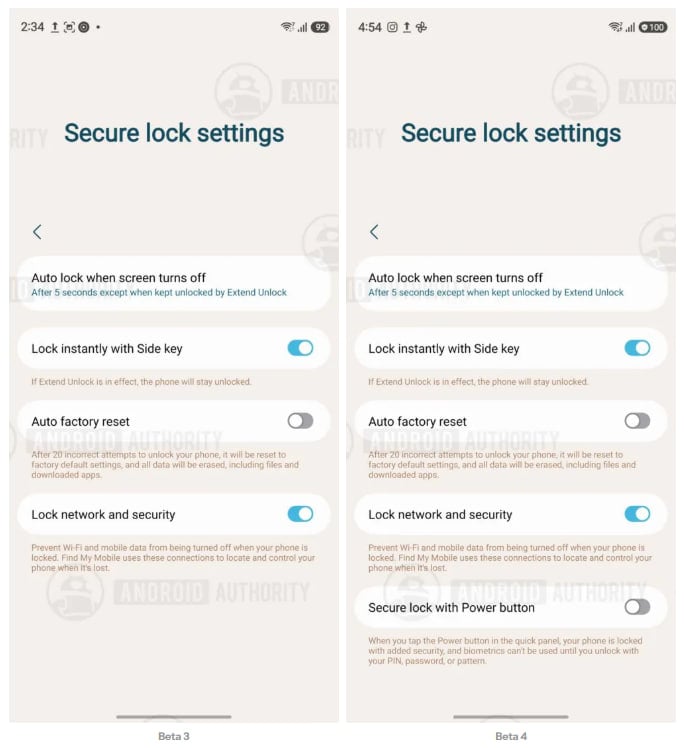
Image: One UI 9 Secure Lock Power Menu | Source: Android Authority
Once switched on, exiting the Quick Settings power menu immediately locks the phone and disables biometric authentication, just as it did in Beta 2 and Beta 3.
Meanwhile, the change affects only the Quick Settings power button, while the physical side button continues to trigger Lockdown by default.
The adjustment appears to be aimed at balancing convenience with security. Many users open the power menu simply to restart or power off their phone, and forcing Lockdown every time may have felt unnecessary.
If the feature remains unchanged, it should be a welcome quality-of-life improvement when One UI 9 reaches its Stable release.
Related article:
-
 Samsung3 days ago
Samsung One UI 9 official brings Gemini Intelligence
-
 Samsung2 days ago
Here’s the new Samsung Adaptive Clock style coming with One UI 9.0
-

 Wearables3 days ago
Galaxy Watch 9 press images leak confirms Snapdragon chip, colors, new UI, and features
-
One UI2 days ago
One UI 9.0 leaked for old Galaxy devices and this one feature caught my attention