
Apps
Samsung Wallet gets bold visual design aligned with One UI 9.5


Samsung Wallet app is getting a major design upgrade, potentially adopting One UI 9.5 aesthetics. Galaxy devices are receiving the One UI 9.0 update, but the company is already working on the next upgrade for the upcoming flagships. A recent Samsung app update also confirmed the existence of the One UI 9.5 version in the pipeline.
X user NingSP dropped a set of screenshots from the Samsung Wallet app, introducing the brand-new design changes familiar to what we’ve seen in One UI 9.5 leaks. The new user interface has landed with version 6.8.67 of Samsung Wallet.
Samsung Wallet is seeing a major overhaul of the setup pages of various tools. The app now shows big beautiful cards when you add Driver’s license/state ID, Bookings, Add NFC access card, or Import vouchers on your Galaxy.

Remaining tools may have also seen a similar upgrade. The design of the new cards matches the aesthetics of One UI 9.5, with Samsung also upgrading the Members app and its One UI Beta banner ahead of the new version’s Beta Program.
Samsung replaced the One UI 9 Beta banner’s graphics in the latest Members app update with a new and more appealing one. The heavy focus is clearly on offering a clean yet vibrant user interface on Galaxy devices.

Image via Kailash (X)
Note that the Samsung Wallet 6.8.67 is available on select Galaxy devices running One UI 9.0. It could soon expand to several models as the company doesn’t restrict app-tied changes to operating system versions.
Samsung Members and Samsung Wallet overhaul indicates that One UI 9.5 preparations are in full swing. The official version will debut on the Galaxy S27 series next year, with a Beta Program anticipated by the end of the year.


Samsung Wallet is expanding its overseas payments support to China, thanks to the fresh WeChat Pay and Woori Bank deal. Korean residents visiting China can make online payments through Samsung Wallet’s rising Money feature.
On October 27, Samsung announced it signed a business agreement with Tencent and Woori Bank in China to support overseas payment services for Samsung Wallet Money, as well as strengthening mutual cooperation.
Through this agreement, the three entities agreed to collaborate closely on:
- launching a Chinese QR payment service for Samsung Wallet Money
- enhancing overseas payment convenience for Korean users
- strengthening long-term partnerships in the digital payments sector
- jointly working to boost their global competitiveness
Samsung Wallet Money now accepted in China
Under the MoU, Korean Samsung Wallet users can make instant payments using Samsung Wallet Money at WeChat Pay merchants across China via WeChat Pay-based QR payments, operated by Tencent.
Since QR codes are widely used in China for everything from table ordering and payments at restaurants to everyday small transactions, this service is expected to significantly enhance local payment convenience.
Samsung Wallet Money users can choose between two convenient payment methods in the Samsung Wallet app: displaying a QR code for store staff to scan, or directly scanning the merchant’s QR code.
What’s more: Samsung Wallet Money service in China is offered without overseas payment transaction fees, and users will earn 0.3% of their offline payment amount as Samsung Wallet Points with no earnings limit.
Additionally, Samsung, Tencent and Woori Bank plan to expand QR payment options in China to include credit cards early next year. The company is also rolling out NFC-based contactless payment in China and globally.
“Starting with this partnership with Tencent and Woori Bank, we have expanded the proven convenience of Samsung Wallet Money overseas. Moving forward, we will continue to collaborate closely with global partners to deliver seamless, locally optimized payment experiences.”
Samsung Wallet Money
Samsung Wallet Money is a rechargeable payment service provided by Samsung in partnership with Woori Bank. It allows users to easily recharge and pay within the Samsung Wallet app while earning Samsung Wallet Points on transactions.
Related article:

WhatsApp is working on a new feature that will help Android users move their followed channels to the Chats tab. The feature will suggest where each channel should go, making it easier for users to organize their chats.
According to information found in WhatsApp beta for Android version 2.26.43.2, WhatsApp will suggest keeping frequently viewed channels in the main chat list. Channels that users rarely check will be suggested for the archive. These suggestions will appear on the migration screen.
Users will have three options for each channel. They can keep it in the main chat list, move it to the archive, or unfollow it. Users can also change any suggestion before confirming their choices. If they agree with all the suggestions, they can tap the “Move now” button to complete the process.
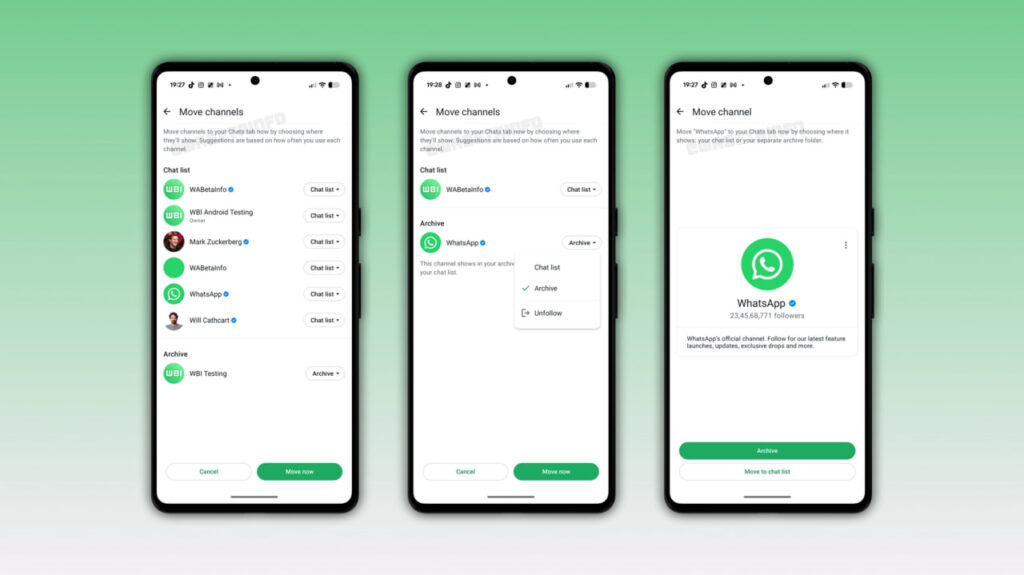
Image via WABetaInfo
This feature will be helpful for people who follow many channels and want to keep their chat list organized. Instead of deciding where every channel should go themselves, users can follow WhatsApp’s suggestions and make changes whenever needed.
WhatsApp may also replace the Updates tab after channels move to the Chats tab. Status updates already appear at the top of the Chats tab for some users. The company is also planning to introduce a new Contacts tab, where users can see who is online and find their contacts more easily.
The improved channel migration tool is still under development for Android. It is not available to users yet, and WhatsApp has not announced an official release date. The feature is expected to arrive in a future update.
WhatsApp is rolling out a new feature for Android beta users: Mentions and replies. It helps users quickly find group chats where someone has mentioned them or replied to their messages. This makes it easier to find important conversations without searching through the entire chat list.
The new filter appears at the top of the Chats tab, alongside options such as Unread, Favorites, and Groups. When users tap it, WhatsApp shows only chats with mentions and replies. A small badge also shows the number of conversations that need attention.
The feature works with both group chats and community groups. It can be useful for people who are part of many groups and often miss important messages in busy conversations.

Image via WABetaInfo
WhatsApp already sends notifications when someone mentions a user or replies to their message. However, these notifications can be missed or cleared. The new filter allows users to find these conversations later, even after the notifications disappear.
The feature is optional. Users can disable it in the app settings or move it to the separate “More” section to keep their main chat list organized.
WhatsApp is gradually rolling out the feature to some Android beta users with version 2.26.42.12, available through the Google Play Store. Not every beta user will see it immediately. WhatsApp has not yet announced when the feature will be available to everyone.

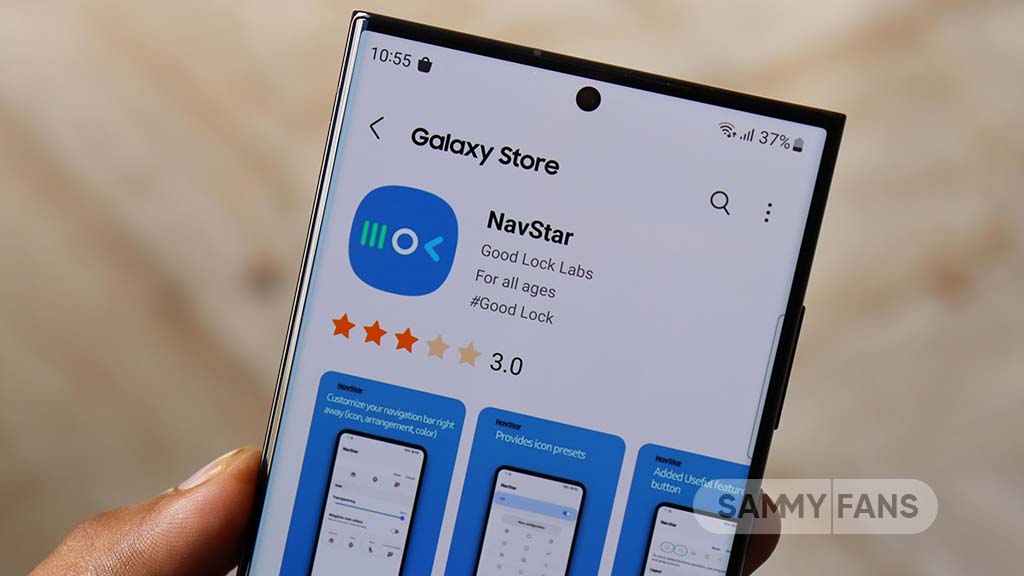
Samsung NavStar is a Good Lock feature that lets users customize the navigation bar on their Galaxy phones. However, some users are unhappy because transparent hints do not work on the keyboard screen.
Transparent hints make the screen look cleaner by reducing the visibility of navigation hints. Users want this feature to work even when they are typing, but Samsung has limited it on the keyboard screen.
A Samsung Community moderator explained the reason for this limitation. According to the moderator, transparent hints could cause the bottom keys of the keyboard to overlap with the navigation gesture area. This could make typing difficult and lead to unwanted touches.
To avoid this problem, Samsung keeps some space at the bottom of the keyboard. This helps users type smoothly without affecting the navigation gestures.
Although this explanation makes sense, the limitation can still disappoint users who want a clean and transparent look on their phones. They expect customization features to work across different screens.
Samsung should consider finding a better solution in a future update. It could allow transparent hints on the keyboard without affecting typing or navigation gestures. For now, this appears to be an intentional limitation rather than a software error.
Hopefully, Samsung will listen to user feedback and improve NavStar in future updates. Users should be able to enjoy both a smooth typing experience and better customization on their Galaxy phones.

WhatsApp is making it easier to share Instagram Reels directly in chats with a dedicated button shortcut in the attachment menu.
The feature, spotted in WhatsApp Beta for Android version 2.26.42.9, gives users a more direct way to access Reels without navigating through the app’s existing media picker. The new button opens a dedicated interface with three tabs: Recents, Saved, and Liked.
As per WABetaInfo, these sections let users find recently watched Reels, bookmarked videos, and content they have liked on Instagram, respectively. Users can then select content to share in a WhatsApp conversation.
The change builds on WhatsApp’s existing integration with Instagram and Facebook media through Meta’s Accounts Center.
Meta introduced a way for users to access their linked social media content from WhatsApp’s media picker, including posts, stories, and Reels. Previously, users had to navigate the picker’s source list and select Instagram to find that content.

Source: WABetaInfo
The dedicated shortcut makes the existing functionality more visible and reduces the steps needed to share a Reel. However, it comes with a requirement: users must link their WhatsApp account through Accounts Center.
Those who prefer keeping their accounts separate can continue using WhatsApp without linking them, but they will not see the new button.
WhatsApp is rolling out the shortcut to select Android beta testers through the Google Play Store. Availability is gradual, so installing the latest beta does not guarantee immediate access. Meta has yet to announce a wider release date.
-
 Updates3 days ago
October 2026 update now available on these Samsung devices
-

 Updates2 days ago
Samsung offers Galaxy S26 users a brand-new One UI 9 update, addressing freezing issue
-
 Android2 days ago
Samsung expands Quick Share AirDrop support to low-cost Galaxy A lineup
-
 Updates2 days ago
Samsung Galaxy A57 receives One UI 9 based October 2026 security update