
One UI
Samsung One UI 9.5 App Lock: How to lock individual apps without Secure Folder


Samsung Galaxy users always want to keep their personal information, like private photos, messages, and important details, safe on their phones. Most of the apps, such as like WhatsApp, Instagram, Gallery, and more apps includes important and personal details. To protect this information, an App Lock feature can be very useful.
A long-awaited feature for Galaxy users has finally been included in One UI 9.5: users can now lock individual apps with an app lock without them having to be locked up in the Secure Folder. This makes phone privacy so much easier and more convenient.
Your phone may be given to friends, family or children at times and they may open up apps while you are away. In these times, App Lock can help protect the apps and the information within them. It allows the user to choose certain apps and lock them with a PIN, password or even fingerprint
How to Lock Apps in One UI 9.5?
If the App Lock option is available on your Galaxy phone, follow these steps:
- Open Settings on your phone.
- Go to Security and Privacy.
- Look for the App Lock option.
- Select the apps you want to lock.
- Set a PIN, password, or fingerprint.
- Save your settings. After this, your selected apps will require authentication before opening.

Image: Samsung’s App Lock in One UI 9.5
Secure Folder provides a private space for your applications and files. However, App Lock is different from Secure Folder because it allows users to lock certain applications directly. As a result, App Lock is more suitable for people who only want to secure a few of their applications.
App Lock can be useful for users of Samsung Galaxy devices. The new function to protect personal apps easier than with Secure Folder in one place. One UI 9.5 Beta is out for the Galaxy S26 series, bringing this app-securing feature. If you have installed One UI 9.5, try out the feature now.


Samsung is now rolling out its Android 17-based One UI 9.0 official update to several Galaxy phones. The company began the stable rollout with the Galaxy S26 series on September 16 in Korea before expanding it to additional devices.
The Korean tech giant is widening the stable One UI 9.0 rollout beyond the Galaxy S26 family, and September 28 marks an important step for several 2025 flagship devices.
As on September 28, Samsung has started rolling out stable One UI 9.0 to the Galaxy S25 series, Galaxy Z Fold 7, and Galaxy Z Flip 7. The update is currently appearing in South Korea, with availability in other markets expected to expand progressively.
Galaxy Z Series
- Galaxy Z Fold 7
- Galaxy Z Flip 7
- Galaxy Z TriFold
- Galaxy Z Fold 6
- Galaxy Z Flip 6
- New: Galaxy Z Fold 5
- New: Galaxy Z Flip 5
Galaxy S Series
- Galaxy S26
- Galaxy S26+
- Galaxy S26 Ultra
- Galaxy S25
- Galaxy S25+
- Galaxy S25 Edge
- Galaxy S25 Ultra
- Galaxy S25 FE
- Galaxy S24
- Galaxy S24+
- Galaxy S24 Ultra
- Galaxy S24 FE
- Galaxy S23
- Galaxy S23+
- Galaxy S23 Ultra
Galaxy A Series
- Galaxy A57
- Galaxy A37
- Galaxy A27
- Galaxy A17
- Galaxy A07
- Galaxy A56
- Galaxy A36
- Galaxy A26
- Galaxy A16
- Galaxy A06
- Galaxy A55
- Galaxy A35
- Galaxy A25
- Galaxy A15
- Galaxy A54
- Galaxy A34
- Galaxy A24
Galaxy Tab S and XCover tablets
- Galaxy Tab S11
- Galaxy Tab S11 Ultra
- Galaxy Tab S10 Plus
- Galaxy Tab S10 Ultra
- Galaxy Tab S10 Lite
- Galaxy Tab S10 FE and Tab S10 FE+
- Galaxy Tab S9
- Galaxy Tab S9+
- Galaxy Tab S9 Ultra
- Galaxy XCover 7 Pro
- Galaxy Tab Active 5 Pro
Galaxy M/F Series
- Galaxy M47
- Galaxy M17/F17
- Galaxy F70 Pro
- Galaxy M07/F07
- Galaxy M56
- Galaxy M36/F36
- Galaxy M16
- Galaxy M06/F06
- Galaxy M35
- Galaxy M54/F54
List updated on November 22, 2026.
More Galaxy devices are next
The September 28 rollout does not mean every eligible Galaxy device will receive One UI 9.0 immediately. Samsung is following a phased approach, with availability depending on the country, carrier, and specific model.
For now, owners of the listed devices can check Settings > Software update > Download and install. If the update is not available yet, it likely means Samsung has not opened the rollout for that particular region.
With the 2025 flagships now joining the stable release, Samsung is expected to continue expanding One UI 9.0 to more Galaxy smartphones and tablets in the coming weeks.
Older flagship models are also part of the broader roadmap, with some expected to receive the Android 17-based software during October.


Samsung has already started rolling out the One UI 9.5 Beta for the Galaxy S26 series, and honestly, it looks like an exciting update for Galaxy users. This time, Samsung is not just making small changes but also adding some useful features that can improve our daily smartphone experience.
The biggest addition is App Lock, which allows users to lock individual apps using a fingerprint, PIN, or password. This is a feature many Galaxy users have wanted for a long time.
Samsung has also improved the Camera app. The Pro and Pro Video modes now offer more control, custom buttons, and presets. The camera controls have also been improved to make them easier to use.
There are some interesting changes in Samsung Health as well. The new Mindful Note feature lets users write down their thoughts, while the Medications feature helps users set reminders and track their medicines.
The new Lock Screen wallpaper effect creates a sense of depth when users tilt their phones. Samsung has also improved DeX, accessibility features, and the My Files app. Users can now open Word and PowerPoint files directly through My Files.
These are just some of the changes that make One UI 9.5 interesting. I personally like the fact that Samsung is focusing on features that can actually be useful in everyday life.
Of course, this is still a beta version, so there may be some bugs and performance issues. But that is part of the testing process. One UI 9.5 seems to be a positive step for Samsung. It is nice to see the company adding features that Galaxy users have been waiting for. Now, it will be exciting to see how much better the final version becomes.

One UI 9.5 Beta Program started this week, and if you think it began after the One UI 9.0 rollout concluded, you may be wrong. Samsung has yet to release the Android 17-based One UI 9.0 update to the Galaxy S23 FE.
Samsung kicked off One UI 9.0 official rollout in mid-September. Galaxy S26 series was the first to jump from the One UI 9 Beta to Stable version. October brought the update to the majority of Samsung flagship phones and foldables.
Why One UI 9.0 delayed on Galaxy S23 FE?
Galaxy S23 FE is probably the last device to receive the Android 17 upgrade. It is eligible, yet the company hasn’t pushed the update. This is literally a mystery, as this Galaxy device is not an entry-level smartphone either.
The Fan Edition device launched with Android 13-based One UI preinstalled. Samsung guaranteed four generations of major OS upgrades, similar to the flagship Galaxy S23 lineup.
Starting with Android 14, the device received Android 15 and Android 16 upgrades. Android 17 should have already arrived for the Galaxy S23 FE. However, the unanswered delay raises questions on the software mechanism.
Back in May 2026, Samsung rolled out the feature-packed One UI 8.5 upgrade. The major release followed a few security updates, including the recently released revised October 2026 build with stability and performance improvements.
Samsung developers may have been facing issues finalizing the OTA. Galaxy S23 FE runs the processor used in the Galaxy S22 series. That lineup is not eligible for the Android 17, which might have been the reason behind the delay.
Meanwhile, Samsung has already rolled out One UI 9.0 to some of the world’s cheapest Android devices. Galaxy A06, Galaxy M06, and Galaxy F06 have been upgraded to the latest OS despite being in the around $150 price range.
Notably, Samsung mentioned the Galaxy S23 FE as an eligible device in a regional One UI 9.0 press release. Based on the software promise, the device is eligible, and it should receive its last major upgrade without further ado.

Samsung has quietly added a useful new toggle to the Intelligent Wi-Fi menu in One UI 9.5, and it is all set to fix dropped calls and online streaming. This new toggle came to our radar during exploration of Samsung’s new software.
With One UI 9.5 rolling out in Beta for the Galaxy S26 series, Samsung is refining how individual apps fall back to mobile data and introducing a smart toggle designed to protect calls and media streams in real time.
Side-by-side comparison: One UI 9 vs One UI 9.5
Comparing the One UI 9 and One UI 9.5 screens side by side reveals both a cleaner layout and a practical new capability.
Both screenshots show the Allow individual apps to switch screen (part of Samsung’s Wi-Fi network switching controls, tucked inside the menu under Intelligent Wi-Fi). However, One UI 9.5 restructures the interface and adds a dedicated section at the bottom.
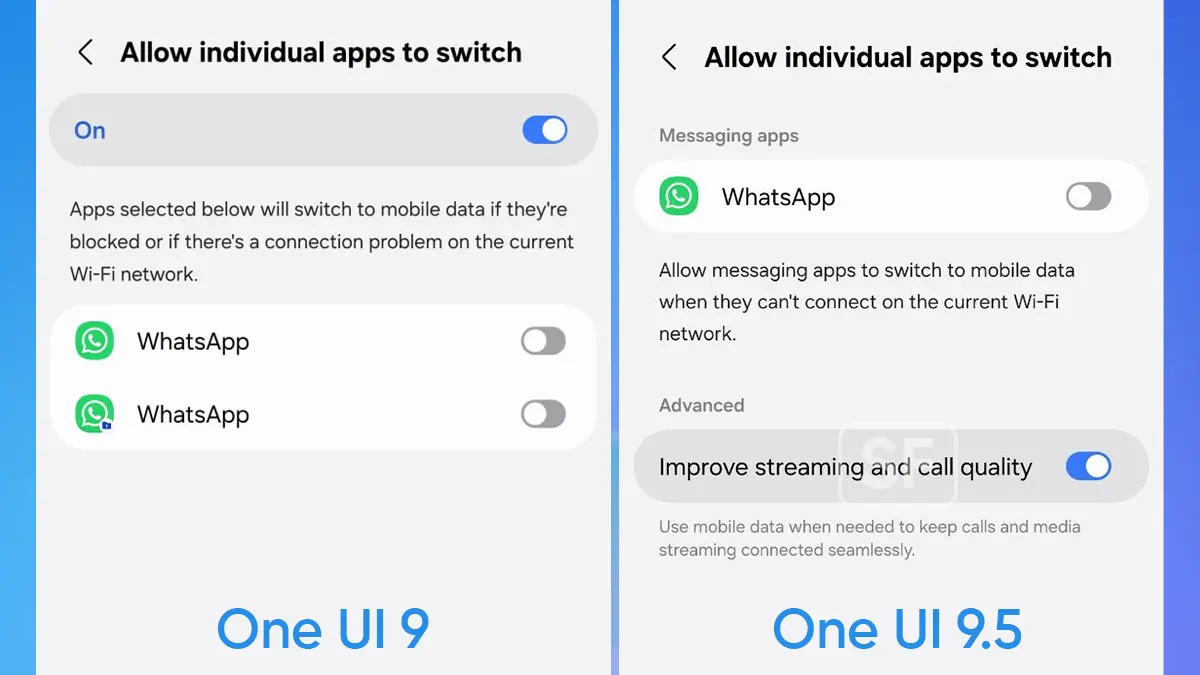
New addition: “Improve streaming and call quality”
The headline change in the One UI 9.5 screenshot sits under Advanced:
Improve streaming and call quality
- Use mobile data when needed to keep calls and media streaming connected seamlessly.
The newly added toggle signals a more proactive, quality-aware fallback tailored specifically to real-time traffic (voice/video calls and media streaming) so your phone can lean on mobile data when Wi-Fi quality dips enough to hurt call clarity or playback continuity.
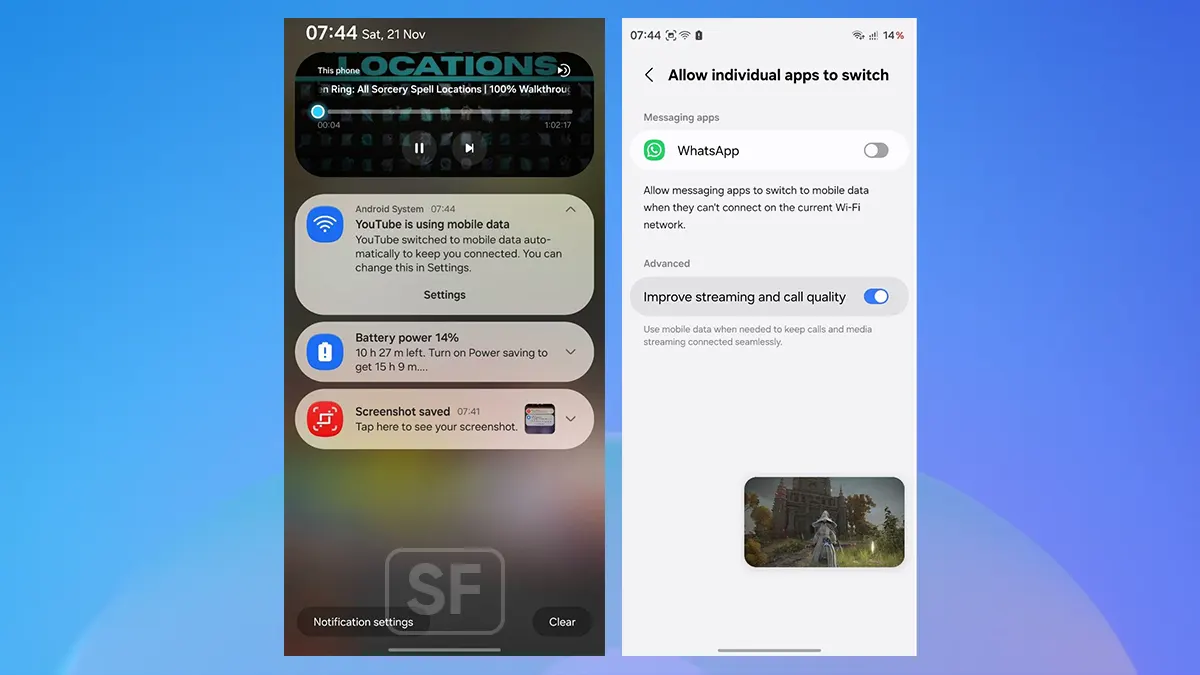
Image: One UI 9.5 Network switching settings
How to check or try it on a Galaxy phone running One UI 9.5
If you want to explore these network-switching controls on a compatible Galaxy device:
- Open Settings > Connections > Wi-Fi.
- Tap the three-dot menu (top right) and select Intelligent Wi-Fi.
- Expand the “Switch to mobile data” to see the new toggle.
You may like:
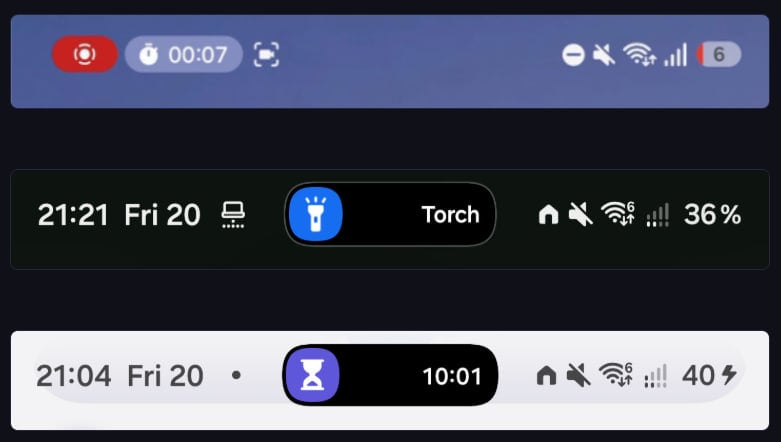
Image: Dynamic Island-style Live Notification Pill | Source: CipherProject

Samsung appears to be repositioning its unique Live Notification Pill in a move to adopt a Dynamic Island-style interface in One UI 9.5.
One UI 9.5 Beta 1 is available on the Galaxy S26 series. In a single shot, Samsung brought the first Beta update to all eligible countries. The development of second Beta firmware is already underway, with rollout could happen next week.
This change, in particular, will receive mixed reactions. Some may welcome this as a usability shift, while others may mock it as Apple’s influence. Note that Samsung brought Live Notification only after Apple’s Dynamic Island debut.
Samsung testing Dynamic Island in One UI 9.5
Latest findings by SamMobile reveal that Samsung is testing a Dynamic Island-inspired Live Notification system in One UI 9.5. The new UI change abandons the unique Live Notification Pill, pushing the new Pill around the selfie camera.
Leaked images of the Dynamic Island notification display are also viral. While One UI 9.0 keeps the Status Bar Pill on the left side, One UI 9.5 is gearing up to favor the center position, dominating the punch-hole cutout on the screen.
Image: One UI 9.5 Moment Effects | Top: 9.0 | Middle/Bottom: 9.5 | Via: SammyGuru
One UI 9.5’s Live Notification Pill is comparatively smaller than the one in One UI 9.0 and older versions. With the size enlarged, the overall appearance changed too, but the edges are not adequately softer in the new redesign.
While the design and positioning are getting shifted, the functionality will remain intact. Tapping the Pill, at the center too, will expand the Live Notification. Meanwhile, there’s room for improvements in its shape and padding.
Samsung’s first Beta has plenty of changes in the software design and user interface. The lock screen, in particular, has adopted several improvements such as better wallpaper blending and glassier Now Bar aesthetics.
-
One UI16 minutes ago
One UI 9.0 official update now rolling out to these Samsung phones
-

 Updates3 days ago
Galaxy S25 and S24 family upgrade with 20 critical Android and 3 One UI patches
-

 Android1 day ago
Bad news for Samsung users: Google confirms App Lock won’t come to older Android phones
-

 Phones3 days ago
Galaxy S27 Ultra dummies disagree on camera layout, and what that means for the final design