
One UI
Galaxy Watch 7 and Watch 6 receive One UI 9 Beta 3 update fixes


Samsung has released the third beta update of One UI 9 for the Galaxy Watch 7 and Watch 6 series smartwatches. This update mainly focuses on fixing bugs and making the company’s older Wear OS smartwatches function better.
The new update comes with a build number ending in ZZJ1 and is around 220MB in size. Samsung has made several changes to improve the watch’s stability, sensors, display, and Health app.
One UI 9 Watch beta 3 update brings a fix for Always On Display. Earlier, the watch screen could flicker when a notification arrived while AOD was turned on. Samsung has now fixed this issue, so the screen should work more smoothly.
The update also includes changes to make the overall system more stable. Samsung has added improvements to help the watch run more reliably during daily use. The company has also worked on making the watch’s sensors more stable.
Some problems with the Samsung Health app have also been fixed. In addition, Samsung has fixed an issue with Home button shortcut settings that could appear after a software update.
Another fix is related to the Now Bar. Some apps opened through the Now Bar could have display problems when shown on the watch’s AOD screen. This issue has now been fixed.
One UI 9 Beta 3 is mostly a bug-fixing update. It does not bring many major new features, but it should make the Galaxy Watch 7 and Watch 6 watches more stable and smoother to use.
Galaxy Watch users enrolled in the One UI Beta Program can check for the update using the Galaxy Wearable app. Open the app on your phone, go to Watch settings, tap Watch software update, and select Download and install.


Samsung is making One UI 9.5 more exciting with a new Home Up update. The latest Home Up version 18.5.00.30 brings several new folder customization features, giving Galaxy users more ways to personalize their home screens.
The main highlight of this update is the addition of 8 different folder icon preview layouts. Until now, users had fewer options to customize the appearance of app icons inside folders. With the latest update, Samsung is making folders more stylish and giving users more control over their appearance.
8 New Folder Icon Layouts
With the latest update, Samsung offers eight different folder styles:
- Grid – Shows app icons in a simple grid.
- Radial – Arranges icons in a circular style.
- Honeycomb – Displays icons in a honeycomb pattern.
- Heart – Arranges icons in a heart shape.
- Arc – Shows icons in a curved arrangement.
- Diamond – Displays icons in a diamond shape.
- Hero – Highlights one main app icon.
- Stack – Arranges icons in a stacked style.
One UI 9.5 Home Up: Folder Customization
Samsung's new Home Up brings 8 cool folder layouts with more customization options 👇
Grid, Radial, Honeycomb, Heart, Arc, Diamond, Hero, and Stack!
Which folder style is your favorite? 👀 pic.twitter.com/59qtcSX7sC
— Sammy Fans – Samsung News and One UI Updates (@thesammyfans) November 28, 2026
Samsung is not just adding new layouts. It is also giving users more control over how these folders look.
Depending on the selected layout, users can adjust different settings, including grid size, icon spacing, ring items, spread, direction, shape, center position, and hero size. These options allow users to change folder designs according to their own choices and create a unique home screen.
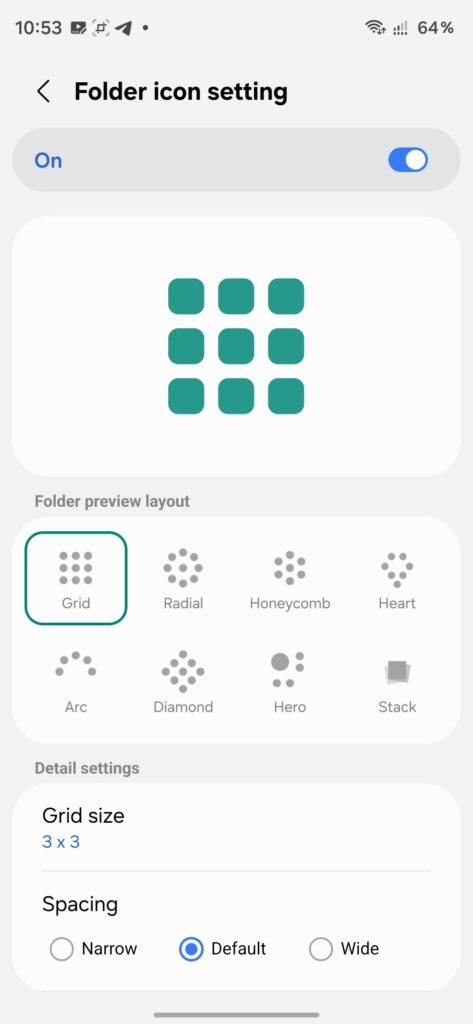
Image via SammyFans
Apart from the eight new layouts, Samsung has also expanded folder background blur controls. Users get more options to adjust the background blur effect and change how folders look when opened.
The update also brings additional folder shadow customization options, allowing users to personalize the visual appearance of folders. Furthermore, Samsung has added more customization options for pop-up folders, making the folder experience even better.
Samsung Home Up 18.5.00.30 is a great update for Samsung Galaxy users who love customization. The addition of eight folder layouts and more adjustment settings makes One UI 9.5 home screen customization more flexible and interesting. Samsung continues to improve its software experience by giving users more control over how their Galaxy smartphones look and feel.

Samsung is preparing to introduce a system-level Charging Reminder feature with the Galaxy S27 series next year. Galaxy’s latest Device Care app has some juicy information about two upcoming features linked to battery and power.
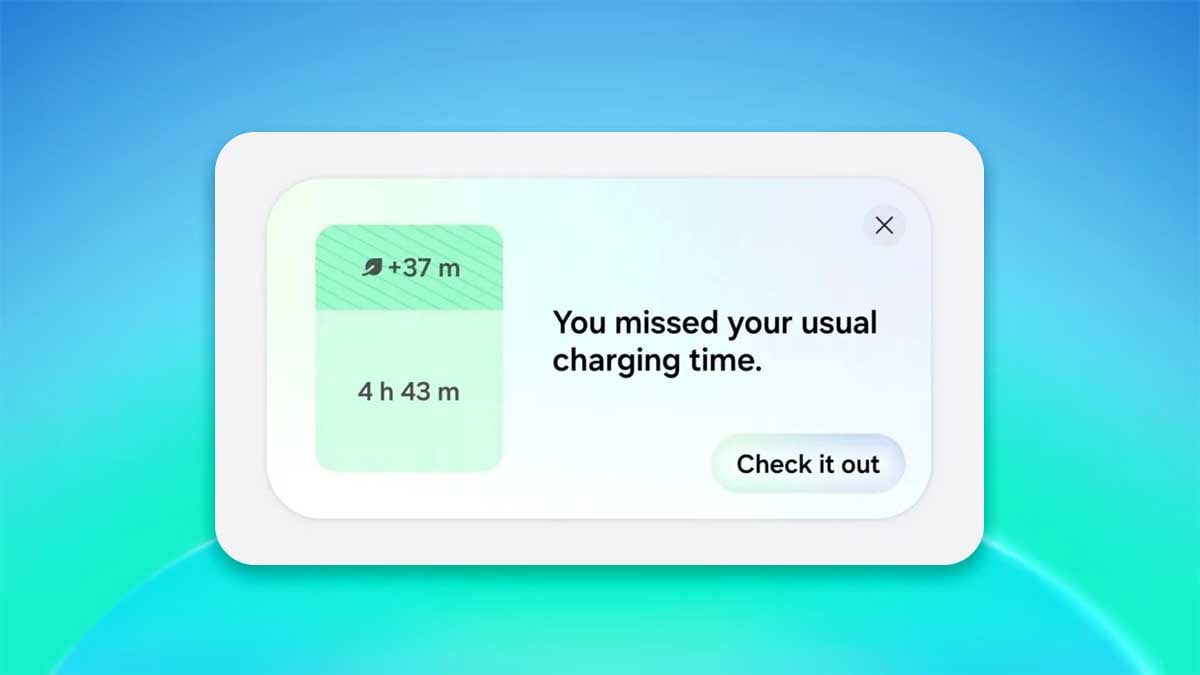
The company is testing two proactive battery alerts inside the One UI 9.5 Beta on the Galaxy S26 series that warn you when you miss your usual charging window or lack enough juice for an upcoming calendar event.
Spotted by Android Authority inside the updated Device Care app (v13.9.00.12), these native reminders turn four weeks of charging history into timely nudges.
Why existing battery notifications always arrive too late
Standard low-battery alerts fire at static thresholds like 15% or 5%. Until now, Galaxy power users had to open Modes and Routines and manually program rigid “If battery drops below X% at Y time” rules to get ahead of a dead phone.
One UI 9.5 replaces that manual setup with adaptive intelligence tied directly to Samsung’s broader “Now Nudge” proactive assistance push. As shown in a Settings UI preview, the alert surfaces as a clean card at the top of the Settings menu. It displays your estimated remaining runtime alongside how many extra hours Power Saving Mode will buy you.
How One UI 9.5 blends charging history with your daily schedule
The system studies your plugging habits over a four-week period and cross-references your default calendar for upcoming workouts, meetings, or movies. Your phone triggers the missed-window card only when all four conditions align:
- Timing: You are inside your normal charging window based on 28 days of history.
- Battery level: Remaining charge sits strictly between 20% and 30%.
- Connection: The device is currently unplugged.
- Power state: Power Saving Mode is turned off.
Screenshot source: SamMobile
Dismissing the card silences it for 24 hours. Because the tool relies on personalized suggestions, it stays disabled by default until you explicitly opt in.
What Samsung needs to get right before the public rollout
Since these strings live inside unannounced beta builds, Samsung could still tweak or delay the feature before public release. To make it truly shine, Samsung should mirror this Settings card on the lock screen or Now Bar so you catch the nudge before leaving home.
Samsung is continuing to refine the visual identity of its custom Android skin in One UI 9.5, introducing a subtle yet noticeable overhaul to the App Drawer’s bottom search bar.
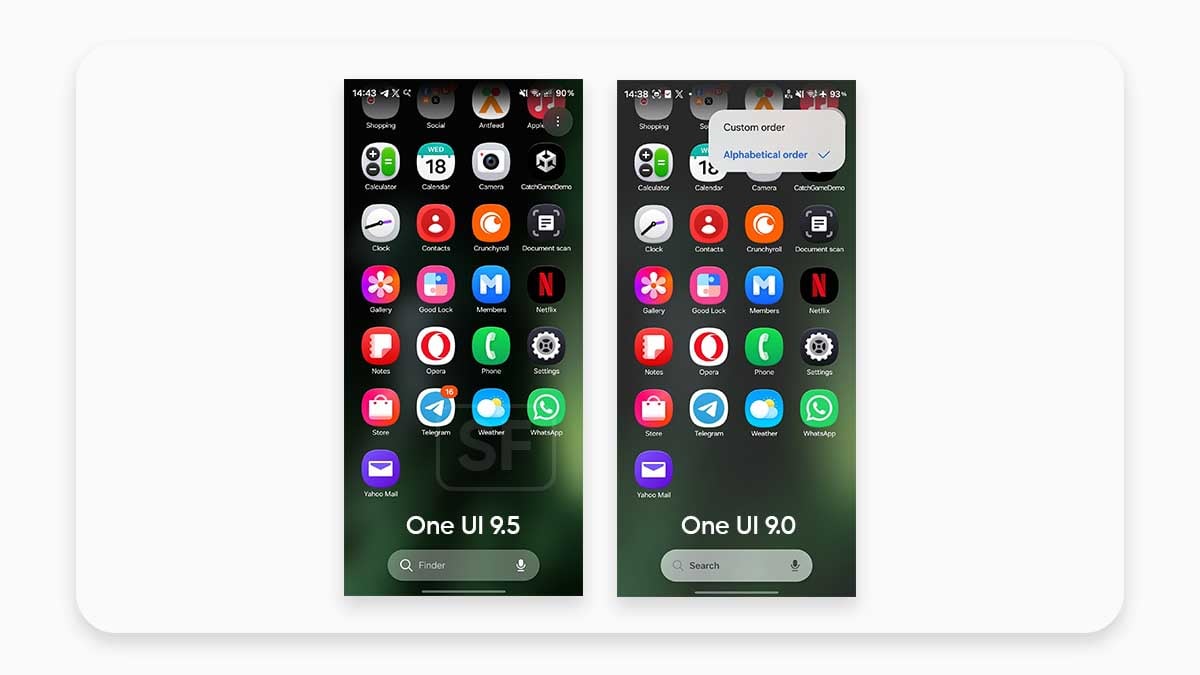
Side-by-side comparisons between One UI 9.0 and the latest One UI 9.5 build show that Samsung is officially retiring the generic “Search” label in favor of “Finder,” paired with a new frosted-glass aesthetic.
Bottom search bar: Key changes – One UI 9.0 vs One UI 9.5
Rebranded from “Search” to “Finder”
In One UI 9.0, the bottom pill-shaped bar in the app drawer is simply labeled “Search” with dark gray text and icons. On the other hand, Samsung explicitly renames the placeholder text to “Finder”, aligning the label with the actual name of Samsung’s system-wide search tool in One UI 9.5.
New Translucent Glass Design
One UI 9.0 uses an opaque/solid light-gray pill background with dark charcoal typography and magnifying glass/microphone icons.
One UI 9.5 shifts to a semi-transparent, frosted-glass aesthetic that blends smoothly into the blurred wallpaper underneath. To maintain contrast against the darker translucent pill, the text, search icon, and microphone icon switch from dark gray to crisp white/light gray.
Image: Samsung Finder in Apps screen [One UI 9.5 vs One UI 9.0]
One UI 9.5 is currently undergoing beta testing on the Galaxy S26 series, with a stable release expected to debut alongside the Galaxy S27 lineup early next year before expanding to eligible Galaxy phones and tablets.

Samsung is shrinking fast its One UI update timeline, and the 63-day gap between the stable One UI 9.0 rollout and the opening of the One UI 9.5 Beta Program is a solid example.
Samsung’s firmware release cadence just hit a record speed. When we analyzed update builds for the Galaxy S26 lineup, one number jumped off the screen: 63 days. That is the exact window between Samsung kicking off its stable One UI 9 rollout and opening the doors to the One UI 9.5 Beta.
For a company that once took months to catch its breath between major OS milestones, a nine-week turnaround signals a structural shift in how Galaxy software gets built and shipped.
63 days from stable One UI 9 to One UI 9.5 Beta
Samsung began pushing the official One UI 9 update to the Galaxy S26, S26+, and S26 Ultra on September 16, 2026, starting in South Korea before expanding globally. Just over nine weeks later, on November 18, 2026, Samsung Members banners went live for the Android 17-based One UI 9.5 Beta.
Depending on your region’s local server switch, that gap sits at 63 to 64 days. Even more surprising is how Samsung handled the regional rollout. Historically, testers in markets like India and Poland had to wait one to two weeks behind South Korea, the US, Germany, and the UK to join early beta waves.
This time, Samsung pulled the trigger across all six markets: South Korea, the US, the UK, Germany, India, and Poland on day one.
Why Samsung’s accelerated Android 17 point-release changes the game
Point-five updates used to be quiet maintenance patches. One UI 9.5 breaks that mold by packing major user-facing upgrades alongside its underlying Android 17 foundation.
Beta testers on the Galaxy S26 series are already running several heavily requested tools:
Native App Lock: Users can finally lock individual apps behind biometrics or their device PIN, automatically hiding notification content and widget previews from prying eyes.

Image: Samsung’s App Lock in One UI 9.5
Mindful Note in Samsung Health: A dedicated journaling space inside Samsung Health that offers guided prompts and free-writing tools alongside a new Medications tracker.
Upgraded Pro Camera Controls: Custom shooting presets, streamlined on-screen zoom bars, and consolidated manual settings that eliminate constant menu-diving.

Image: New Camera controls in One UI 9.5
Shipping features of this weight in a “x.5 Beta,” only two months after a major stable release, proves Samsung’s software teams are running parallel development tracks. Rather than waiting for One UI 9 to finish trickling down to older mid-range phones before starting fresh beta tests, Samsung is overlapping its cycles.
What this compressed cycle means for the Galaxy S27 launch window
Firmware schedules rarely speed up without a hardware deadline driving them. By launching the One UI 9.5 Beta in mid-November, Samsung has given itself a clean two-month runway to squash bugs before January 2027.
That timing lines up directly with the expected Galaxy S27 debut window. Samsung clearly intends to ship the Galaxy S27 series out of the box with stable One UI 9.5, avoiding the messy post-launch software delays that used to plague early-year hardware releases.
For current Galaxy S26 owners, this rapid pace means shorter waits for headline features and faster access to Google’s latest Android platform code. If nine-week turnarounds become the new normal in Suwon, waiting half a year for Samsung’s next big software jump might officially be a thing of the past.

Samsung is developing two new camera features inspired by Apple iOS 27 in One UI 9.5 and bringing them a Galaxy twist. The two features could headline the flagship Galaxy S27 next year, before landing on existing models.
One UI 9.5 Beta 1 is available on the Galaxy S26 series, and the firmware code hides two unreleased camera features, namely: Vision mode and Auto portrait. Early insights reveal how these features function and benefit Galaxy users with an enhanced experience.
Vision mode puts AI search right inside the Samsung Camera
Code strings (SM_VISION_AI) reveal Vision sitting directly in the main Camera mode carousel beside Photo and Video. Rather than snapping a picture, pressing the shutter freezes the viewfinder preview and streams it to a missing background component called Visual Agent Service.
While Galaxy users already have Circle to Search and Gemini Live camera sharing, placing AI directly in the camera carousel mirrors Apple’s Siri mode from iOS 27. Samsung’s twist is its pre-Gemini scene card, giving you instant context and keyword taps before handing off complex questions to Google’s assistant.
Auto portrait brings instant background blur to standard Photo mode
For everyday photographers, Auto portrait (Title_Portrait_effect_in_photo) promises effortless depth without mode-switching.
When standard Photo mode spots a human face or pet, it automatically triggers background blur (bokeh_effect_blur), backed by a viewfinder toggle and blur intensity slider. Unlike iPhones, Samsung shifts into a live Auto portrait capture state as you shoot.
Galaxy S26 Ultra can’t run them yet
Neither feature works on the Galaxy S26 Ultra today due to missing system and hardware dependencies. Samsung has not officially announced either tool; details could still shift, but all signs point to a headline debut on the Galaxy S27 series rumored for early 2027.
You may like:
-
 One UI2 days ago
One UI 9.5 Eligible Devices: These Samsung devices could receive the next major update
-
 Wearables2 days ago
Samsung confirms Galaxy Watch 9 features for older models, including Watch 4!
-

 News2 days ago
Galaxy S25 could be banned in the US as Samsung loses camera patent case
-
 Deals3 days ago
Samsung Galaxy S26 Ultra is $350 off for Black Friday