
Apps
Samsung’s One UI 9 Try Galaxy adds Z Fold 8 and Watch 9 experience


Samsung has upgraded the Try Galaxy web app experience with One UI 9, featuring the Galaxy Z Fold 8, Galaxy Watch 9, and more. You can now try Samsung’s latest devices and software advancements right on your current device.
Try Galaxy helps Samsung and non-Samsung users try out the ecosystem before making their purchase decision. It offers an in-hand experience so you can access some of the top features before jumping to Galaxy.
Thanks to the upgraded Try Galaxy app experience, you can preview the user experience, explore helpful tutorials, and get a feel for features as if you’re using Galaxy Z Flip 8, Galaxy Z Fold 8, or Galaxy Z Fold 8 Ultra.
One UI 9 Try Galaxy lets you experience the new Galaxy Z Fold 8 foldable phone’s top features, including Side-by-side Productivity, Immersive Viewing, Flex Window, and My FanCam.

From the Try Galaxy home screen, you can get a feel for the new Galaxy Z Flip 8 Hero Wallpaper. When using the Galaxy AI Widget, you can try My FanCam and Photo Assist.
Additionally, you will be able to try MultiWindow productivity for multitasking and experience Immersive Viewing and Super Steady video.

Galaxy S26 Ultra experience is also here if you are not a foldable fan so far. Samsung also lets you try out its wearable devices through interactive tutorials, such as the Galaxy Watch, Galaxy Ring, and Galaxy Buds.
Pre-orders are over, yet Samsung is offering up to $1,000 instant trade-in credit or $200 Credit without trade-in. If you go for a carrier-locked Galaxy upgrade, you can score up to $1,900 in carrier deals.
You may like:


Samsung Expert RAW is getting updated to version 6.0.02.4 in August 2026, and the changelog confirms the adoption of a new feature called Virtual Reflector.
Virtual Reflector was already available on compatible Samsung phones, including the Galaxy S26 Ultra. The real change post One UI 9 Beta 5 is how Samsung users access the Virtual Reflector feature of the Expert RAW app.
It seems Samsung may have silently expanded the availability of the Expert RAW’s Virtual Reflector feature. However, its switch from Labs and becoming a downloadable feature signals seamless wider availability on Galaxy devices.
That said, you can use the Virtual Reflector on Galaxy S26, S25, S24, S23 and S22 series devices, S21 Ultra, S20 Ultra, Note 20 Ultra, Z TriFold, Z Fold 8/Ultra, Z Flip 8, Z Fold 7, Z Flip 7, Z Fold 6, Z Flip 6, Z Fold 5, Z Fold 4, Z Fold 3 and Z Fold 2.
Samsung Virtual Reflector
Samsung’s Virtual Reflector feature aims to reduce shadows on the face depending on the direction of the light source, to give you brighter portraits.
When shooting outdoors or indoors, if shadows appear on the face due to the direction of the light source, you can use a reflector to minimize these shadows and obtain bright photos.
When to try:
- When the outdoor sunlight is strong and the face appears dark
- When filming pets
- When the lighting is not uniform indoors
To get Virtual Reflector on your Galaxy, make sure to install Expert RAW first. It’s available on Galaxy Store for supported Samsung flagships.


Google Messages has disabled the “Clear data” button in Android settings for some beta users. The change started appearing in recent beta versions, including version 20260731.
This is not likely to be a bug. Google appears to be working on a new feature that will let users manage Messages storage from inside the app.
Google has added a new activity, ManageSpaceActivity, to the Messages app. This suggests that the company may soon offer a special storage management page.
Usually, Android’s “Clear data” option removes all data stored by an app. But Google Messages may soon let users choose what they want to delete instead. Like users could be able to remove old photos, videos, voice messages, and other large files without deleting their important conversations.

The new storage feature is still being developed and does not work yet. Due to this, Android has currently made the “Clear data” button unavailable in the latest beta versions.
For now, beta users who want to completely erase Google Messages data may need to uninstall the latest updates and go back to an older stable version. The new storage manager could be very useful for Messages users. This could make Google Messages much easier to manage in the future.

Samsung plans to add stablecoin features to Samsung Wallet by the end of this year. The new service will allow Galaxy smartphone users to send money overseas and make payments using stablecoins without downloading a separate cryptocurrency app.
The company will reportedly introduce the new features step by step in selected countries. The services may include opening a stablecoin account, sending money internationally, and making payments at stores. The company will decide where to launch the services based on local laws and market conditions.
Samsung announced its stablecoin plan at Galaxy Unpacked 2026 in London. The company said Samsung Wallet will support new types of digital money, including stablecoins. A stablecoin is a digital currency designed to keep a stable value.
The company plans to make stablecoin features available to more than 800 million Samsung Wallet users around the world by the end of this year. Samsung Wallet is currently available in 61 countries and has around 19 million users in South Korea.
The new service could also help reduce the cost and time of international money transfers. Companies often pay currency exchange fees and bank charges when sending money to other countries. Transfers can also take several days.
Professor Kang Hyung-gu of Hanyang University estimated that Samsung could save up to $103.9 million, or about 147.5 billion won, each year by using stablecoins for its internal international transfers. Samsung’s move shows that stablecoins could become a bigger part of everyday payments and money transfers.
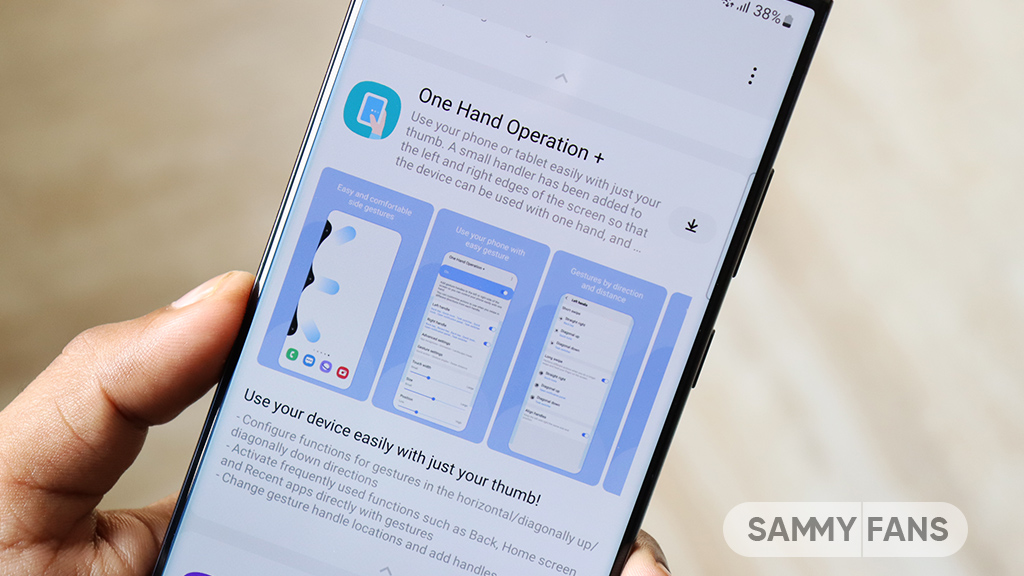
Samsung is getting ready to release a new update for its One Hand Operation + Good Lock module with version 9.2.21.0. It will fix several problems that users have been facing and will also improve the overall stability of the feature. The update is mainly focused on making gestures work better on Galaxy phones.
Along with these fixes, Samsung will add other bug fixes and stability improvements to make One Hand Operation + smoother and more dependable. Samsung has not yet announced the exact release date. Once available, users should be able to get the update through the Galaxy Store or the Good Lock app. Let’s explore what’s new coming!
Samsung One Hand Operation + 9.2.21.0 update reportedly fixes issues related to the Edge Panel. One Hand Operation+ lets users perform different actions by swiping from the sides of the screen. Sometimes, these gesture areas can overlap with the Edge Panel handle. However, it has not always worked as expected.
This problem could cause the Edge Panel to stop working. In some cases, the home screen could also become unresponsive when the two gesture areas conflicted. Samsung had already confirmed that it was working on a fix, and the solution will arrive with the new One Hand Operation+ update.
The update will reportedly also fix a problem with Instagram. Some gestures from One Hand Operation+ were not working properly when users were using the Instagram app. Samsung is expected to fix this issue with version 9.2.21.0.
There is an issue related to vibration feedback. Some gestures did not produce vibration even when they were supposed to. Samsung will fix this problem as well. The update will also address a screenshot afterimage issue, where users could notice an unwanted visual effect after taking a screenshot.

Samsung rarely rolls out new update for the Always On Display (AOD), but one arrives whenever it’s necessary. The newest version has started rolling out on select Galaxy devices, bringing improvements to the interface.
August 2026 Always On Display update improves Samsung lock screen interface. The changelog specifically mentions the target improvements. Your lock screen will be even more reliable as the clock GUI issue is getting fixed.
Samsung says the update “fixes Graphical User Interface (GUI) issues with the clock on the lock screen under certain language settings.” It’s not much of a detail, helping us determine what the exact problem is.
Galaxy users are facing issues with the AOD clock on the lock screen. It doesn’t seem to be happening when the language is English, but with others.
Samsung is providing the necessary improvements so your lock screen clock functions fine. The version you need is v8.9.55.2 (via LarrySWhite), rolling out through Galaxy Store, sequentially.
To check if the latest AOD update has arrived, open Galaxy Store > Menu > Updates. You should see the app on the list along with a “refresh” icon to install the latest version.

-
 Samsung3 days ago
A massive wave of Samsung updates is near
-
 One UI2 days ago
Samsung releases first official One UI 9-based update for Galaxy Z Fold 8 phones in more countries
-
 Updates2 days ago
Google Play System August 2026 update brings new features and improvements
-
Apps3 days ago
Fresh Samsung Always On Display (AOD) update fixes GUI issues