One UI
Samsung One UI 9.0 Power Menu adds a new Security Label

Samsung has brought your Galaxy’s Power Menu a Security Label with One UI 9.0 Beta 4. The update landed yesterday, weighing around 1.25 gigabytes. Release notes contained some crucial bug fixes, making the most anticipated update the most boring release.
Our team discovered a minor yet noticeable change in Beta 4. With the latest One UI 9.0 Beta, Samsung has added a Security Label to the Power Menu. For the first time, the menu now shows why your Galaxy device has been locked.
One UI 9.0 Power Manu adds Security Label
Samsung has made Lockdown mode the default in One UI 9. The power menu has deleted the lockdown mode button with the initial rollout. The revamped security system starts enforcing device lock as soon as you enter the power menu.
Simply put: entering power menu on your Galaxy device will result in a device lock. You can not revert to the home screen without unlocking your device. You can use the same credentials as the lock screen to unlock the power menu.
Previously, it was a blind application, leaving users to guess what happened suddenly. Adding a bit more clarity, the Korean tech giant has now slapped a dedicated information label.
The updated Power Menu page now displays “For your security, your phone is locked.” It doesn’t sound like a major development, but it’s practically a welcome addition.
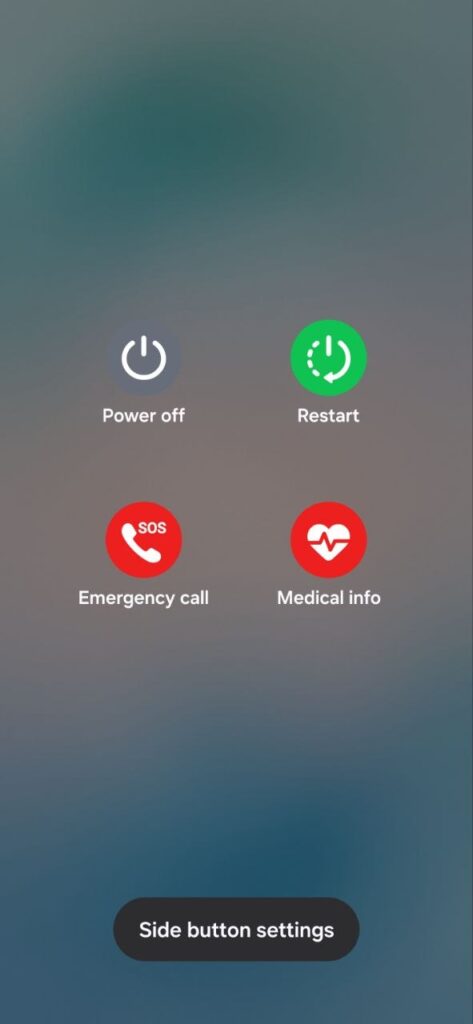
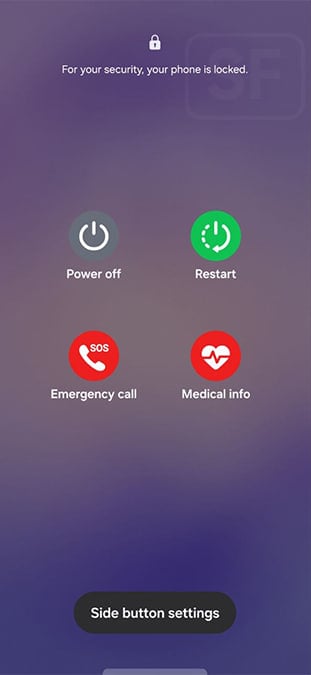
If you are on One UI 9 Beta 4, you can check the message by entering the Power menu. Users running One UI 8.5 will get the complete deployment once the company begins the public rollout of the One UI 9.0 firmware update.
You may like: