
WhatsApp lets you control how long your status stays visible – Hours to Month options


WhatsApp has updated its About section to make it more useful and fun. The new feature lets users set temporary statuses that disappear automatically after a chosen time, from a few hours up to one month. This helps keep profiles up to date without old or outdated information staying forever.
Now, the About status appears directly in chats. It shows up in a small bubble under a contact’s profile picture and is also visible in the chat info screen. This makes it easy to see what a contact is doing or their availability without opening their profile.
Users can also add emojis to their About messages, making them more expressive. For example, a coffee cup can show a short break, and a suitcase can show travel.
There are also preset timer options, like one day or one week, so users can quickly choose how long their status will stay visible. When a status expires, it is saved in a private archive so users can check past updates if they want.

Image via WABetaInfo
Full control stays with the user, as you can edit, update, or delete your status at any time before it disappears. Privacy settings let you choose who can see your updates, giving you control over your information.
Before this update, the About section was static and often showed outdated information. With disappearing statuses, users can share current activities, moods, or temporary updates in a clear and organized way.
The new feature is rolling out on Android and iOS. Users can find it under Settings >> Set About. By adding disappearing statuses and quick-view bubbles in chats, WhatsApp makes it easier to share real-time updates and keep your profile fresh, fun, and relevant.










WhatsApp is introducing a new bottom navigation bar for its Android app. The new design gives the app a fresh look and makes better use of screen space. The feature is currently rolling out to some beta testers with the WhatsApp beta for Android 2.26.45.5 update, available on the Google Play Store.
The new navigation bar has a floating design with rounded corners. Unlike the older bar, it does not touch the edges of the screen. WhatsApp has also removed the text labels, showing only icons for Chats, Updates, Contacts, and Calls. Some users may also see a fifth tab, You.
The biggest change is how the bar responds when users scroll. When users scroll down through their chat list, the navigation bar slowly becomes smaller and turns into a compact floating pill. This gives users more screen space while browsing their chats. When they scroll back up, the bar returns to its normal size.
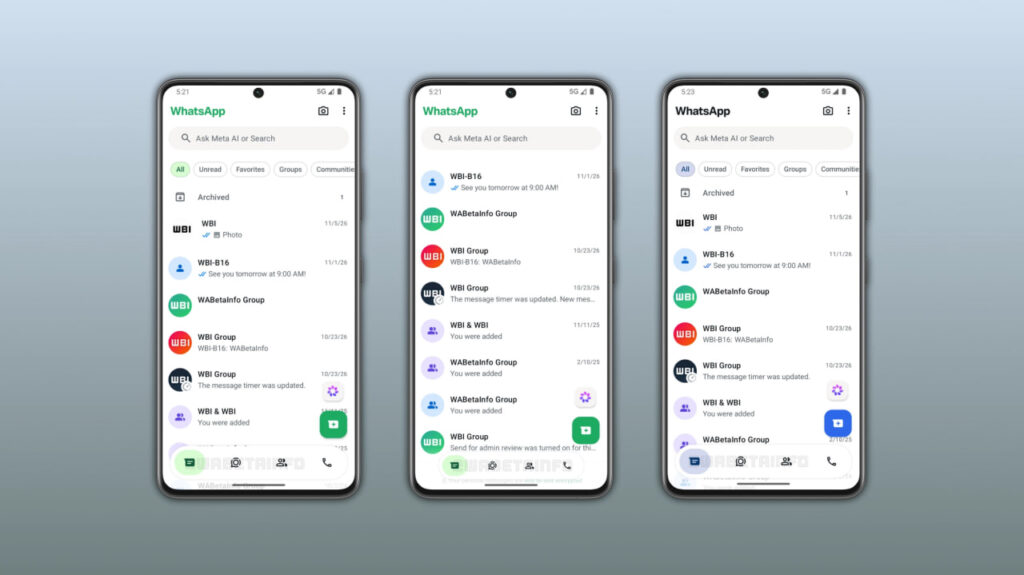
Image via WABetaInfo
WhatsApp has also added a blur effect below the navigation bar. This makes the bar blend smoothly with the content behind it and gives the app a cleaner look.
Another change is the colour of the selected tab. It now follows the app’s theme colour. Green is the default option, while WhatsApp Plus subscribers can choose a different accent colour.
WhatsApp is currently rolling out the new navigation bar to selected Android beta testers. Not everyone will receive it immediately. The company is expected to make it available to more users in the coming weeks. However, there is no official date for its release to all Android users yet.
WhatsApp is introducing a new Contacts tab for Android users. The new feature will help users find their contacts, check who is online, and start new conversations more easily.
The new Contacts tab appears in the bottom navigation bar and replaces the Communities tab. It includes a Favorites section at the top, where users can quickly find their favorite contacts. Below it, users can see their complete contact list.
WhatsApp also allows users to sort contacts in three ways: alphabetical order, birthdays, and activity. When users select the activity option, online contacts appear at the top with a green dot next to their names. Users can also see the last seen information of offline contacts if they have enabled this privacy setting.
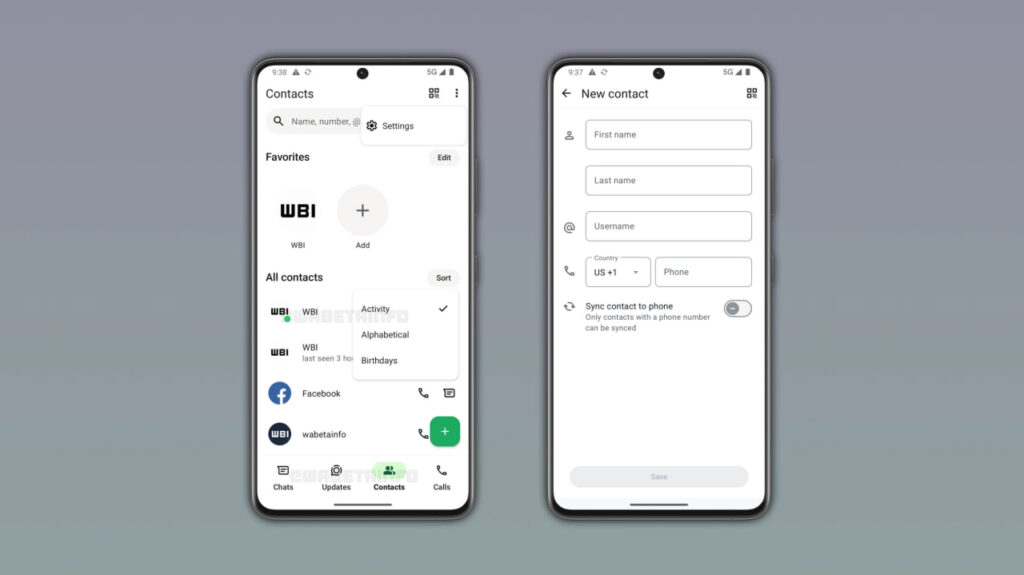
Image via WABetaInfo
The new tab also includes a shortcut to open Meta AI chats. Users can invite people to join WhatsApp through other apps and Instagram. They can also add new contacts by tapping the floating button at the bottom-right corner. The contact form allows users to enter a first name, last name, username, and phone number.
WhatsApp is replacing the Communities tab because users can already access communities through a filter in the Chats tab. This makes the new Contacts tab more useful for quickly finding people.
It is currently rolling out to some beta testers with the WhatsApp beta for Android 2.26.45.2 update, available on the Google Play Store. WhatsApp has not announced when it will be available to all users.
WhatsApp is working on a new privacy feature that will give users more control over who can see their phone numbers when they use usernames. The feature is currently under development for Android and was spotted in WhatsApp beta version 2.26.45.1.
Recently, WhatsApp added a username field to the contact creation screen. This allows users to save someone’s username along with their name and phone number.
When a user sets up a username, people who do not have their phone number saved in their contacts cannot see it. This helps users connect with others without sharing their phone numbers. Now, WhatsApp is planning to add a new option to its privacy settings. This will allow users to choose who can see their phone numbers.
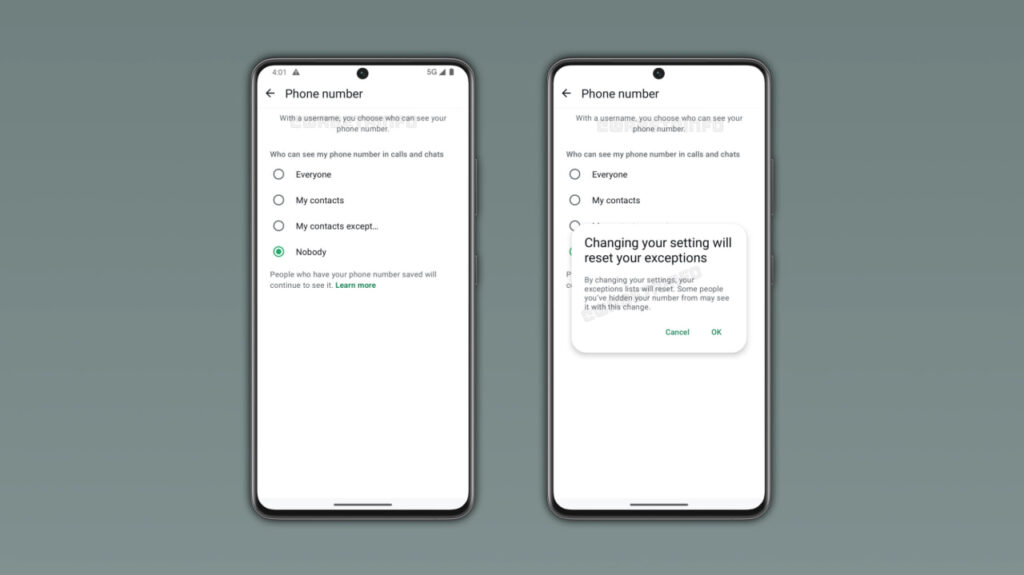
Image via WABetaInfo
According to the latest information, there will be four options: Everyone, My contacts, My contacts except, and Nobody. Users can choose to show their number to everyone, only their contacts, selected people, or hide it from people who do not already know it.
By default, WhatsApp will select the Nobody option for users who have a username. This means their phone numbers will remain hidden from new people who contact them through their usernames.
WhatsApp will also show a warning when users change this setting. The warning will explain that changing the option will reset their previous exceptions list. As a result, some people may be able to see their phone numbers after the change.
The new feature is still under development and is not available to users yet. WhatsApp has not announced when it will be released. It is expected to arrive in a future Android update.


WhatsApp is developing a native option to send media (photos and videos) in uncompressed, original quality, according to findings in the Android beta build 2.26.44.12. The feature expands beyond the existing Standard and HD presets, targeting power users who require pixel-perfect file delivery without resorting to workaround file-sharing methods.
Currently, WhatsApp’s standard tier compresses media heavily, while its HD toggle introduces lighter compression while retaining up to six times more data.
The upcoming “Original quality” mode bypasses compression algorithms entirely, as discovered by WABetaInfo. Meta plans to limit file size and resolution parameters only at extreme thresholds well beyond standard camera output.
The capability is slated as an exclusive perk for WhatsApp Plus. While standard users can currently send uncompressed files by routing media through the document picker, the native editor toggle streamlines high-fidelity transfers into the primary media flow.
The move reflects a broader monetization strategy across Meta’s messaging ecosystem, reserving workflow conveniences for paid subscribers while leaving core functionality accessible. By embedding full-resolution sharing into the standard camera and gallery pipeline, WhatsApp bridges a functional gap long exploited by platform competitors like Telegram.
The feature remains under active development and is expected to roll out to beta testers ahead of a wider public release in a future Android update.
WhatsApp is working on a new feature that will make it easier for users to manage their chats with Meta AI. The messaging app is introducing separate chats for Meta AI, allowing users to create different conversations and find them easily in their chat list.
With this feature, users can create separate chats with Meta AI for different topics. To create a new chat, users need to open their conversation with Meta AI and select the new chat option from the three-dot menu. They can then enter a name for the chat and choose a custom profile picture to identify it easily.
Once created, the new chat will automatically appear in the WhatsApp chat list, just like regular conversations. A small Meta AI logo on the profile picture will help users identify these AI chats.

Image via WABetaInfo
WhatsApp is also adding a new AI filter in the Chats tab. Users can tap this filter to see all their conversations with Meta AI in one place. They can also move the filter to a separate section if they do not want it in the main chat list. Users can delete these chats whenever they want.
Earlier, users had to open the main Meta AI conversation and find their saved threads through the menu. The new feature makes it easier to switch between different AI conversations.
The feature was spotted in the WhatsApp beta for Android 2.26.44.6 update, available on the Google Play Store. It is currently rolling out to some beta testers. There is no information about when it will be available to all users.
-
 One UI11 hours ago
One UI 9.0 official update now rolling out to these Samsung phones
-

 One UI2 days ago
Fresh One UI 9.5 leaks reveal AI Rambler, Telegram and WhatsApp call recording, new widgets and UI tweaks
-
 AI2 days ago
Gmail gets new Gemini AI tools for writing and email summaries
-
 Updates1 day ago
Flagship Galaxy S26 lineup now getting November 2026 update globally