
Android
Google Discover may soon let you choose more languages


Google is working on a new update for its Discover feed. This feed shows you news and articles based on what you like and read online. Right now, it shows content mostly in one main language. Sometimes, Google adds content in other languages automatically based on your reading habits. But you can’t really choose more languages yourself. That may soon change.
According to Android Authority, Google is testing a new feature called “Discover feed languages” in the Settings of the Google app. This feature will let you manually pick multiple languages you want to see in your feed. You can also remove or edit these languages anytime.
So far, users could only choose one language. Google decided the rest. If there were languages you didn’t like, you could hide them, but not add your own. With this upcoming feature, you’ll get full control over the languages in your feed.

Image via Android Authority
Also, it looks like Google won’t limit how many languages you can choose. This is helpful for people who read news in more than one language.
The new language feature is not live yet, but it may roll out soon. Once it’s available, users will be able to customize their feeds more easily to make Discover more helpful and enjoyable.




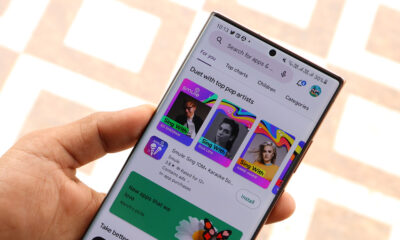


Google is working on a new app, Create My Widget. The app will help users make their own widgets with the help of Gemini. Google has now listed the app on the Play Store, giving users a first look at its features.
The app will offer different widget categories. These include combo widgets, important dates, weather alerts, and daily brief. Each category will have different templates and ideas that users can try.
Users will also be able to edit the widgets after creating them. They can make changes and adjust the widget before adding it to their home screen.
-

- Image via (9to5Google)
-

- Image via (9to5Google)
Create My Widget is also expected to work on Googlebook laptops. These devices may offer more categories, including events and travel, daily habits, and tools and tips. Users can choose a template or simply describe what they need, and Gemini will help create it.
The Play Store listing shows the app version as 1.27.983746769.0-desktop_release. This may be connected to Google’s upcoming Googlebook laptops.
Google has not yet announced all the details or the final release date. However, the Play Store listing gives us a clear idea of how the new app could work.


Google pushed the Android 17 QPR2 Beta 6 update for Pixel devices, bringing fixes for the top five issues. This release focuses on addressing OS-related problems instead of installing new features for users.
Released on September 24, the Android 17 QPR2 Beta 6 build carries version CP41.260831.007 and addresses several problems affecting system UI, charging, camera use, multitasking, and overall device reliability.
Android 17 QPR2 remains a relatively incremental release, with Google describing it as a minor SDK update without planned behavior changes.
The Beta 6 build is available across a broad range of Pixel devices, from the Pixel 6a through newer Pixel models. With Beta 6 now addressing several core stability problems, Google appears to be moving Android 17 QPR2 closer to its eventual stable rollout.
Top issues fixed in Android 17’s QPR2 Beta 6
- A visual regression causing letterboxed content to leak through the status bar during activity transitions.
- The screensaver displays a blank screen while charging.
- Unexpected device reboots on Pixel 9 Pro Fold when initializing the camera viewfinder in third-party applications.
- Locked applications could not be dismissed using swipe gestures in Recents.
- A system kernel crash causing devices to unexpectedly reboot when third-party applications requested simultaneous camera and microphone access during biometric identity verification.
- An issue that caused device crashes, reboots, or hangs when scrolling.

Google has released Android Canary 2609, a new test version of Android. It includes an important security feature that many users have been waiting for.
The new feature adds a lock to Quick Settings. When this feature is turned on, users must first unlock their phone before changing some important settings. These include Wi-Fi, Bluetooth, Mobile Data, and Airplane Mode.
This feature can be helpful if a phone is lost or stolen. A person who finds the phone will not be able to quickly turn off Wi-Fi, mobile data, or other connections without unlocking the device.
Users can find this option under Settings >> Security & privacy >> Device unlock or Settings >> Display and touch >> Lock screen, depending on the phone.

Image via Mishaal Rahman
Android Canary 2609 is currently a test version, so Google does not recommend using it as a daily phone software. It is mainly designed for developers who want to test new Android features. Canary versions can have bugs and may cause other problems.
The new update is available for many Pixel phones, including the Pixel 10, Pixel 9, Pixel 8, Pixel 7, and Pixel 6a series, along with Pixel Fold and Pixel Tablet. Pixel 9a support will come later, while Pixel 11 support is expected in the next Canary release.
After installing Canary, users will receive regular Canary updates. To go back to a normal Android version, the phone must be flashed with a non-Canary build, which will erase all data. Android Canary 2609 gives users an early look at new Android features, with the Quick Settings lock being one of its most useful security additions.

Google Pixel and Samsung Galaxy phones running the latest Android 17 version have started getting the new Motion Assist bubbles.
Earlier this month, Google introduced Motion Assist as part of its September 2026 Feature Drop. This new feature helps people tackle motion sickness while travelling in a vehicle, though it might not be fully effective.
Google says the Motion Assist feature aims to reduce motion sickness when you’re in a car, bus, or other moving vehicle. When enabled, your device shows on-screen bubbles that shift their place as per the device’s motion.
Earlier, we’ve seen the Motion Assist toggle in One UI 9 Beta builds. At that time, the toggle wasn’t functioning because the feature was not activated. With Google starting the rollout, users should be able to set up and use Motion Assist.
You can find the Motion Assist feature right on the Quick Panel. Additionally, you can try locating the feature through Settings >> Google services >> All services >> Personal and device safety >> Motion assist.

The rollout is sequential and server-side, meaning you might not see it immediately. Google offers auto detection to trigger this feature, but it’s still advised to have a toggle in the Quick Panel for timely activation manually.
You get two columns of shapes on the left and right edges, and the Customize menu lets you adjust:
- Color: Based on system (Dynamic Color), Red, Yellow, Green, Blue
- Shape: Circle, Square, Pentagon, Diamond
- Opacity: Slider
- Randomization: “Color and shape change every few seconds”
Tip: Having installed version 26.33.32 of Google Play Services boosts the availability of the feature on Samsung and Google smartphones.

Google has started rolling out its September Pixel Drop for supported Pixel phones and Pixel Watch devices. The update brings Android 17 QPR1 to stable, along with new features. These changes make Pixel devices safer, easier to use, and more personal.
Pixel VIPs is getting a useful update. Users can now call or text their favorite contacts directly from the home screen with one tap. New notification badges will make unread messages easier to spot. Users can also quickly switch between VIP contacts.
Google has also added a Harry Potter theme for Pixel phones. The new Audiobook Packs are made with Audible and include Harry Potter-inspired wallpapers, icons, and sounds. The feature is available on Pixel 6 and newer phones in selected countries, including India.
Scam Detection in Google Messages is also expanding. It can check messages and warn users if they look like possible scams. The feature is now available in more countries, including India, the US, the UK, Canada, Australia, Germany, Japan, France, Mexico, and Singapore.

Image via Google
Google is also adding scam warnings for other chat apps. Gboard can check messages shown in notifications from other chat apps and warn users about possible scams. This can help users stay safer when using different messaging platforms.
Pixel Watch users are getting better gesture controls with this update. These improvements can make some actions easier and quicker. Google is also making Android 17 QPR1 stable for supported Pixel devices. September Pixel Drop brings several useful changes to give users more way to explore.
-
 One UI2 days ago
One UI 9 stable update has these 14 new features, 5 changes, and 10 improvements
-
 One UI1 day ago
Samsung India announces One UI 9.0, but where the update actually is?
-
 Phones2 days ago
iPhone 18 Pro early buyers demand refund over Face ID reboot issue
-
Android2 days ago
Android 17 QPR2 Beta 6 arrives with 5 key enhancements