
Samsung
Samsung Green Line Issue: What is it, why it appears, what’s the solution?


Samsung Galaxy smartphones have long been using AMOLED screens, especially the flagship phones, In the past five years, this technology has also been utilized in mid-range as well as some budget-friendly devices, but a display-related issue, known as Green Line, still appears to this date.
AMOLED panels have rapidly evolved in the mobile industry, but the green line issue has remained the same since its first appearance. To be clear, the majority of the phones are working in good shape, but this problem has become quite obvious and widely reported online. So, let’s explore this entire issue in detail.
What’s the Green line issue
It causes the disturbance in screen pixels and forms a line (or lines) that overlays the on-screen content. In most cases, these lines are spotted vertically, but in a few rare cases, some users report horizontal and, sometimes, in pink and white colors.
The majority of such cases are reported in India, but it’s also spread in other parts of the world. You can find user reports with queries “Samsung green line” on Samsung forums, X (formerly Twitter), and Reddit.
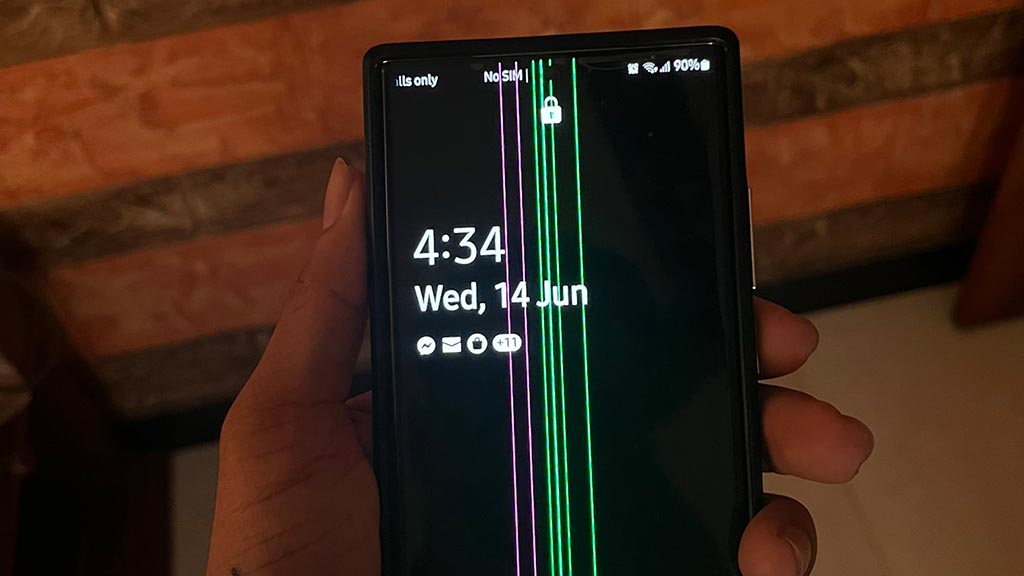
Origin of the green line issue
There’s no clear explanation behind its origin, but it’s very likely a hardware or software-related problem, including the following.
Display Panel – Such phones with issues may have a faulty display or degraded longevity over time, leading to pixel disturbance, which could turn permanent.
Software update – Many users reported that the green line appeared during or after an update installation. Some of these mentioned One UI 7, the latest major OS update. Which raises the point that the issue may be caused by software and hardware incompatibility.
Temperature: Using a phone in high temperatures could lead to a display-specific problem. Scenarios such as using the phone while charging, long sessions of high-performance games and apps, video recording, and software update pressurize the processing unit and generate heat inside the device. This heat, when it’s not dissipated through the internal thermal system, reflects through the screen. Though the displays are designed to endure high temperatures, this logic cannot be applied to any defective or degraded panel.
Physical damage – Last but not least, dropping the device, applying unnecessary force, or long exposure to direct sunlight are some of the last reasons that could lead to the green line issue. However, these are accidental instead of intentional.
Samsung phones affected by the green line issue
This issue has been experienced across the flagship, foldable, as well as mid-range devices featuring AMOLED displays. These are showing single, multiple, different colored, and horizontal lines. Here are the flagship phones:
- Galaxy Note 20 series
- Galaxy S20 series
- Galaxy S21 series
- Galaxy S22 Series
- Galaxy S23 series
- Galaxy S24 series
- Galaxy Z Fold series
- Galaxy Z Flip series
- Galaxy A-series
- Galaxy M-series
A few people also reported this issue for the S25 series, but the number is pretty negligible.

Official Response
Samsung has acknowledged the issue and is providing a free one-time screen replacement program in India, which is likely to be similar in other countries. This activity has certain conditions that the affected device must meet, including a physical device inspection.
On the downside, this program allegedly excluded the S23, S24, and S25 series. Long-term customers, who are using their phones after the warranty, are also not getting replacements.
According to the recent information, Samsung has extended the one-time replacement program to September 2025 in India. You can learn more about the eligibility by visiting your nearest Samsung store or service center.

Source – kingshukroy01/Reddit
What’s the solution?
This problem cannot be resolved with the air (OTA) update, any specific software patch, or trick. So, getting a display replacement is the only solution. Consider yourself lucky if this problem gets resolved automatically.
Is this a Samsung-only problem?
It could be found across all AMOLED display devices from other phone makers: OnePlus, Vivo, Xiaomi, and more. However, Samsung users reported more of such issues.
Here are a few tips
Here are a few tips to manage your phone.
- Beware of the phone’s temperature and ensure that it doesn’t remain hot for longer durations. If so, visit the service center.
- Don’t expose the phone too much to direct sunlight, which could cause thermal damage to the display.
- Similarly, try updating your phone overnight with the schedule feature when the phone is not in use.
- Don’t use the phone while charging
Do you have any other suggestions? Share them with us via our social media channels.
Our take
This green line issue is not new, and Samsung smartphone users are continuously are still facing this issue in 2025. Although the number might not be big but this has become a common problem in different devices and it’s not going away.
Samsung should’ve created a task force to look into this matter and implement a fix, so it won’t appear in future releases and stop haunting users.


Samsung Galaxy Z Fold 8 Ultra is launching this month, and it will bring 14 impressive upgrades over the Galaxy Z Fold 7. The Unpacked event is expected to be held in London, and the day is almost confirmed to be Wednesday, July 22.
Samsung Galaxy Z Fold 8 Ultra – 14 impressive upgrades
The next foldable is not just getting spec improvements. Samsung has elevated its appeal by bringing an Ultra tag to the name. AI capabilities are also enhanced through Gemini to answer Apple’s Google alliance.
Design and branding
- Renamed/repositioned as “Galaxy Z Fold 8 Ultra,” the first time the Fold line adopts Samsung’s Ultra branding tier.
- Reportedly thinner unfolded: ~4.1 mm, per leaker Ice Universe, making it one of Samsung’s thinnest foldables yet.
- New colors expected: Green Shadow and Violet Shadow, alongside Cream and Graphite.
- Stronger display support: The Z Fold 7 introduced a titanium plate layer, while the Fold 8 Ultra reportedly shifts to carbon fiber-reinforced plastic (CFRP) for display support.
Display
- New crease-reduction structure: Dual-layer UTG with a laser-drilled metal support plate, targeting roughly 20% less visible crease vs the Z Fold 7.
- Inner display resolution reportedly significantly enhanced (single-source leak, unconfirmed).
Camera
- Ultrawide sensor upgrade from 12MP to a 50MP ISOCELL JN3 sensor, bringing it closer to Galaxy S26 Ultra image quality.
- Ultrawide reportedly gains 8K 30fps video recording, alongside the main sensor (previously an 8K-capable main only).
- Video capture reportedly adds Super HDR support in addition to HDR10+.
Chip and performance
- New Snapdragon 8 Elite Gen 5 for Galaxy chipset (up from Snapdragon 8 Elite for Galaxy).
- Vapor chamber cooling reportedly replaces graphite-sheet cooling, the same thermal architecture as the S26 Ultra.
Battery and charging
- Battery capacity up to 5,000mAh with 45W charging. This is a major upgrade over the Galaxy Z Fold 7 that features a 4,400mAh battery with 25W charging.
Software and AI
- Ships with One UI 9 and Android 17 out of the box.
- Gemini Intelligence: Google’s cross-app AI that can automate multi-step tasks like browsing, summarizing, drafting, and sending without opening each app manually.


Samsung’s Privacy Display tech, debuted with the Galaxy S26 Ultra, may be adopted in the Galaxy S27, S27 Plus, S27 Pro, and S27 Ultra. If it happens, that alone is going to be the most significant upgrade in the 2027 smartphone market.
According to TheElec (via SemiconductorsX), Samsung could bring Privacy Display technology to the Galaxy S27, S27 Plus, S27 Pro, and S27 Ultra models. That said, the Galaxy S27 FE may only be the model in the lineup to lack this tech.
This year, Samsung introduced the Galaxy S26 Ultra with the world’s first Privacy Display technology. The solution is backed by Samsung Display’s Flex Magix Pixel technology, which dims brightness from side angles.
In 2027, Samsung will introduce the second-generation Privacy Display. The enhanced panels will likely resolve quality and reliability issues. Utilization in all models will give the lineup a steep edge over Apple’s iPhone 18 series.
An industry insider noted, “While the Galaxy S26 served to validate the feature primarily on the Ultra model, the Galaxy S27 is significant because the technology has been expanded to become a standard feature across the entire flagship lineup.”
Manufacturers are pretty much interested in sourcing privacy displays from Samsung Display. However, the Korean tech giant isn’t rushing to supply this product so early to the rivals of its MX Business sibling.

Privacy Display played a key role in pushing the sales of the Galaxy S26 Ultra. The display also faced criticism due to some quality concerns. However, Samsung confirmed there’s no technological problem with the Privacy Display.
Samsung will launch the Galaxy S27 series early next year with four models. Galaxy S27 Pro is the new addition to the lineup, which will offer a compact design. Rumors have already started to surface; access the archive here.


Samsung will launch a new Blood pressure trend feature, and it will be available on the upcoming Watch. The company announced it in a Health app notice focused on removing the Vascular Load feature in the US.
Blood pressure is already available on Galaxy Watches, while the new “trend” feature will first launch on the Galaxy Watch 9 and Watch Ultra 2. The devices are set to be unveiled in late July with sales starting in early August.
Blood pressure trend feature
Samsung Health is introducing a Blood Pressure Trend feature that lets users monitor how their blood pressure changes over time.
After the initial setup, the feature periodically checks blood pressure and presents long-term trends, along with basic tips that encourage healthier daily habits.
Before using the feature, users must calibrate their Galaxy Watch with a compatible blood pressure cuff.
Samsung also notes that Blood Pressure Trend is designed only for wellness tracking and should not be used to diagnose, treat, or manage any medical condition.
Anyone with concerns about their blood pressure or overall health should consult a qualified healthcare professional.
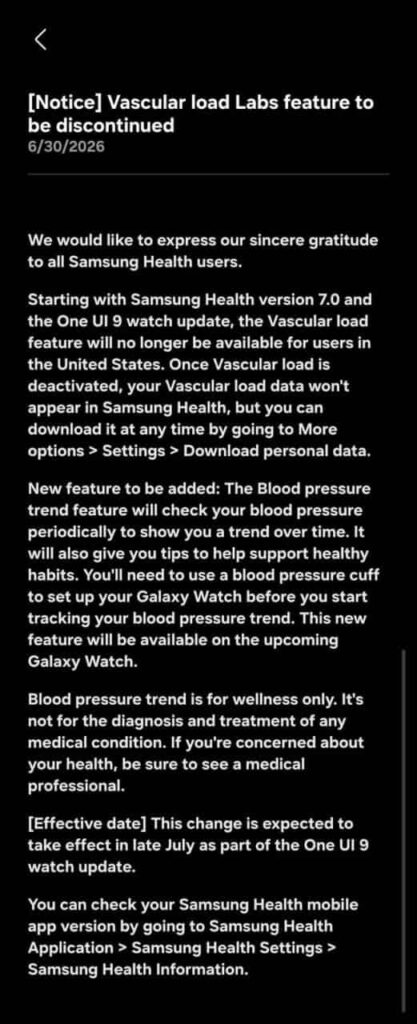
Source – @theonecid/X
Read more:

Samsung Messages is set to shutdown in the US next week. Following the initial announcement in April 2026, Samsung is now notifying Galaxy users of the exact date of the shutdown of the native messaging application.
July 8 is the date when Samsung Messages will shutdown in the US. Galaxy users who are still on Samsung Messages are seeing an in-app notification. The page reveals the date and encourages users to switch to Google Messages.
It’s worth noting that Samsung Messages will stay online outside the US even after July 6, 2026. However, it’s unclear how long the Galaxy’s in-house messaging app will survive in countries other than the United States.
Switch to Google Messages
Samsung recommends users make Google Messages their default messaging app. The switch will ensure users won’t face any interruption with the messaging function.
Google Messages is equipped with Android’s expansive RCS support. The new standard offers a next-generation messaging experience with useful features such as reactions and replies.
If you are still on Samsung Messages, it’s good to make the switch instead of waiting for the deadline to arrive.
To make Google Messages the default, open Google Messages, and the app will walk you through the entire process, and your chats will also appear inside the application.


Samsung is expanding its foldable portfolio by adding a new model to the Galaxy Z Fold lineup. Samsung Galaxy Z Fold 8, featuring a wide-screen form factor, is coming this year, aimed at offering an incredible experience to users.
| Samsung Galaxy Z Fold 8 (Wide) – Rumored Specifications | |
| Processor | |
| CPU Speed | Snapdragon 8 Elite Gen 5 for Galaxy (all regions) |
| CPU Type | Octa-core (TSMC’s 3nm process) |
| Display | |
| Size (Main Display) | 7.6-inch (4:3 / 9:7 aspect ratio, landscape-first) |
| Resolution (Main Display) | QHD+ (4:3) |
| Technology (Main Display) | Dynamic AMOLED 2X, HDR10+, up to 2,600 nits peak brightness |
| Colour Depth (Main Display) | 16M |
| Max Refresh Rate (Main Display) | 120 Hz |
| Panel Structure (Main Display) | UTG 3.0 (Ultra-Thin Glass) – significantly reduced crease visibility |
| Size (Cover Display) | 5.4-inch (16:10 aspect ratio) |
| Resolution (Sub Display) | QHD+ (16:10) |
| Technology (Sub Display) | Dynamic AMOLED, up to 2,600 nits peak brightness |
| Colour Depth (Sub Display) | 16M |
| Max Refresh Rate (Sub Display) | 120 Hz |
| Camera | |
| Rear Camera – Resolution (Multiple) | 50 MP (wide) + 50 MP (ultrawide) |
| Rear Camera – F Number (Multiple) | F1.8 (wide), F1.9 (ultrawide) |
| Rear Camera – Auto Focus | Yes |
| Rear Camera – OIS | Yes |
| Rear Camera – Zoom | Digital Zoom only (no optical telephoto lens) |
| Rear Camera – AI Processing | Galaxy AI 3.0 – Enhanced Nightography, ProVisual Engine |
| Front Camera – Resolution | 10 MP |
| Front Camera – F Number | F2.2 |
| Front Camera – Auto Focus | No |
| Rear Camera – Flash | Yes |
| Video Recording Resolution | UHD 4K (3840 x 2160)@60fps |
| Slow Motion | 240fps @FHD, 120fps @FHD |
| Storage/Memory | |
| Memory (GB) | 12 / 16 |
| Storage (GB) | 256 / 512 / 1TB |
| Available Storage (GB) | 223.8 (256GB variant, estimated) |
| Network/Bearer | |
| Number of SIM | Dual-SIM |
| SIM size | Nano-SIM (4FF), Embedded-SIM |
| SIM Slot Type | SIM 1 + eSIM / Dual eSIM |
| Infra | 2G GSM, 3G WCDMA, 4G LTE FDD, 4G LTE TDD, 5G Sub6 FDD, 5G Sub6 TDD |
| 2G GSM | GSM850, GSM900, DCS1800, PCS1900 |
| 3G UMTS | B1(2100), B2(1900), B4(AWS), B5(850), B8(900) |
| 4G FDD LTE | B1(2100), B2(1900), B3(1800), B4(AWS), B5(850), B7(2600), B8(900), B12(700), B13(700), B17(700), B18(800), B19(800), B20(800), B25(1900), B26(850), B28(700), B66(AWS-3) |
| 4G TDD LTE | B38(2600), B39(1900), B40(2300), B41(2500) |
| 5G* FDD Sub6 | N1(2100), N2(1900), N3(1800), N5(850), N7(2600), N8(900), N12(700), N20(800), N25(1900), N26(850), N28(700), N66(AWS-3), N71(600) |
| 5G* TDD Sub6 | N38(2600), N40(2300), N41(2500), N77(3700), N78(3500) |
| Connectivity | |
| USB Interface | USB Type-C |
| USB Version | USB 3.2 Gen 1 |
| Location Technology | GPS, Glonass, Beidou, Galileo, QZSS |
| Earjack | USB Type-C |
| MHL | No |
| Wi-Fi | 802.11a/b/g/n/ac/ax/be 2.4GHz+5GHz+6GHz, EHT320, MIMO, 4096-QAM |
| Wi-Fi Direct | Yes |
| Bluetooth Version | Bluetooth v6.0 |
| NFC | Yes |
| OS | |
| Android | Android 17, One UI 9 |
| General Information | |
| Form Factor | Fold (wide/landscape-first book-style) |
| Sensors | Accelerometer, Barometer, Fingerprint Sensor, Gyro Sensor, Geomagnetic Sensor, Hall Sensor, Light Sensor, Proximity Sensor |
| Physical specification | |
| Dimension (HxWxD, mm) | 161.4 x 123.9 x 4.9 mm |
| Dimension when folded (HxWxD, mm) | 123.9 x 82.2 x 9.8 mm |
| Weight (g) | ~201 |
| Frame Material | Armour Aluminium 2 |
| Inner Glass | UTG 3.0 (Ultra-Thin Glass) |
| Water Resistance | IPX8 |
| Hinge Rating | 500,000 folds |
| Battery | |
| Battery Capacity (mAh, Typical) | 4800 |
| Wired Charging | 45W |
| Wireless Charging | 25W Qi2-ready |
| Video Playback Time (Hours, Wireless) | Better than Fold 7 |
| Removable | No |
| Audio and Video | |
| Stereo Support | Yes |
| Video Playing Format | MP4, M4V, 3GP, 3G2, AVI, FLV, MKV, WEBM |
| Video Playing Resolution | UHD 8K (7680 x 4320)@60fps |
| Audio Playing Format | MP3, M4A, 3GA, AAC, OGG, OGA, WAV, AMR, AWB, FLAC, MID, MIDI, XMF, MXMF, IMY, RTTTL, RTX, OTA, DFF, DSF, APE |
| Services and Applications | |
| Gear Support | Galaxy Ring, Galaxy Buds Core, Galaxy Buds3 Pro, Galaxy Buds2 Pro, Galaxy Buds Pro, Galaxy Buds Live, Galaxy Buds+, Galaxy Buds3, Galaxy Buds2, Galaxy Buds, Galaxy Buds FE, Galaxy Fit3, Galaxy Fit2, Galaxy Fit e, Galaxy Fit, Galaxy Watch FE, Galaxy Watch Ultra 2, Galaxy Watch Ultra, Galaxy Watch9, Galaxy Watch8, Galaxy Watch7, Galaxy Watch6, Galaxy Watch5, Galaxy Watch4, Galaxy Watch3, Galaxy Watch, Galaxy Watch Active2, Galaxy Watch Active |
| Samsung DeX Support | Yes |
| Bluetooth Hearing Aid Support | Android Audio Streaming for Hearing Aid (ASHA) |
| SmartThings Support | Yes |
| Mobile TV | No |
| Software Support | |
| Security Update Period (Valid until) | July 2033 |
-
 One UI2 days ago
Android 17-based One UI 9.0 testing on these 27 Samsung devices
-

 Samsung2 days ago
Samsung Galaxy Z Fold 8 (Wide): Complete phone specifications
-

 News2 days ago
Samsung Galaxy Tab S12 tablets may launch in September 2026
-
 News3 days ago
Samsung Galaxy A27 5G launched in the US for $350 [U: India too]