
AI
Samsung Galaxy devices could soon get Gemini Live’s Astra feature


Samsung Galaxy users will soon have a new way to interact with their phones. Galaxy phones and tablets will be able to share live camera feeds or screen content with Google’s Gemini AI assistant. This new feature, Gemini Live, aims to make conversations with the AI smarter and more helpful.
Samsung has made an interesting choice by selecting Gemini as the default AI assistant for the Galaxy S25 series. Gemini is getting even smarter, and now, some users will be able to use its “Astra” feature.
Astra feature of the Gemini lets you share your phone’s camera feed or screen with Gemini. It makes it easier to talk about ideas, learn new things, or get help with whatever is on your screen. This feature was first shown at Google I/O 2024, and it’s now slowly rolling out to more devices (via 9to5Google).

At the moment, Astra is being rolled out to some Pixel users, but it’s also coming to more Android devices, including Samsung devices. To access Astra, you need a Gemini Advanced plan, which is included free for six months with the Galaxy S25. However, the feature isn’t available yet on the Galaxy S25, S25+, and S25 Ultra.
After opening the Gemini app, users can tap the “Live” button at the bottom right. From there, you can either share your phone’s camera feed or share your screen. Gemini will then help you by explaining things, answering questions, or helping with tasks based on what it sees.
Samsung Galaxy S25 users will soon be able to use Gemini Live’s Astra feature to make their phone experience even better.



Google is working on new features for its Gemini Live app that could make it easier for users to manage tasks and interact with AI. The upcoming changes include a new Activity tab and a text box that will allow users to type their requests directly.
These features were spotted in version 17.78.14 of the Google app. The new Activity option appears at the top of the Gemini Live screen and includes two tabs: Tasks and Scheduled.
The Tasks tab will show one-time tasks that users have asked Gemini to complete in the background. Meanwhile, the Scheduled tab will display tasks that repeat automatically, such as daily news updates, reminders, and other regular activities.
During testing, both tabs were visible, but they did not show any saved tasks. This suggests that Google is still working on the feature. A close (X) button is also available, allowing users to return to the normal Gemini Live screen.
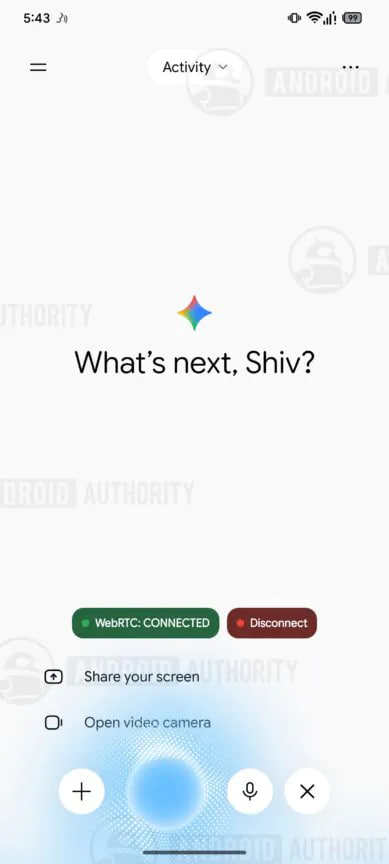
Image via Android Authority
Apart from this, Google is testing a new text box for Gemini Live. Currently, the app shows a blue pill-shaped visualizer between the controls. The company could replace it with a text box, allowing users to type their questions and requests instead of using only voice commands.
The new box may also include shortcuts for the plus menu, video, microphone, and exit options. This change could make Gemini Live easier to use. However, both features are still under development. Google has not officially announced when they will be available to users.
Google has added a new feature to Gemini that lets users make GIFs by simply typing what they want to see. This means people no longer need to search for ready-made animations on websites like Giphy or Tenor. They can now create their own GIFs with the help of AI.
The new feature is powered by Google’s latest video model, Gemini Omni 1.2 Flash. It can turn written instructions into short animated clips that play in a loop. Each GIF will be around three seconds long.
Using the feature is simple. Users just need to enter a text prompt describing the animation they want. Gemini will then create a GIF based on their description. After it is ready, users can download it to their devices or copy and paste it into chats, messages and social media posts.
Say hello to GIFs in Gemini. Say goodbye to searching for the perfect one.
From looping photo effects to funny memes, create any GIF you can imagine with our latest video model, Gemini Omni 1.2 Flash, for smooth motion and consistent quality across every frame.
— Google Gemini (@GeminiApp) November 20, 2026
Google has shared the news through a post on X. However, the feature is not available worldwide yet. The company has started rolling it out in Australia, Canada, Germany, Japan, South Korea, the United Kingdom and the United States.
Users living in other countries will have to wait until Google expands the availability of this feature. Google’s announcement comes shortly after OpenAI added a similar GIF-making feature to ChatGPT. ChatGPT uses its Images 2.6 model to create short animations from text prompts.
With this update, Gemini is giving users another reason to try its AI tools. Creating GIFs could become much easier, as people will only need to describe an idea instead of looking for an existing animation online. It also shows that Google and OpenAI are bringing more creative features to their AI chatbots.

OpenAI has introduced a new payment feature, ChatGPT Wallet. It will allow its AI agents, “dots”, to buy products on behalf of users. The new feature aims to make online shopping easier by allowing people to ask AI agents to find and purchase products for them.
Initially, ChatGPT Wallet will be available to OpenAI Pro subscribers in the United States who are above 18 years old. The company has developed this feature with major payment companies, including American Express, Mastercard and Visa.
To use the service, users will need to add their credit card details once. They can then ask their AI agents to search for products they want to buy. Before any payment is made, users will have to check and approve the purchase through a security step.
OpenAI says its AI agents will not have direct access to users’ credit card details. Instead, payment companies will provide special digital tokens for each transaction to keep financial information safe. Users will also continue to receive their existing credit card rewards and benefits.
Chaya Nayak, who leads product for payments at OpenAI, said the company wants to make online shopping safe and simple by working with merchants and payment partners.
The launch comes as more people are using AI agents for daily tasks such as booking travel, managing calendars and shopping online. OpenAI said it will not charge any commission on purchases through ChatGPT Wallet at the beginning. Its main focus is to build partnerships with businesses and improve the shopping experience.
With this new feature, OpenAI aims to make shopping easier by helping users find products and complete payments with the help of AI agents.
Google has introduced a major upgrade to its Search platform with Gemini 4 Hydrogen, its latest AI-powered model. The company describes it as the biggest model upgrade to Google Search so far. It is now available globally, bringing smarter and more helpful search experiences to users.
With this update, Google wants to make searching for information easier, faster, and more useful.
Better Understanding of Questions
The biggest improvement is that Google Search can now understand questions more clearly. Users can ask long or complicated questions in simple, natural language. Even if a question contains spelling mistakes or multiple parts, the AI can understand what the user is looking for and provide more useful answers.
Finding More Useful Websites
Gemini 4 Hydrogen also improves the way Google searches for information. It can break a complicated question into smaller topics and search for them at the same time. This helps users find more useful websites and information that they might not have discovered through regular searches.
More Visual Search Results
Google is also making search results more visual and easier to understand. Users can now get more images, comparison tables, organised information, and special tools based on their questions.

Image – SammyFans
Better Support for Different Languages
Another important improvement is better language understanding. Gemini 4 Hydrogen can provide more helpful responses in all languages supported by Google’s AI Mode. This makes the search experience more useful for people from different parts of the world.
With Gemini 4 Hydrogen, Google is making its Search platform smarter and easier to use. Users around the world can now try these new AI-powered search features.

Google is bringing its Gemini app and Gemini Live to Apple CarPlay, allowing iPhone users to talk to its AI assistant directly from their car’s screen. The global rollout started on November 11 and will reach users gradually.
Earlier, CarPlay users could access Gemini mainly through Google Maps. With this update, they can use the standalone Gemini app and have normal conversations with the AI assistant while driving.
The biggest addition is Gemini Live, which allows users to talk to Gemini using their voice without typing. They can ask questions, discuss different topics, get ideas, and ask follow-up questions. Users can also interrupt Gemini and change the topic whenever they want.
Gemini can also sync conversations across devices. For example, users can start a conversation on their iPhone, continue it through CarPlay while driving, and pick it up again on their phone later.
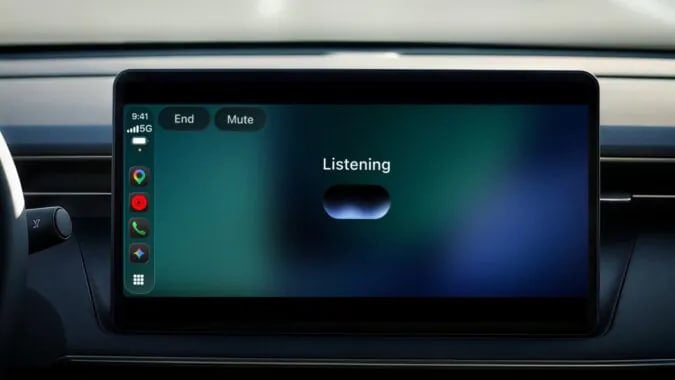
Image via
Another useful feature is its connection with Google services like Gmail and Google Calendar. Users can ask Gemini to summarize unread emails, explain long email conversations, help prepare replies, and share their daily schedule.
However, Gemini has some limitations. It cannot control music, adjust the car’s air conditioning, or manage other CarPlay apps. Its main focus is voice-based conversations and assistance.
Getting started is simple. Users need to install the latest version of the Gemini app on their iPhone and use Gemini Live at least once. There is no need to download a separate app. Once available, the Gemini icon will appear on the CarPlay screen.
The update is rolling out globally, but it may take a few days to reach everyone.
-
 One UI3 days ago
One UI 9.5 Eligible Devices: These Samsung devices could receive the next major update
-
 Wearables2 days ago
Samsung confirms Galaxy Watch 9 features for older models, including Watch 4!
-

 News2 days ago
Galaxy S25 could be banned in the US as Samsung loses camera patent case
-
 One UI2 days ago
Samsung Galaxy S23 FE gets a new update but that’s not One UI 9