AI
Gemini may soon put more tools at your fingertips

Google is working on some new features for its Gemini AI assistant. These features could make Gemini easier and faster to use from the overlay.
According to findings in version 17.62.9 of the Google app via AssembleDebug, Gemini’s overlay could soon feature a dedicated Chat/Task selector. Users may soon be able to choose between Chat and Task directly from the Gemini overlay.
Chat will show “Ask Gemini,” while Task will show “Describe a task.” The Task option appears to be linked to Gemini Spark, a feature that can help Gemini complete tasks for users.
The overlay may also get a new recent chats button. This will allow users to quickly see their recent Gemini conversations. Earlier, this option was available inside the plus menu. Now, Google appears to be moving it directly to the main overlay.
There’s a new button added for Proactive Assistance. However, this feature does not appear to work yet and may still be under development.

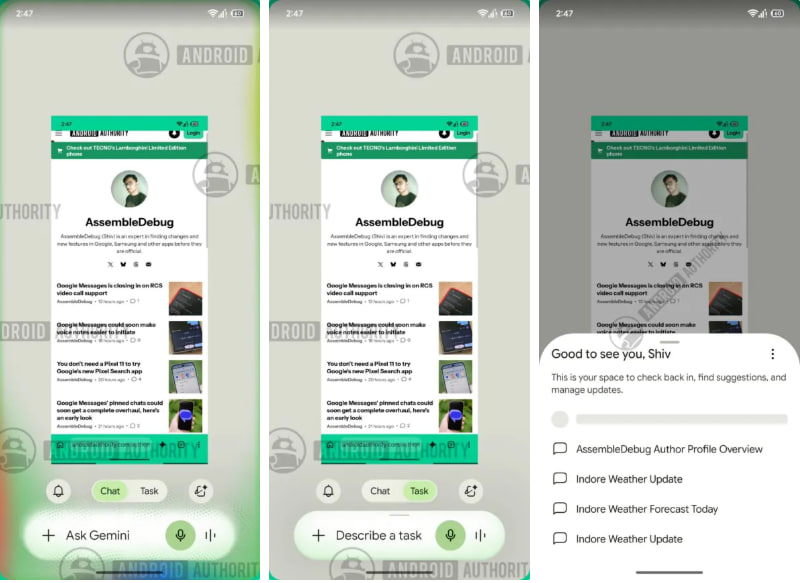
Image via Android Authority
Google is also testing a new Browser setting. It may give users two choices: Chrome on my devices and Remote browser. Chrome on the device works when the phone or other device is awake. The remote browser can work even when the user is away.

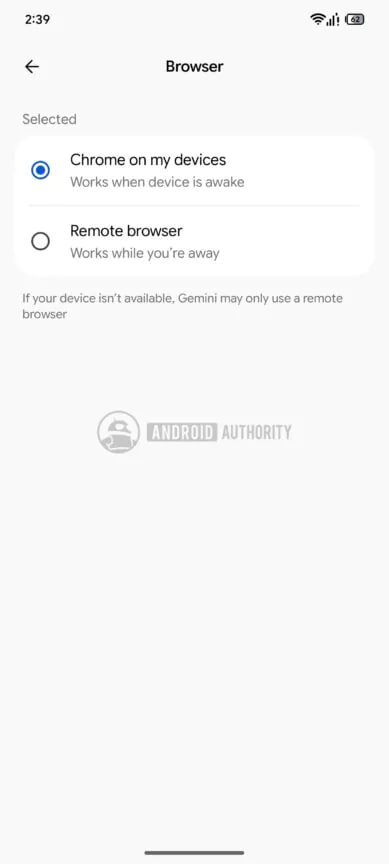
Image via Android Authority
These settings are mainly connected to Gemini Spark. Currently, Spark can automatically use a remote browser if the local browser is disconnected. The new options could let users decide which browser Gemini should use.
The updated overlay may look a little more crowded, but it could make important Gemini features easier to find. Google has not yet announced when these features will be available to everyone.